

Website errors are the most common digital traps that cause businesses to lose customers and revenue without realizing it. If you have a site but no visitors are converting, you’re not showing up on Google, or you’re receiving customer complaints — the problem is most likely your perspective on the site. This guide addresses ten critical website errors that businesses repeatedly fall into, along with concrete solutions.
🔍 According to HubSpot’s 2024 website research, 88% of visitors never return to a site where they’ve had a bad experience. The same research shows that 76% of businesses are unaware of the fundamental problems on their sites. However, identifying and correcting website errors is the most effective way to increase organic conversion without spending advertising budget.
This guide addresses four critical categories: slow page, mobile incompatibility, lack of communication, and outdated content. Each category shares the most common mistakes businesses make and how to correct them. Businesses that identify website errors early start far ahead of their competitors in the digital space.
1. Slow Page: Every Second Loses You Customers ⏱️
Your page loads in 5 seconds; do you find this normal? It doesn’t count visitors: every load exceeding 3 seconds dramatically increases the bounce rate. Google also considers speed a ranking factor; a slow site loses both visitors and ranking at the same time. Slow loading is one of the most common and costly website errors; but it’s also the easiest to fix.
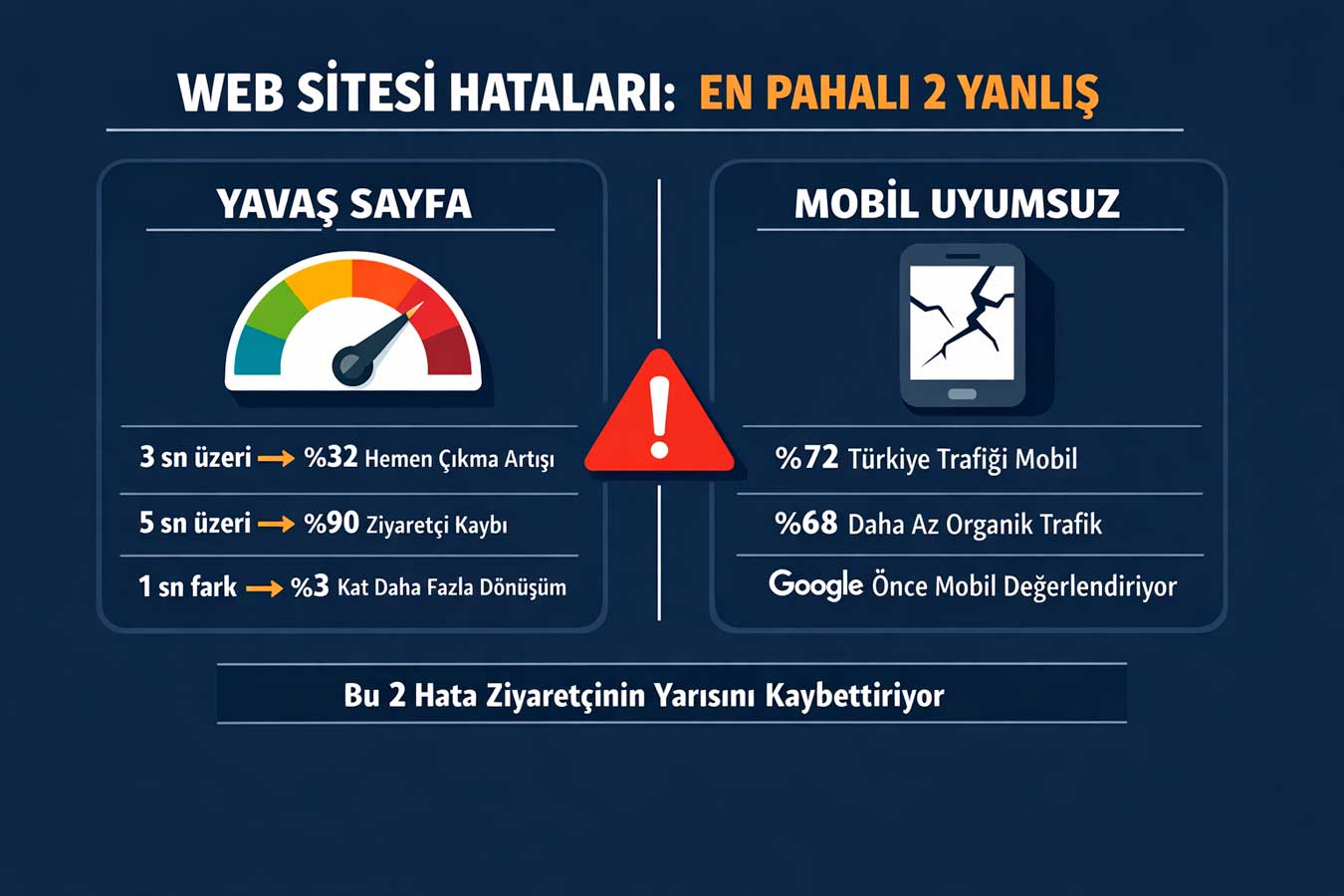
⏱️ According to Google’s 2024 benchmark data, when page load time increases from 1 to 3 seconds, the bounce rate increases by 32%, and when it reaches 5 seconds, it exceeds 90%.
Portent’s research from the same year shows that a page that loads in 1 second generates 3% more conversions than one that loads in 5 seconds. Speed reduction is the quietest but most devastating conversion killer.1.1 Unoptimized Images
The biggest speed killer on a website is often images. A 5 MB hero photo, a 2 MB product image, uncompressed PNGs — all of these significantly increase loading time. Switching to WebP format provides an average 30% size reduction; lazy loading speeds up the initial loading by delaying the loading of invisible images. Image optimization is the solution that provides the most speed with the least effort — and it’s one of the most common website errors on websites.
🔧 Quick Solution:Compress images with Squoosh or TinyPNG · Convert to WebP format · Enable lazy loading
There’s a fine balance between reducing image size and compromising image quality. When converting to WebP format with the Squoosh tool, an 80% quality level is sufficient for most projects; the eye doesn’t notice, but the file size dramatically decreases. For bulk compression of product photos on e-commerce sites, the Bulk Image Optimizer plugin reduces a hourly work to minutes.
- WebP conversion:WebP instead of PNG/JPG — average 30% smaller file size
- Lazy loading:Images outside the screen don’t wait while the page loads
- Size limit:Maximum 200KB for hero images, maximum 80KB for product images target
- Responsive image: Show small image on mobile, large image on desktop with srcset
1.2 Inflated Plugin Load
WordPress has 30 active plugins, and each one loads its own CSS/JS file to the page. Before the user clicks and leaves, the browser downloads dozens of files sequentially. According to Ahrefs’ 2024 analysis, the average WordPress site hosts 22 unnecessary plugins. Each plugin means a separate HTTP request; reducing HTTP requests directly improves speed. Cleaning up unnecessary pluginsThis is one of the fastest solutions to website errors.
- Plugin control: Ask each plugin “What do I lose without this?” — most can go
- Functional merging: 1 multi-functional plugin instead of 5 separate plugins — less load
- CSS/JS merging: Merge and minify files with Autoptimize
- Caching: WP Rocket or W3 Total Cache — static content fetches quickly from the server
1.3 Insufficient Hosting Selection
How fast can a site be that’s stuck on a 30 TL monthly hosting package? In shared hosting, hundreds of sites share the same server resources; when one receives traffic, the others slow down. An SSD-based hosting package with CDN support and running PHP 8.x can increase the speed of the same site by 3-5 times. Hosting errors are one of the frequently overlooked website errors that negate all optimization efforts.
- VPS or Cloud hosting: First step from shared hosting — speed difference is dramatic
- CDN integration: Cloudflare (free) — content comes from the server closest to the visitor
- PHP version: Use PHP 8.2 — 30% faster compared to version 7.4
Changing hosting can seem daunting; however, most reputable hosting companies offer a free migration service. The migration process is usually completed within a few hours, and the site continues to operate without interruption. Comparing traffic and loading times over the past 3 months before switching to new hosting helps you set accurate expectations.
- Server location: Server in the target audience’s country — latency is reduced
1.4 Render-Blocking Resources
Before the page loads, the browser downloads and processes CSS and JavaScript files. If these files are large, the page freezes — the user is left with a blank screen. Google’s Core Web Vitals directly measures this with LCP and INP metrics. Inlining critical CSS, loading JavaScript asynchronously, and cleaning up unused code solves this problem. Render-blocking resources are one of the website errors frequently seen on sites with low PageSpeed scores.
- Critical CSS inline: CSS required for the initial page display is embedded directly into the HTML
- JavaScript defer/async: JS files are loaded in the background without blocking the page
- Remove unused CSS: Remove unnecessary styles with PurgeCSS — the page becomes lighter
- Font optimization: font-display: swap — show system font until font loads
The “Core Web Vitals” report in Google Search Console is the most reliable source for tracking Core Web Vitals scores. Because it is based on real user data, it provides a much more realistic picture than lab environment measurements. Correcting URLs marked in red first is the step that shows the fastest improvement in ranking.
👉 For speed control → Corporate Web Design Service
2. Mobile Incompatibility: You’re Losing Half of Your Visitors 📱
Have you ever opened your site on a phone? The menu is overloaded, the buttons are small, and the text is unreadable. In Türkiye, 72% of web traffic comes from mobile devices (Statista, 2025). Mobile incompatibility turns away almost half of visitors at the door. Mobile-incompatible design is the most common problem businesses face.
📱 According to Google’s mobile-first indexing policy, the search engine evaluates your site with a mobile-first perspective. If the mobile experience is poor, the ranking drops regardless of how good the desktop design is. According to BrightEdge’s 2024 research, mobile-friendly sites receive 68% more organic traffic compared to non-mobile-friendly ones. Mobile incompatibility is a double-sided disaster for both SEO and conversions due to website errors.
2.1 Fixed Width Design
How does a site designed with a fixed width of 800px look on a phone with a 390px screen? Horizontal scrolling appears, content moves, text shrinks. The user tries to read by zooming in and out, and most likely leaves within 1 minute. Adapting to every screen size with CSS media query and fluid grid system is the foundation of responsive design.
- Fluid grid: Percentage-based width instead of fixed pixels — adapts to every screen
- Media query: 360px, 768px, 1024px breakpoints — minimum standard
- Viewport meta tag: Mobile scaling will not work without
- Mobile-first approach: Design from small to large screen — doing the opposite is twice as hard
The quickest way to test your current site’s mobile compatibility: Paste the URL into the Google Mobile-Friendly Test tool. It lists problem areas in 30 seconds. For more comprehensive analysis, iPhone, Galaxy, and iPad simulations can be done in minutes using the Chrome DevTools tool’s Device Toolbar feature.
2.2 Small Touch Targets
A button that needs to be clicked is 20×20 pixels. The user tries to press it, presses the wrong place, gets frustrated and leaves. Google’s Material Design guideline recommends a minimum 44×44 pixels touch target. Menu items, CTA buttons, form fields, and links should not be smaller than this size.
Small touch targets are one of the website mistakes that silently reduce mobile conversion.- Minimum 44×44px: button and link touch area — Material Design standard
- Spacing between buttons: Adjacent buttons should be at least 8px apart — prevents accidental clicks
- Form area height: minimum 48px — easily selectable by finger
- Chrome DevTools test: mobile simulation — visualize touch areas
To detect touch target issues, simply run the Lighthouse control in the Chrome DevTools tool. The “Tap targets are not sized appropriately” warning shows which elements are small individually. Increasing padding in CSS code is the easiest way to expand the touch area without changing the image size.
2.3 Mobile Menu and Navigation Issues
There are 8 menu items on the desktop, and the hamburger menu is all crammed together. The visitor can’t find what they’re looking for and leaves the homepage. Mobile navigation demands simplicity: a maximum of 5-6 main menu items, a large touch area, and clear labels. The search bar, sticky header, and large CTA button are elements that keep the user engaged on mobile.
Complex mobile navigation is one of the common website errors that degrades user experience.
- Hamburger menu: clear on/off animation — user should know where they are
- Menu shortening: priority pages only on mobile — submenus with dropdown
- Sticky header: Keep menu visible while scrolling — easy to return
- Search button: Required for large catalog or blog sites on mobile
The most realistic way to test mobile navigation: Have a real user browse the site on their phone and describe their thoughts. When given tasks like “Try to find prices” or “Find contact information,” the point where they get stuck becomes immediately apparent. This simple user test sometimes outweighs thousands of dollars worth of A/B testing.
2.4 Mobile Speed: Different Issues Than Desktop
A site that scores 92 on desktop scores 41 on mobile — this is a common scenario. Mobile connectivity is slower; the same images and scripts take much longer. PageSpeed Insights mobile tab should also be examined; the desktop score is misleading. Smaller images, fewer scripts, and AMP ratings improve mobile speed.
What makes mobile speed neglect one of the website errors is precisely ignoring this difference.
- PageSpeed mobile tab: evaluate independently from desktop — optimize separately
- Mobile image set: serve small images suitable for mobile devices with srcset
- Script reduction: defer unnecessary third-party scripts on mobile
- LCP improvement: Preload hero image — LCP score increases
In mobile speed improvements, real device testing can give very different results than lab environment testing. Testing using a mid-range Android phone on a 4G connection reflects the real user experience much more accurately. The Google PageSpeed Insights Mobile tab simulates this scenario; However, real-world device testing is always more reliable.
👉 For mobile compatibility testing → Professional WebTdesign
3. Lack of Communication: Cannot Find Customers Even If They Want to 📞
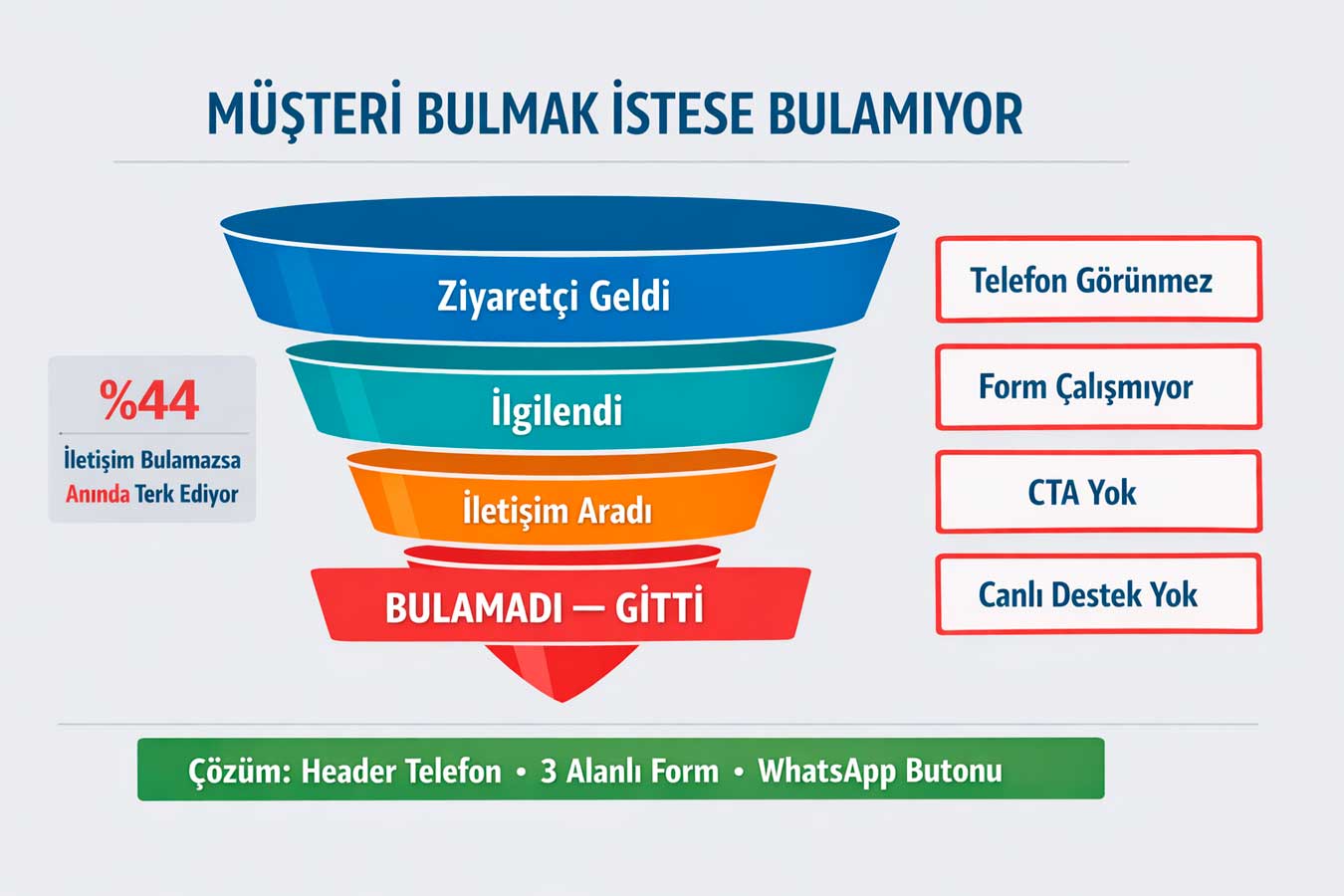
The visitor wants to contact you but there is no phone number, the contact page is embedded in the menu, and the form is not working. According to KoMarketing’s 2024 research, 44% of users immediately leave a site where they cannot find contact information. The simplest yet most costly of the website errors that stop customers at the door is a lack of communication.
📞 According to Forrester’s 2024 research, sites with live support or easy communication options achieve a 29% higher conversion rate. Phone, address and working hoursTrust cannot be established without providing complete basic information such as working hours. Lack of communication is the most destructive category in terms of conversion.
3.1 Phone and Address Being Invisible
The phone number is only on the contact page, the address is in the footer in small font, and working hours are nowhere to be seen. However, phone and address information should be visible in the header or footer of every page. Especially for businesses offering physical services — pharmacies, restaurants, clinics, law firms — a clickable phone number is the first condition for conversion on mobile. The phone number and address being invisible is one of the common website errors that stops customers at the door.
📞 Critical Visibility:Phone · Address · Opening Hours — on every page, in clickable format
- Phone number in Header:clickable tel: link at the top of every page
- Full address in Footer:with Google Maps link — directions open directly
- WhatsApp button: Fixed position, bottom right corner — most used communication channel
- Opening hours: Open or closed — visitors want to know before arriving
The consistency between the phone and address information in the Google My Business profile and the website is critical for local SEO. NAP inconsistencies (Name, Address, Phone) lower the trust score in local rankings by Google.
Updating information simultaneously on all platforms prevents this inconsistency.
3.2 Contact Form Not Working or Being Complex
The form requires 7 fields: name, surname, email, phone, city, subject, message. The visitor abandons filling it out. Sometimes the form doesn’t work at all — nothing happens after submission, no thank you page, no email arrives. Simple rule: contact forms should not have more than 3 fields; immediate approval should be given after submission. A complex or malfunctioning contact form is the quietest revenue killer of website errors.
- Maximum 3 fields: name, phone/email, message — more fields reduce conversion
- Submission confirmation: instant thank you message + how many days it will take to get back to you
- Spam protection: honeypot instead of reCAPTCHA — doesn’t tire the user
- Form testing: Real submission test every month — silent failure is prevented
The most practical way to increase form conversion rate: A/B testing. By testing different CTA texts, number of fields and button colors, it is possible to measure which version receives more submissions. Google Optimize or free Hotjar tools allow you to set up this test without technical knowledge.
3.3 Weak or Missing CTA Buttons
The visitor has read the page, is interested, but doesn’t know what to do. Instead of vague buttons like “More Information” or “About Us,” clear calls to action like “Get a Free Quote,” “Call Now,” or “Schedule an Appointment” directly increase conversion. Every page should have at least one strong CTA button, and this button should be in a visible location without scrolling. A weak or missing CTA is one of the common website errors that closes the conversion funnel.
- Action-oriented text: “Get a Quote”, “Search”, “Download” — use verbs, not nouns
- Color contrast: The CTA button should stand out prominently from the background — it attracts attention
- Above the fold: At least 1 CTA required in the area visible without scrolling
- Repetition: CTA every 3-4 paragraphs on long pages — don’t miss the opportunity
The location of the CTA button, as well as its color and text, affects conversion. Having the call to action in the “above the fold” area (where it’s visible without scrolling) significantly increases the conversion rate. Having CTAs at the top, middle, and bottom of the same page captures visitors at different decision-making stages.
3.4 Lack of Live Support and Instant Communication
The visitor has a question, but no one is there. Sites with live support chat have a 29% higher conversion rate (Forrester, 2024). WhatsApp Business integration is free and is the most preferred instant messaging tool in Türkiye. Whether it’s a bot or a real person, if a visitor gets an immediate answer to their question, they can make a purchase decision right then and there. Lack of live support is one of the website errors that silently reduces conversion.
- WhatsApp Business: Free, high usage in Türkiye — can be integrated immediately
- Chatbot: Handles questions outside of working hours, provides basic information
- Live chat: Tidio, Crisp (free plan) — setup in 10 minutes
- Offline message: Possibility to leave a form while chat is closed — don’t miss the opportunity
The most common mistake during live support setup: setting up the system and then leaving it deactivated. After the response time exceeds 5 minutes, the conversion rate drops dramatically. Activating bot responses outside of working hours and guaranteeing a response within a maximum of 2 hours effectively manages customer expectations.
👉 Let’s set up your communication infrastructure → Website Design Prices
4. Outdated Content: You’re Losing Trust and Ranking Simultaneously 📅
What does the phrase “Founded in 2021…” or the last blog post dated “January 2022” tell the visitor? It raises the question, “Is this company still active?” Outdated content harms both trust and SEO ranking in two ways. Content that looks old and abandoned is the most overlooked category.
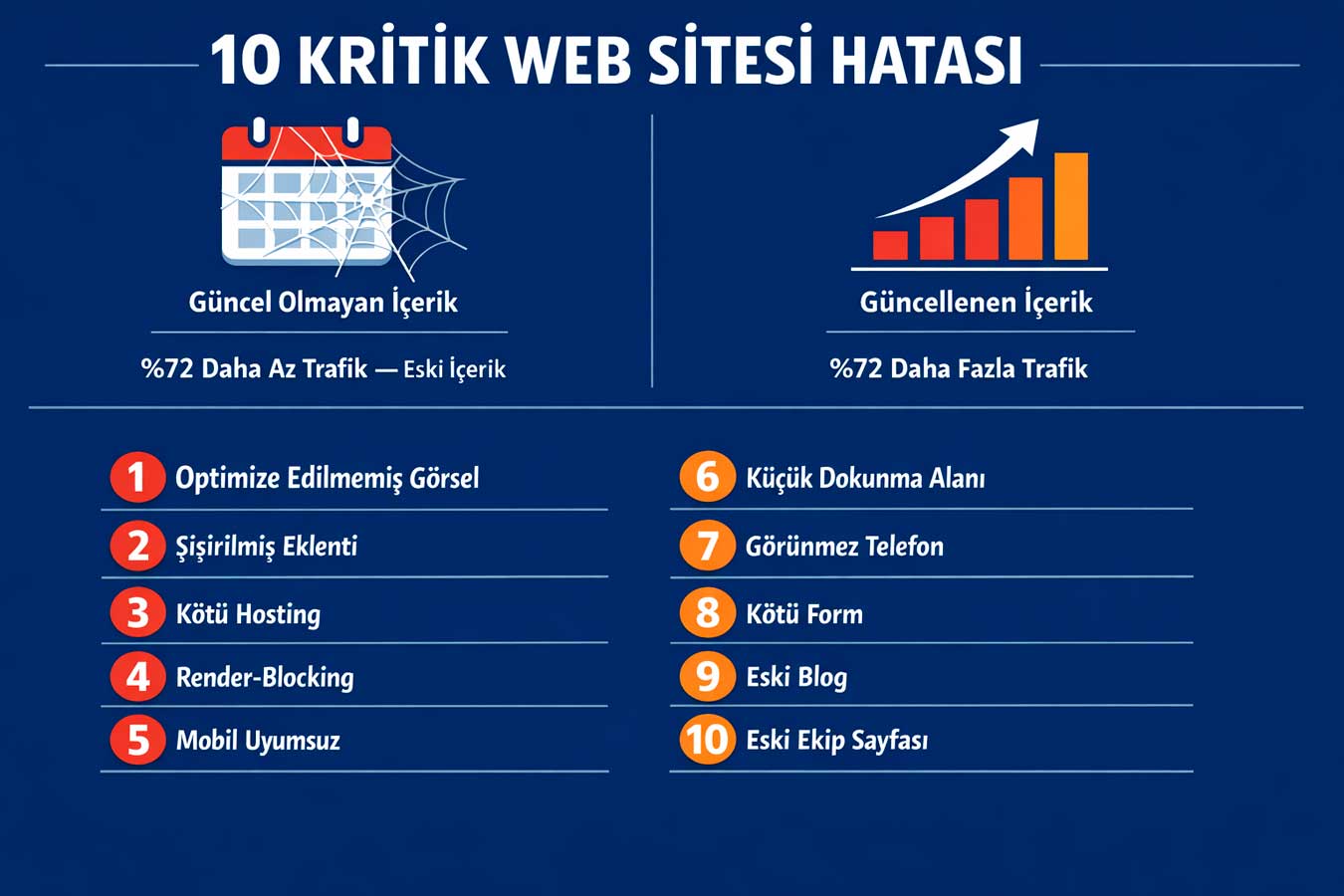
📅 According to Semrush’s 2024 content research, sites that regularly update their content attract 72% more organic traffic compared to those that don’t.
Google considers the last update date as both a relevance and a quality signal. Content that lacks update discipline is the slowest form of SEO poison. Among website errors, outdated content is the category that silently but for the longest time leaves damage.
4.1 Blog Posts Written Years Ago
Your “Social Media Trends” article from 2019 is still on your site and hasn’t been updated. Visitors see the old date and question its reliability. Google, on the other hand, uses content freshness as a ranking signal; outdated content falls behind. The solution is not to delete, but to update: refresh old statistics, add new sections, update the date.
Three hours of work generates traffic for years — neglecting old content is one of the common website mistakes.
- Date update: Update the publication date when the content is updated
- Statistics update: All figures and sources must be from the current year
- Add new section: Title “2025 update”Add new information — fresh signal
- Internal link update: link to new content from old — link value is transferred
To accelerate the SEO impact of content updates, it is useful to notify the updated page in the Google Search Console tool with a re-indexing request. Using the “URL Inspection” tool to select the page and click the “Index” button allows Google to see the new content much faster.
4.2 Failure to Remove Closed Services or Products
A service that is no longer offered is still on the site, a closed branch is on the map, and a deleted product can still be added to the cart. This disappoints the customer and creates a trust-breaking experience. Worse: the customer places an order, then finds out the product is unavailable. Failing to remove canceled services and products from the page is one of the website mistakes that silently erodes customer trust.
- Monthly content check: Inactive service/product list — remove or mark “coming soon”
- 301 redirect: Redirect deleted page URL to similar content — SEO is preserved
- Stock status: “out of stock” tag in e-commerce — purchase misleading prevented
- Price update: Leaving the old price on the site may create legal problems
4.3 Team and About Us Page Obsolescence
An employee who left two years ago is still on the “Our Team” page. New members have not been added at all. The About Us page has the same text since 2018. These details may seem small; but they are pages that carry a trust signal for a customer visiting your site for the first time. The old team page asks, “Is this company really active?” This is one of the overlooked website errors that raises the question.
- Team update every six months:remove those who left, add those who joined, update photos
- About Us revision:at least once a year — growth figures, new achievements should be updated
- References and certificates:expired certificates should be removed, new ones should be added
- Customer logos: Old customer logos should not be removed without permission; new ones should be added
4.4 Failure to Update Copyright History and Legal Pages
The footer says “© 2019 All rights reserved.” This small detail raises questions of trustworthiness in the visitor. The GDPR privacy policy is not updated, the cookie notification is incomplete, and the distance selling contract is prepared according to old legislation. Legal pages are critical in terms of both customer trust and legal compliance; It should be reviewed at least once a year. Failing to keep legal pages up-to-date is both a legal risk and one of the website errors.
- Copyright year: The year in the footer can be automatically updated — with PHP date()
- KVKK update: Annual lawyer revision — legislative changes must be followed
- Cookie policy: All cookies you use must be listed — missing = KVKK violation
- Distance selling contract: Mandatory for e-commerce — Follow the changes to the Consumer Law
👉 For site audit → Web Design Institution — Contact
📊 10 Critical Website Errors: Summary Table
Most common Website Errors, their effects and solutions paths:
| Error | Impact | Solution | Priority |
| Unoptimized images | Slow loading, high bounce | WebP + lazy loading | 🔴 Critical |
| Inflated plugin | Slow site, security vulnerability | Plugin audit | 🔴 Critical |
| Poor hosting | All optimization wasted | VPS + CDN migration | 🔴 Critical |
| Render-blocking resources | Low PageSpeed score | Defer + inline CSS | 🔴 Critical |
| Mobile-incompatible design | 72% traffic loss risk | Responsive development | 🔴 Critical |
| Small touch area | Low mobile conversion | 44x44px minimum | 🟠 Important |
| Phone invisible | Customer unable to communicate | Move to header | 🔴 Critical |
| Poor communication | Potential customer is leaving | 3 fields, instant approval | 🔴 Critical |
| Old blog content | SEO decline | Update, refresh history | 🟠 Important |
| Old team page | Reliability is questioned | Update every six months | 🟡 Normal |
🧠 Summary Box: 5 Critical Takeaways From This Post
5 Critical Takeaways from Website Errors:
- Speed first:90% of visitors are lost if the 3-second threshold is exceeded — visual optimization is the first step
- Think mobile first:72% of traffic in Türkiye is mobile — a mobile-incompatible site turns half the visitors away at the door
- Contact information must be visible:44% of visitors leave if they can’t find contact information — in the header Clickable phone number required
- Content freshness SEO: Updated content attracts 72% more traffic — old pages should be updated
- Audit routine required: Monthly form testing, six-monthly content audit, annual legal update
❓ Frequently Asked Questions
Comprehensive audits can be performed with free tools like Google Search Console, PageSpeed Insights, Google Analytics 4, and Screaming Frog. Running these tools once a month catches problems early.
How long does speed optimization take?
Basic improvements like image optimization and caching can be completed in a few hours. Hosting changes or extensive code optimization may take 1–2 weeks. Website Among website errors, speed issues are the category where solutions are produced most quickly.
Is it necessary to redesign the page for mobile compatibility?
Most of the time, no. Adding a media query to the existing CSS and some adjustments may be sufficient. In very old designs with fixed widths, redesigning is more efficient. Among website errors, mobile incompatibility is a category where small fixes can make a big difference.
How do I know if the contact form is working?
Test it yourself: fill out the form, submit it. Do you get a confirmation message? Do you receive an email? Doing this test every month prevents silent failures. Among website errors, a non-functioning form is the quietest revenue killer.
Should I delete or update the old content?
Generally, updating is better — the accumulated SEO value of the old URL is preserved. Among website errors, updating the old content instead of deleting it restores its SEO value.
🚀 Result: Fix Your Mistakes Today, Win Customers Tomorrow
Website errors are digital traps that go unnoticed and erode trust. From slow page speeds to mobile incompatibility, from lack of communication to outdated content, each of the ten critical mistakes addressed in this guide is fixable and makes an immediate difference when corrected.
📋 About This Content:
This article was prepared by Adapte Digital for business owners, marketing managers, and digital strategy managers who want to improve website performance.
🌐 Professional Website:webtasarimkurumu.com.tr 🔗 Related Article:Website Maintenance: Why Does it Require Constant Attention?