
WordPress vs. Custom Software is a strategic decision that every business wanting a website will face sooner or later. The wrong choice will cost both money and time; but the right choice will support productivity and growth for years. The difference between the two is not only technical; it is also decisive in terms of business model, budget and long-term goals.
🔍 According to W3Techs’ 2025 data, 43.4% of all websites on the internet run on WordPress. This figure shows how widespread WordPress is; but it doesn’t mean it’s right for everyone. Websites built with custom software generally have an advantage in corporate, e-commerce, or complex process-requiring projects. A comparison between WordPress and custom software cannot be made without a proper analysis of the needs. This guide addresses four critical criteria: cost, flexibility, maintenance, and security. Each section provides clear answers to the question of what is suitable for whom, from e-commerce sites to corporate portals, from small businesses to large corporations. Because choosing between WordPress vs. Custom Software becomes the smartest investment decision when done with the right information.
1. WordPress vs. Custom Software Cost Comparison: Initial and Long-Term View 💰
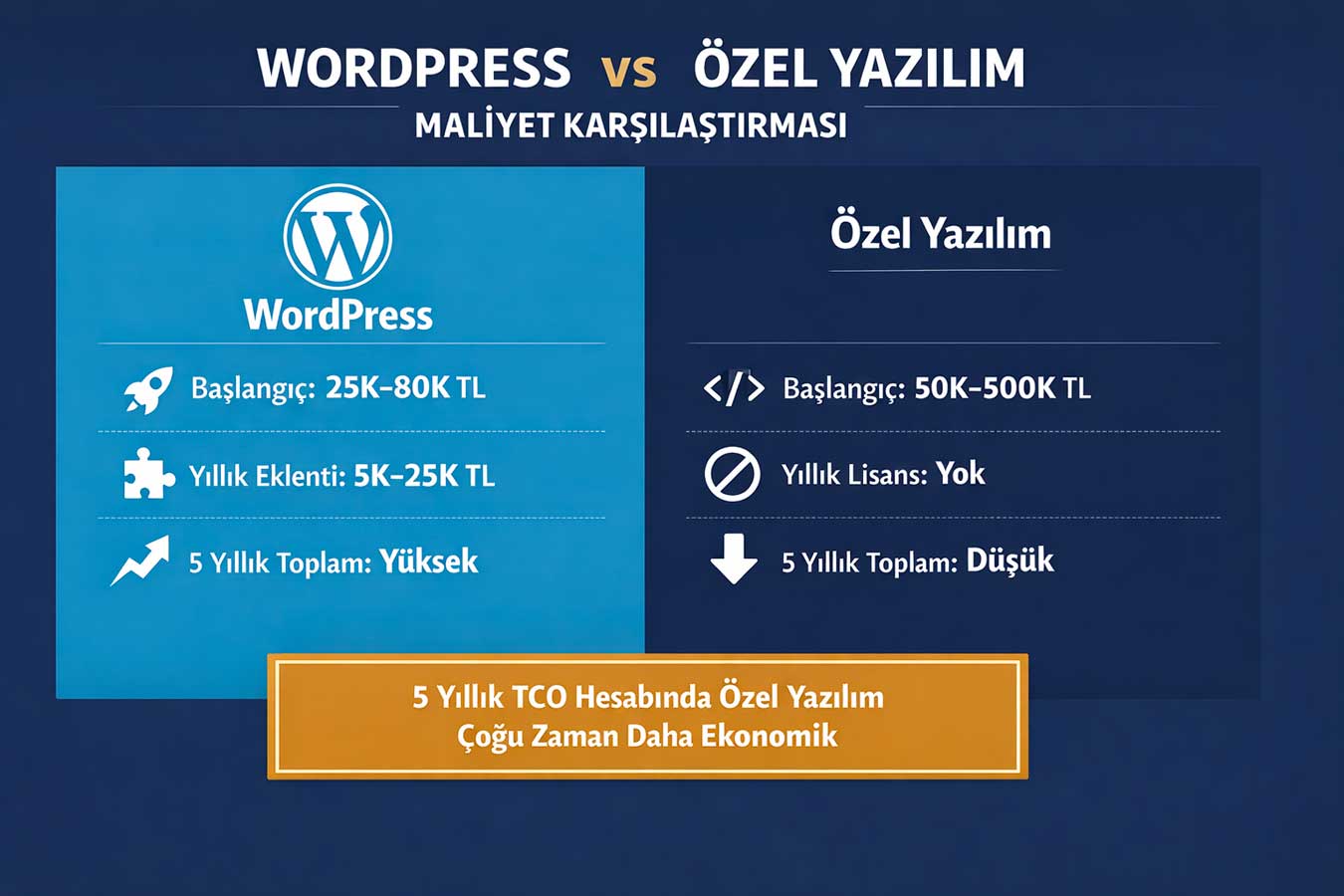
WordPress is free; but is it really free? When theme, plugin, hosting, security, and maintenance costs are added, the picture looks very different. On the other hand, the initial cost of custom software is high; but in the long run, the license and plugin costs are zero. The WordPress vs. Custom Software cost comparison cannot be done by only looking at the initial price; Total cost of ownership (TCO) should be calculated.
💰 According to Clutch’s 2024 web development research, small and medium-sized WordPress sites generate 5,000–25,000 TL in annual maintenance and plugin costs. The initial investment for a custom software project is 3–10 times higher; however, there are no additional license or plugin costs in subsequent years.
The cost equation of WordPress vs. Custom Software reveals a very different picture when viewed from a 3-5 year perspective.1.1 WordPress Initial and Annual Costs
WordPress software itself is free; however, the other items needed to set up the website quickly add up. A basic ready-made theme costs 500–3,000 TL, premium plugins cost 200–5,000 TL annually, quality hosting costs 1,500–6,000 TL annually, SSL and maintenance cost 1,000–4,000 TL.
💡 WordPress Cost Summary:Starting: 25K–80K TL | Annual maintenance: 5K–25K TL |
Plugin licenses: variable- Hosting quality is critical: Cheap hosting leads to speed and security problems — quality hosting is essential
- Premium plugins: SEO, security, forms, email — annual renewal fee applies
- Developer cost: WordPress also charges a significant development fee when customization is needed
- Theme update risk: Theme updates may break customizations — creating additional costs
1.2 Initial and Long-Term Costs of Custom Software
The price of a custom software project varies greatly depending on the scope and team. Small-scale corporate website: 50,000–150,000 TL; medium-scale e-commerce: 150,000–500,000 TL; large corporate platform: 500,000 TL and above. The high initial cost is rewarded with complete freedom: no annual license, no mandatory add-ons, and free hosting choice. In a 5-year TCO calculation, custom software often turns out to be more economical. Custom software,
- One-time investment: no platform license or plugin fees in subsequent years
- Scaling cost: no additional license required for increased traffic; Only the infrastructure is scaled up
- In-house developer advantage: If the company has a technical team, long-term costs are dramatically reduced
- Ownership of source code: Does not tie you to a specific company — you can get competitive bids
1.3 Which Budget is Suitable for Whom?
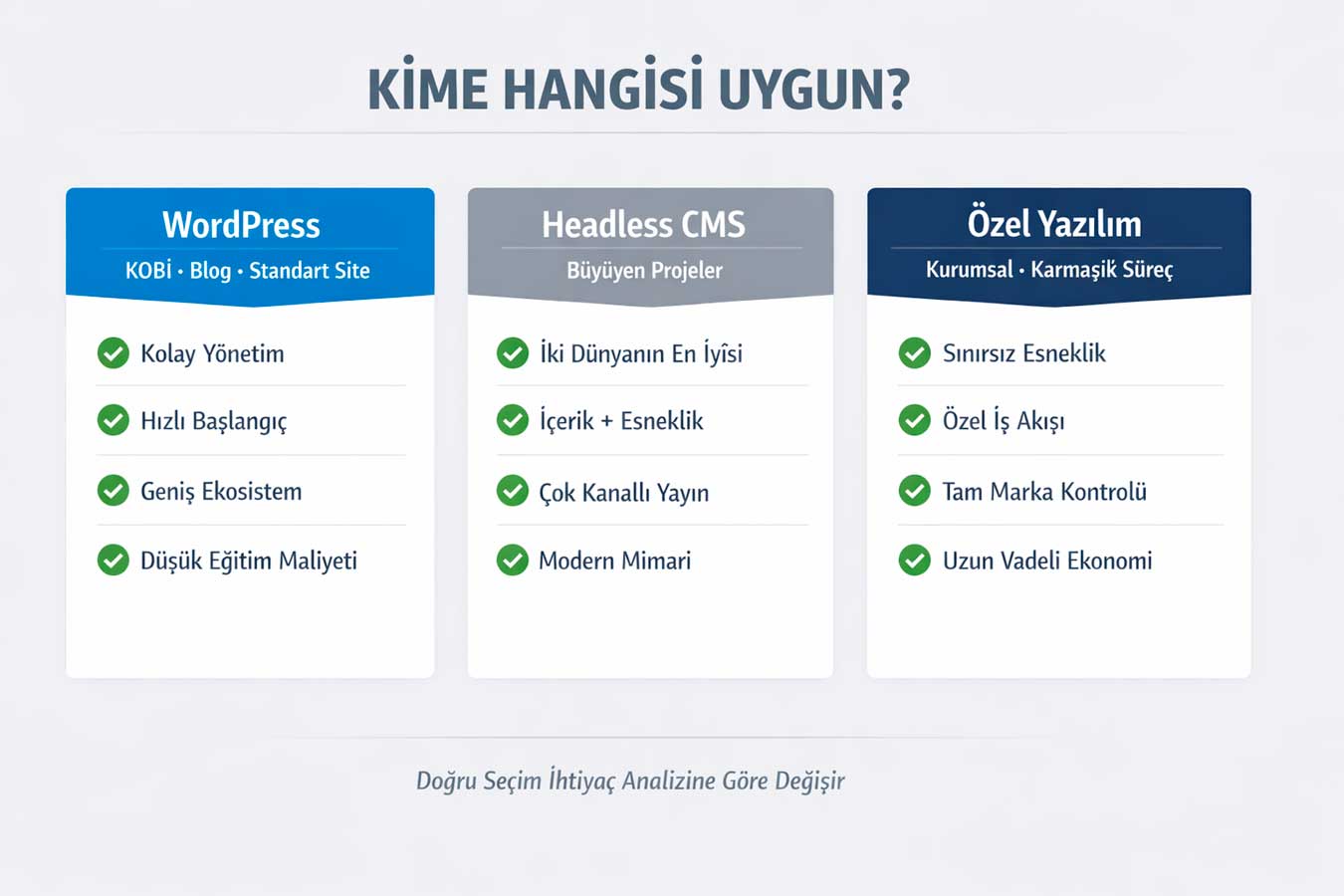
Budget and project type, WordPress vs The most decisive factor in the decision is custom software. As a rule, we can say that if the initial budget is under 50,000 TL and a standard corporate website or blog is sufficient, WordPress is a strong choice. If the budget is over 100,000 TL, and there are specific business processes or integration requirements, custom software is more efficient. The middle range (50,000–100,000 TL) is where the needs analysis should be given the most attention. The decision between WordPress vs. Custom Software is determined by the budget and the list of needs.
- Under 50K TL:WordPress — a combination of template and custom plugins is sufficient
- 50K–100K TL:A hybrid approach — developing custom modules on WordPress
- Over 100K TL:Consider custom software or a headless CMS + custom frontend
- E-commerce: WooCommerce or custom platform depending on volume and customization needs
1.4 Hidden Costs and Considerations
Both options have invisible costs. In WordPress: site crashes and recovery costs due to plugin conflicts, the cost of optimizing a slow site, the cost of redoing customizations of a deleted theme. In custom software: developer dependency (if source code is not documented), legacy technology debt, the cost of adding new features increases over time. Both options require a transparent contract and source code assurance. Inquiring about hidden costs from the outset prevents major surprises when making a choice. WordPress vs Custom Software Whichever you choose, a transparent contract is the safest start.
- Source code delivery: must be explicitly stated in the contract — in both options
- Developer dependency: technical documentation must be mandatory for custom software
- Backup and disaster recovery plan: must be included in the cost for both platforms
- Training cost: The training fee for the team to use the system should be added to the contract
👉 For a solution that suits your budget → Corporate Web Design Service
2. Flexibility Difference: How Much Can You Customize? 🔧
The designer said “this isn’t possible”; is it really? Many things that aren’t possible in WordPress are achieved in custom software with a few lines of code. But the WordPress ecosystem also offers astonishing flexibility with over 59,000 plugins. In a WordPress vs. Custom Software flexibility comparison, the question is: “How different do you want to be?”
🔧 According to Stack Overflow’s 2024 developer survey, 68% of projects that prefer custom software do so because of “feature requirements that don’t fit on standard platforms”. WordPress, on the other hand, is flexible enough for standard content management, corporate presentation, and basic e-commerce.
The difference in flexibility between WordPress and custom software depends on how unconventional your project is.
2.1 WordPress Flexibility Limitations
You can do a lot with themes and plugins in WordPress; but it’s not everything.
Complex multi-step order processes, custom pricing algorithms, ERP/CRM integrations, or real-time data display are scenarios that challenge WordPress. Page builder tools (Elementor, Divi) offer visual flexibility; but they create code clutter in the background, reducing performance. As a result, WordPress is turning into a structure that adds plugin after plugin as it tries to “go outside the box”. Knowing this limitation beforehand when comparing WordPress vs. Custom Software saves time and money.
- Content management: WordPress is excellent — blog, news, portfolio, simple product catalog
- Complex business logic: custom pricing, dynamic forms, conditional content — limited
- API integrations: basic integrations are possible; Complex bidirectional integration is becoming difficult
- Performance: Many plugins = bloated code = slow site — optimization needed
2.2 Unlimited Flexibility of Custom Software
There are no limits in custom software — only budget and time are constraints. Multi-step production tracking system, dynamic pricing engine, custom reporting panel, customer portal, mobile application integration — all of these can be implemented on a single platform. A vehicle tracking panel for a logistics company, a patient management system for a hospital, or an order tracking module for a manufacturing company — all of these are tailor-made solutions. If you’re saying “I want to do exactly what I want” between WordPress vs Custom Software, the answer is clear.
- Design from scratch: unique user experience fully aligned with brand identity
- Complex workflows: order management, approval processes, dynamic pricing — complete control
- Multi-platform: web, mobile, tablet — management from a single codebase (API-first (architecture)
- Third-party integration: ERP, CRM, accounting, logistics — unlimited bidirectional integration
2.3 Headless CMS: The Best of Two Worlds
The Headless CMS approach combines the ease of content management offered by WordPress with the flexibility of custom software. WordPress is used only as a content repository; the front-end is entirely custom-developed with React, Vue, or Next.js. This approach is an ideal solution, especially for projects requiring a multi-channel presence (web + mobile + kiosk). The disadvantage is that it requires both a content and development team — increasing the budget burden. For those caught in the dilemma of WordPress vs. Custom Software, Headless CMS is the most balanced third option.
- WordPress + REST API: Content management WordPress; Frontend custom — good balance
- Next.js / Nuxt.js: SEO friendly, fast loading, modern development experience
- Multi-channel: Distribute the same content to web, mobile, and IoT devices
- Cost note: Requires two areas of expertise — consider in budget planning
2.4 Design Freedom: How Different Can Anyone Be?
While changing a WordPress theme is easy, creating a design from scratch that perfectly suits your brand requires custom development in both options. The difference is this: WordPress is limited by its custom design theme structure; with custom software, any visual can be applied with pixel perfection without any restrictions. Animated product pages for e-commerce, interactive graphics for financial platforms, drag-and-drop interfaces for SaaS — these are the advantages of custom software. WordPress vs. Custom Software In terms of design, the stronger the brand identity, the more meaningful the custom software becomes.
- WordPress design: free within the theme framework; Going beyond theme boundaries incurs additional costs.
- Custom software design: complete freedom — every detail in Figma can be reflected in the code
- Animation and interactivity: Libraries like GSAP, Three.js, D3.js work seamlessly in custom software
- Brand consistency: font, color, spacing — every pixel is under control in custom software
👉 Let’s determine the technology suitable for your project → Professional Web Design
3. Ease of Maintenance: Who Will Manage the Site and How? 🛠️
Will you manage the site yourself, or will you call a developer for every change? This question is a vital factor that is often overlooked when deciding between WordPress and Custom Software. For an SME without a technical team, a system that allows them to update their content themselves is more important, while for a large corporation, a secure and scalable platform is more crucial.
🛠️ According to the 2024 report by CMS research company CMSWire, 71% of businesses state that being able to update website content without technical support is a primary priority. WordPress meets this need relatively well; in custom software, the quality of the admin panel is the determining factor.
A poorly designed custom admin panel is much more difficult to use than a well-designed WordPress.
3.1 User-Friendly WordPress Administration
WordPress has an administration interface tested on over 60 million websites worldwide. Writing blog posts, adding images, updating pages — all this can be done without technical knowledge. The Gutenberg editor offers drag-and-drop blocks; WooCommerce product management is relatively simple. New team members can adapt to the system in 1-2 days — training costs are low. WordPress vs. Custom Software In terms of ease of maintenance, WordPress clearly outperforms businesses without a technical team.
- Gutenberg editor:visual block editor — adding text, images, and videos requires no technical knowledge
- Wide ecosystem:thousands of free resources, YouTube tutorials, Turkish documentation
- Role management:editor, author, contributor — permissions can be defined according to the team
- Expanding with a plugin:Adding plugins as needed is sufficient — no developer required
3.2 Maintenance and Update Process in Custom Software
In custom software, “changing something” often means calling the developer. This isn’t about billing for every text change; but technical dependencies are inevitable in structural changes. The solution: request an intuitive admin panel upon project delivery. A well-designed custom software admin panel can be as user-friendly as WordPress — depending on preference and budget. WordPress vs. Custom Software maintenance comparison: admin panel quality is the factor that changes the outcome.
- Custom administration panel:A simple and intuitive interface is essential for content, product, and user management
- Technical documentation:API documentation and user guide included in delivery — protection if the developer changes
- Modular structure:Well-designed custom software is updated with independent modules
- DevOps process: Updating with CI/CD pipeline — uninterrupted, tested deployment
3.3 Updates and Release Management
Do plugins conflict when a WordPress update is released? This is a real risk: The WordPress 6.x update can disable some plugins, or even crash the site. With custom software, the update only affects your own code; there are no third-party plugin conflicts. Testing (staging) and secure updating can be implemented on both platforms; however, it is much more predictable in proprietary software. WordPress vs. Custom Software ;
- WordPress update risk: staging environment required — test first, then live
- Plugin compatibility check: All plugins must be checked for compatibility before updating
- Custom software update: Only your own code — predictive, controlled
- Long term Support: The LTS (long-term support) version of the framework used should be preferred.
3.4 Technical Team Requirements
WordPress doesn’t require a programmer to manage; however, it is sometimes necessary for troubleshooting. For custom software, at least one acquaintance with a backend developer is required. Evaluation for SMEs: WordPress with an annual maintenance agreement with an agency or freelancer + content managed by a team = practical option. Large corporate structure: if they have their own technical team, custom software is better; otherwise, WordPress is more manageable. WordPress vs Custom Software;
- For WordPress: Content editor + monthly technical maintenance agreement — no team required
- For custom software: At least 1 developer — internal team or trusted agency
- Hybrid approach: WordPress content + custom integration module — balanced solution
- Investment in training: Regardless of which platform is chosen, team training should be budgeted
👉 Get technical consulting for your project → Website Design Prices
4. Security Status: Which is Safer? 🔒
Is WordPress “insecure”? This claim is partially true and partly misleading. WordPress’s 43% market share makes it a primary target; but a well-structured WordPress site can be far more secure than poorly secured proprietary software. The WordPress vs. Proprietary Software security comparison is a matter of application quality, not platform.
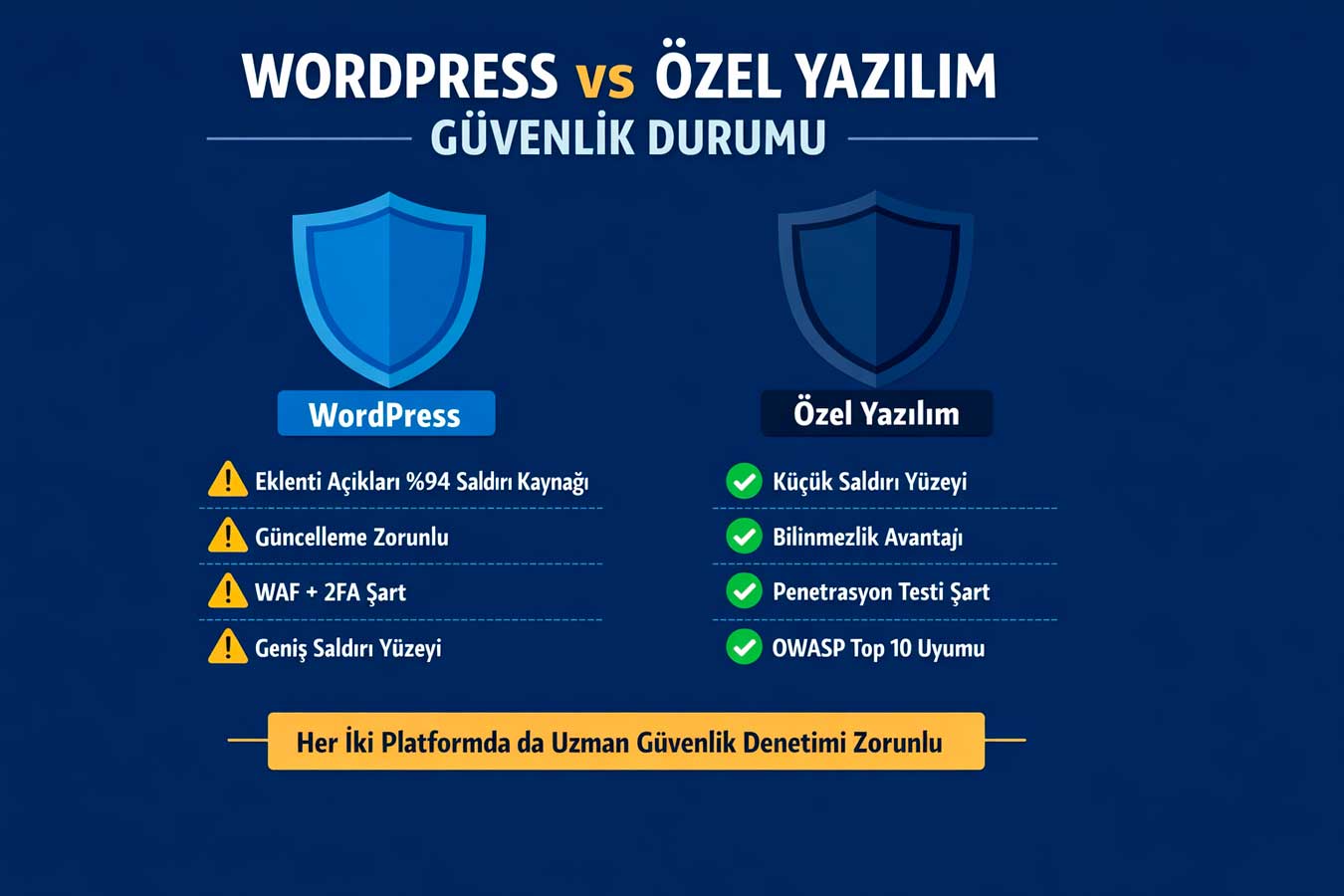
🔒 According to Wordfence’s 2024 WordPress security report, 94% of attacks originate from outdated plugins and themes. With regular updates and proper configuration, WordPress runs very securely. Proprietary software, on the other hand, has a smaller attack surface — there are no publicly known vulnerabilities. But even proprietary code can have errors; Code quality and security audits are crucial on both platforms.
4.1 WordPress Security Vulnerabilities and Solutions
The WordPress core is strong in terms of security; the real problem is plugins and themes. Every plugin is a potential vulnerability. Not all 59,000 plugins have security audits. Solution: use a minimum number of plugins, and only choose actively developed and high-rated plugins. Enterprise-level security can be achieved with WAF (Web Application Firewall), strong passwords, 2FA, and regular updates. WordPress vs. Custom Software In terms of security, WordPress, when properly configured, is a strong option.
- Plugin selection:5 stars, 100K+ active installations, updated in the last 2 weeks — minimum criteria
- WAF (Cloudflare/Wordfence):bad traffic filtering — DDoS, brute force protection
- Login protection:2FA + limit login attempts + admin URL change
- Regular scanning: Sucuri SiteCheck monthly — blacklist and malware check
4.2 Security Advantages and Risks of Custom Software
The biggest security advantage of custom software: unknown. Attackers know WordPress vulnerabilities; they don’t know the architecture of custom software. Although this “security through privacy” principle is said to be a weak safeguard, it actually significantly reduces the number of attacks. On the other hand, proprietary code can harbor its own flaws: SQL injection, XSS, CSRF — these are prevented by code review. In WordPress vs. Proprietary Software, the source of the security risks is different; Both require expert oversight.
- Penetration testing: Independent pre-release security audit — critical
- OWASP Top 10: Developers should write code that complies with these security standards
- Dependency management: Libraries used should be kept up-to-date — npm audit, composer update
- Data encryption: Sensitive data must be stored encrypted, HTTPS is mandatory, token-based authentication
4.3 GDPR and Data Security Compliance
GDPR compliance is mandatory on both platforms; the difference is how it is achieved. In WordPress, GDPR compliance is mostly achieved through plugins — cookie management, privacy policy, data deletion requests. In custom software, GDPR requirements can be integrated into the design from scratch: what data is collected, where it is stored, when it is deleted — complete control. For sectors that process sensitive data, such as healthcare, law, and finance, custom software offers a more secure ground in terms of GDPR. WordPress vs. Custom Software;
- WordPress GDPR: CookieYes, GDPR Cookie Consent — plugin-based solution
- Custom software GDPR: Data architecture is being redesigned from scratch — more comprehensive control
- Data localization: User data in Türkiye must be stored in Türkiye — hosting selection is critical
- Data deletion request: According to the KVKK (Turkish Personal Data Protection Law), the “right to be forgotten” is applicable on both platforms
4.4 SSL, Backup and Disaster Recovery
SSL, backup and disaster recovery plan are platform independent; mandatory in both options. UpdraftPlus + external storage is the standard solution in WordPress. In custom software, CI/CD pipeline and automatic database backup infrastructure design should be included. Daily backup, staging environment, 72-hour recovery target (RTO) — minimum standards for both.
- Daily automatic backup: mandatory on both platforms — external storage required
- Staging environment: test without affecting the live site — applicable to WordPress vs. custom software
- Disaster recovery plan: RTO (recovery time) and RPO (data loss tolerance) must be defined
- Firewall: Cloudflare or similar CDN/WAF can be applied to both platforms
👉 Let’s set up your security infrastructure → Web Design Institution — Contact
📊 WordPress vs Custom Software: Comparison Table
Comprehensive comparison based on four criteria:
| Criteria | WordPress | Custom Software | Winner |
| Initial Cost | 25K–80K TL | 50K–500K+ TL | WordPress |
| 5-Year TCO | High (license + plugin) | Low (single) (investment) | Custom Software |
| Flexibility | Medium (plugin limit) | Unlimited | Custom Software |
| Ease of Use | High | Panel-based | WordPress |
| Maintenance | Easy (with plugin) | Developer required | WordPress |
| Security | Good (if kept up to date) | Very Good (small surface area) | Custom Software |
| Speed | Optimize Can be done | Natural advantage | Custom Software |
| KVKK Compliance | Plugin-based | Design integrated | Custom Software |
| Suitable for | SME, blog, standard site | Corporate, custom process | According to need |
🧠 Summary Box: 5 Critical Takeaways from This Article
5 critical takeaways:
- Cost is not just for the beginning: 5-year TCO should be calculated — WordPress’s annual plugin cost can exceed that of custom software
- Flexibility depends on needs analysis: WordPress is sufficient for a standard site; Custom software is required for a custom workflow
- Security is an application issue, not a platform: Regularly updated WordPress is more secure than poorly written custom code
- Ease of maintenance is the primary question: For SMEs without a technical team, WordPress is more manageable
- Headless CMS is the best of two worlds: WordPress content + custom frontend — the ideal bridge for growing projects
❓ Frequently Asked Questions
Can a corporate website be built with WordPress?
Yes. Thousands of corporate firms use WordPress. With the right theme, minimal plugins, and professional development, corporate-level results can be achieved. Constraint: Custom software should be evaluated when complex, specialized business processes are required.
How long does it take to deliver custom software?
Depending on the scope, it can range from 3 months to 18 months. MVP (minimum uWith the (implementable product) approach, the basic system can be launched in 3-4 months and expanded over time.
Is it possible to switch from WordPress to custom software?
Yes — content migration is possible, but there is a cost that should not be ignored. If the URL structure is preserved, the transition can be made harmless in terms of SEO.
The transition plan must be meticulously prepared.
Which one for e-commerce?
For low and medium volume, WooCommerce (WordPress) is powerful and economical.
For projects requiring high volume, custom pricing, or ERP integration, a custom platform or Headless + WooCommerce is more logical.
Which is faster?
Optimized WordPress is sufficient in terms of speed. But custom software starts naturally faster because it doesn’t contain unnecessary code. The difference is largely closed with the right hosting and optimization.
🚀 Conclusion: The Right Choice Requires the Right Analysis
There is no single right answer to the question
WordPress vs. Custom Software. For SMEs with limited budgets and standard needs, WordPress is a smart and efficient choice. For corporate structures with complex business processes, high traffic, and long-term scaling goals, custom software is a strategic investment. Needs analysis, budget planning, and a 5-year perspective are essential for making the right decision.
As a web design company, we offer deep technical expertise on both platforms. Our expertise lies in performance-oriented development for WordPress projects and scalable architecture design for custom software projects. Let’s schedule a free needs analysis meeting for your project.
Make the right decision together: WordPress vs. Custom Software
👉 For a free needs analysis → Web Design Institution
📋 About This Content:
This article was prepared by Adapte Digital for business owners, digital strategy managers, and project managers planning to have a website built.
📹 Video Suggestion: Adapte Dijital · Web and Digital Marketing Agency
🌐 Professional Website: webtasarimkurumu.com.tr
🔗 Related Article: Website Maintenance: Why It Requires Constant Attention?