

If you haven’t performed a health check on your website, it could be silently ailing — and you’re not even aware of it. A slow-loading, mobile-incompatible, or SEO-infected site is losing visitors and revenue every day, but this loss often grows unnoticed. Just as it’s unreasonable to expect to heal on its own without going to the doctor, it’s equally risky to expect problems to resolve themselves without auditing your site. The 10 questions in this guide reveal the true situation in minutes.
🩺 According to HubSpot research, 61% of site owners haven’t technically audited their site in the last 12 months. During this time, a security vulnerability, slowdown, or mobile break can grow unnoticed.
This guide covers 10 questions you should ask in four critical areas: speed, mobile, SEO, and security. For each question, we provide a free test tool, expected score, and quick solution steps. All of these tools provide results in minutes and don’t require technical knowledge.
1. Speed Test: How Many Seconds Does Your Site Take to Load? ⚡
Have you ever measured your site’s speed — or are you assuming it’s “fast enough”? The first and most critical stop in a website health check is speed; because speed directly affects both user experience and Google ranking. According to Amazon’s research, every 1-second delay reduces the conversion rate by 7%. Google, on the other hand, penalizes pages exceeding 3 seconds in organic ranking. These two facts make the speed test the top priority in your website’s health check.
⚡ 67% of websites in Türkiye are still in the slow category. This statistic offers a significant competitive advantage to businesses that regularly perform this check. If your competitor is slow and you are fast, Google ranks you organically. Moreover, speed optimization is the most effective way to convert more visitors without spending an advertising budget.
1.1 ✅ Page Load Time: Gold Standard 2 Seconds
Question 1: Does your page load in 2 seconds or less?
Test tool: PageSpeed Insights (pagespeed.web.dev) — Desktop and mobile scores are displayed separately when the URL is entered. Expected value:90+ points “Good”, 50–89 “Needs Improvement”, 0–49 “Slow”. Real user data and lab data are shown separately — see both. The “Domain Data” section, in particular, reflects the experience of real visitors.
⚠️ Critical threshold:Below 2 seconds is ideal;
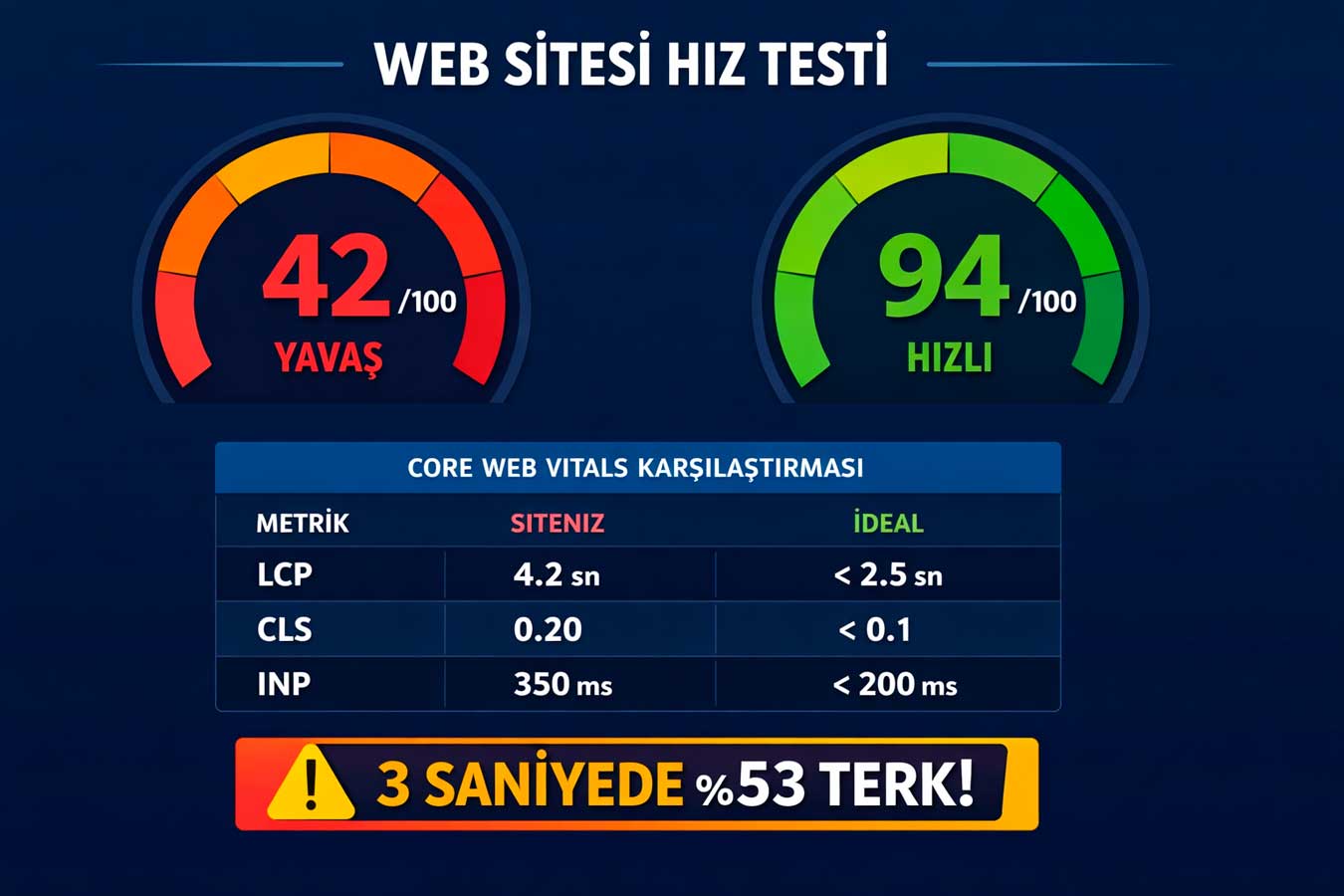
53% of visitors leave the page after 3 seconds- PageSpeed Insights desktop score: If below 90, immediate intervention is necessary
- Also check mobile score: often 20-30 points lower than desktop
- Check LCP value: Below 2.5 seconds “Good”, above 4 seconds “Bad”
- Second measurement with GTmetrix: The waterfall graph answers the question of which resource is slowing down
1.2 ✅ Core Web Vitals: Google’s Ranking Criterion
Question 2: Are your Core Web Vitals scores at Google’s “Good” threshold?
Test tool: Google Search Console → Core Web Vitals report. Expected values:LCP ≤ 2.5 sec / CLS ≤ 0.1 / INP ≤ 200 ms. These three metrics are the direct ranking factors Google has been using since 2021. The “Needs Improvement” or “Poor” label seriously impacts organic visibility.It creates loss. LCP measures large images, CLS measures displaced elements, and INP measures click delays.
Core Web Vitals is the most technical but most critical part of the speed section in this process.
Every page that receives a red alert means lost organic traffic for that day.⚠️ Critical threshold:Core Web Vitals directly affect Google ranking — red alert requires immediate action
- Search Console → Core Web Vitals → Mobile:Red-marked URLs are priority targets
- CLS issues:Defining dimensions for images solves most CLS issues
- INP tracking: User interaction should be responded to within 200 ms
- Chrome DevTools Performance: For in-depth page-based analysis
1.3 ✅ Server Response Time: Infrastructure Robustness
Question 3: Is your server response time (TTFB) under 600 ms?
Test tool: GTmetrix or WebPageTest — Check the “Time to First Byte” value. Expected value: Below 600 ms. If TTFB is high, all other speed optimizations become ineffective; because the browser cannot display anything without a response from the server. Cheap shared hosting usually increases TTFB to 1,500–3,000 ms. If this value is high, the hosting quality should be questioned. If this value is high, the hosting quality should be questioned. In your website’s health check TTFB reveals the weakest link in the chain — the infrastructure.
⚠️ Critical threshold:If the server is slow, all speed optimization is wasted — infrastructure comes first..
1.4 ✅ Image and Code Optimization
Question 4:Are your images compressed and your code optimized?
Test tool: PageSpeed Insights → “Opportunities” section — shows how many KB each image will save. Expected situation:Images are in WebP format, under 200 KB. A single large, unoptimized image can slow down the site by 2–3 seconds. Minifying CSS and JavaScript files and cleaning up render-blocking resources reduces page size by 40–60%.
Image and code optimization is the step that provides the fastest return on investment among these steps. Often, without changing hosting or themes, the score increases by 20-30 points with just optimization.
⚠️ Critical threshold:A single unoptimized image can slow down the site by 2-3 seconds
- WebP conversion:All images must be converted to WebP format; Approximately 30% smaller on average
- Lazy loading: Off-screen images should only load when scrolled
- CSS/JS minify: All style and script files should be served in compressed form
- Render-blocking cleanup: Non-critical resources should be loaded asynchronously or with defer
👉 Let’s solve speed issues together → Corporate Web Design Service
2. Mobile Test: How Do 72% of Your Visitors See It on Their Phones? 📱
Did everything display correctly the last time you opened your site from your smartphone? A Website Health Check cannot be completed without mobile tests. In Türkiye, 72% of web traffic comes from mobile devices, and Google evaluates the site first from a mobile perspective with mobile-first indexing. So, in Google’s eyes, the mobile version of your site is the real version.
📱 GAccording to Google’s research, 88% of users never return to a site after a bad mobile experience. The mobile experience isn’t just about “fitting on a small screen”: touch targets, font readability, lack of horizontal scrolling, and page speed — all of these influence a visitor’s decision to stay on the site.
2.1 ✅ Mobile-Friendly Test: Google’s Approval
Question 5: Is your site Google’s Mobile-Friendly Does it pass the test?
Test tool: search.google.com/test/mobile-friendly — A green confirmation of “Page is mobile-friendly” should be expected. If errors occur, they are directly visible in Search Console and negatively affect organic traffic. Text readability, clickable element proximity, and viewport configuration are particularly common sources of errors on small screens. This test is the first mobile step in your website’s health check.
⚠️ Critical threshold:Mobile-Friendly failed = Google organic ranking penalty — urgent fix
- Test each homepage separately:homepage, services, contact pages — all checked separately
- Viewport meta tag:<meta name=”viewport”> must be present on all pages
- Horizontal scrolling test: No side scrolling should occur on any page
- Chrome DevTools Toggle device toolbar: Check iPhone 14, Galaxy S23 views
2.2 ✅ Touch Targets: Finger-Friendly Design
Question 6: Are mobile touch targets large enough?
Test tool: Chrome DevTools → Lighthouse → Mobile control → “Tap targets” alert. Expected value: all clickable elements minimum 44×44 pixels. Buttons and links below this size are difficult to click; accidental clicks are frustrating and the visitor leaves the site. Especially mobile menus, footer links, and contact buttons must comply with this standard.⚠️ Critical threshold:Tap targets below 44px = wrong click = frustration = exit from site
- Lighthouse Mobile check:Look for the “Tap targets are not sized appropriately” warning
- Test CTA buttons on phone:comfortable to click with thumb
2.3 ✅ Mobile Page Speed: Evaluate Separately from Desktop
Question 7: How does your mobile page speed compare to desktop?
Test tool: PageSpeed Insights — compare desktop and mobile scores for the same URL. Expected difference:mobile score should be at most 15–20 points lower than desktop. A larger difference indicates a lack of mobile-specific optimization. Since mobile connection speed is lower than desktop, each additional KB feels much heavier on mobile.
⚠️ Critical threshold:Google weighs mobile score more than desktop
- Mobile-specific images: Large images should be reduced in size on mobile using srcset
- Render-blocking resources: The impact is much more severe on mobile; async/defer should be added
- Font loading: font-display: swap should solve the invisible text issue
- Third-party scripts: chat widget, pixel, analytics — the biggest factor reducing mobile speed
2.4 ✅ Mobile Menu and Navigation Quality
Question 8: Is your mobile menu usable with one hand and intuitively?
Test tool: Manual test on a real device + Chrome DevTools logging feature. Expected situation: Hamburger menu opens in under 300ms, all home pages are accessible with one touch, menu depth maximum 2 levels. Menu structures that look great on desktop often cause problems on mobile: nested categories, small text, hidden search box are among the main issues.
Mobile navigation quality is the most concrete indicator of the user experience section in this process. Give someone seeing your site for the first time 30 seconds on their phone; Navigation is successful if the contact page can be found.
⚠️ Critical threshold:A complex mobile menu will drive the visitor away within 10 seconds
- Hamburger menu loading time:Under 300ms, animation should be smooth
- Menu depth:Max 2 levels on mobile — deeper structures should be handled with a separate page
- Sticky header: Keep the menu fixed at the top while scrolling the page
- Search button: Mobile search box is mandatory on sites with 10+ pages
👉 Let’s have your mobile checked → Professional Web Design Service
3. SEO Score: Does Google See You? 🔍
Do you know how many organic visitors you received from Google in the last 30 days? The SEO aspect of this audit is where invisible losses surface. Technical SEO errors are often traffic that is silently lost while the site appears to be “working”. Every error, from missing title tags to broken links, negatively impacts how Google evaluates your site.
🔍 According to Ahrefs’ 2024 research, 68% of websites have at least one critical technical SEO error. Most of these errors can be detected in minutes with free tools.
As SEO audits are delayed, your competitors continue to widen the gap in organic rankings.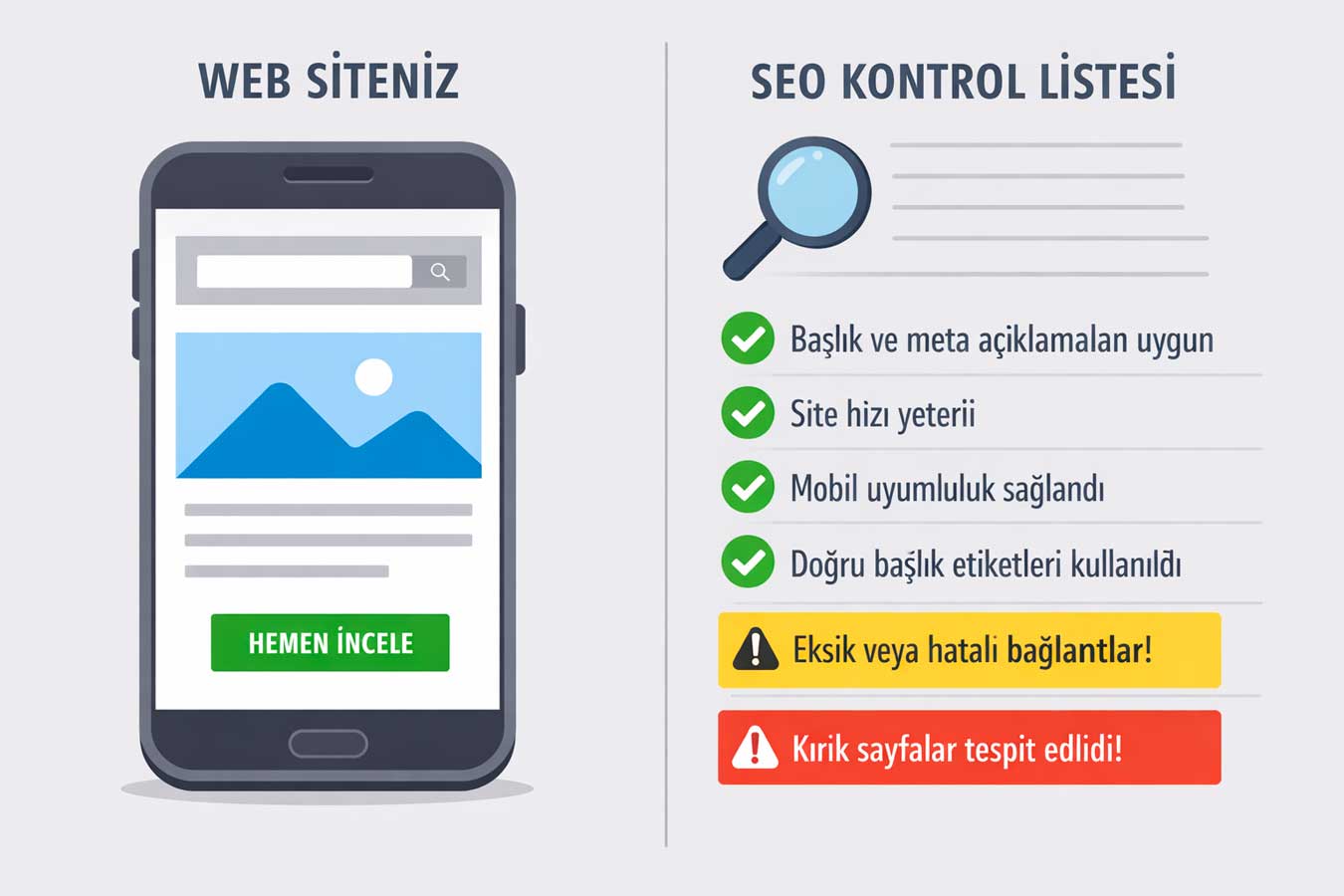
3.1 ✅ Title Tag and Meta Descriptions
Question 9: Your title tag and meta descriptions are complete and unique on every page Is that right?
Test tool:Screaming Frog SEO Spider (free, up to 500 URLs) or Search Console → Comprehensive report. Expected value:Each page should contain a unique title (50–60 characters) and meta description (150–160 characters). Duplicate or empty titles severely reduce organic click-through rates. Google displays its own automatic title in these cases — which means losing control over your brand message.
⚠️ Critical threshold:Emptyor duplicate title = Google writes its own title = loss of CTR control
- Search Console title preview: check the title of each page
- Screaming Frog title scan: filter out empty, duplicate, or titles over 60 characters
- Meta description check: create a unique and clickbait description for each service/product page
- Yoast / RankMath: If you are using WordPress, green light should be targeted
3.2 ✅ Broken Link and Redirect Issues
Question 10: Do you have a broken link (404 error) or redirect issue?
Test tool: Search Console → Comprehensive → “Not Found (404)” report or Site scan with Ahrefs Webmaster Tools (free). Expected value: zero 404 error. Every broken link degrades user experience and also ruins the backlink value pointing to that page. Sites that delete old URLs but don’t redirect lose all of their link value.
⚠️ Critical threshold:404 errors destroy backlink value + ruin user experience
- Search Console 404 report:Either repair these URLs or redirect to the correct page
- 301 redirect chain:A→B→C chains lead to loss of speed and link value opening
- Internal link scan: It is critical that the site does not have broken links within itself
- Canonical tags: If there is duplicate content, the homepage should be shown with canonical tags
3.3 ✅ Search Console Setup and Monitoring
Question 11: Your site is Google Is it registered in Search Console and regularly monitored?
Test tool: search.google.com/search-console — free, not required. Expected status: registered, verified, sitemap submitted, zero critical errors in the last 7 days. Without Search Console, you cannot see which pages are down or which keywords are driving traffic. Managing SEO without this tool is like flying without indicators.
⚠️ Critical threshold:Monitoring SEO performance is impossible without Search Console — setup is mandatory
- Is the account open and verified:Verification must be done with an HTML tag or DNS record
- Is the XML sitemap submitted:yourdomain.com/sitemap.xml must be added to the Console
- Comprehensive report: See the ratio of “Indexed” vs “Not Indexed”
- Performance report: Which keywords are driving traffic, which pages are being clicked?
3.4 ✅ Page Indexing Status
Question 12: All your important pages are indexed on Google Has it been indexed by?
Test tool:Search Console → Comprehensive → Page report. Expected status:All important pages are in the “Indexed” category. Investigate the reason for pages in the “Not indexed” category: noindex tag, robots.txt block, thin content, or canonicalization issue. An unindexed page is considered not present in Google search. An unindexed page is considered not present in Google search. The indexing report in your website’s health check is the most direct way to identify invisible pages in minutes.
⚠️ Critical threshold:Pages not indexed are invisible to Google — zero organic traffic
- Robots.txt check: Ensure important pages are not accidentally blocked
- Noindex tag scan: Check meta robots tags on all pages with Screaming Frog
- Thin content: Pages under 300 words may not be indexed; Content should be enriched
- Sitemap update:Newly added pages should be included in the sitemap and resubmitted to the Console
👉 Let’s get your SEO audit done → Website Design Prices
4. Security Status: Are Your Site and Visitors Safe? 🔒
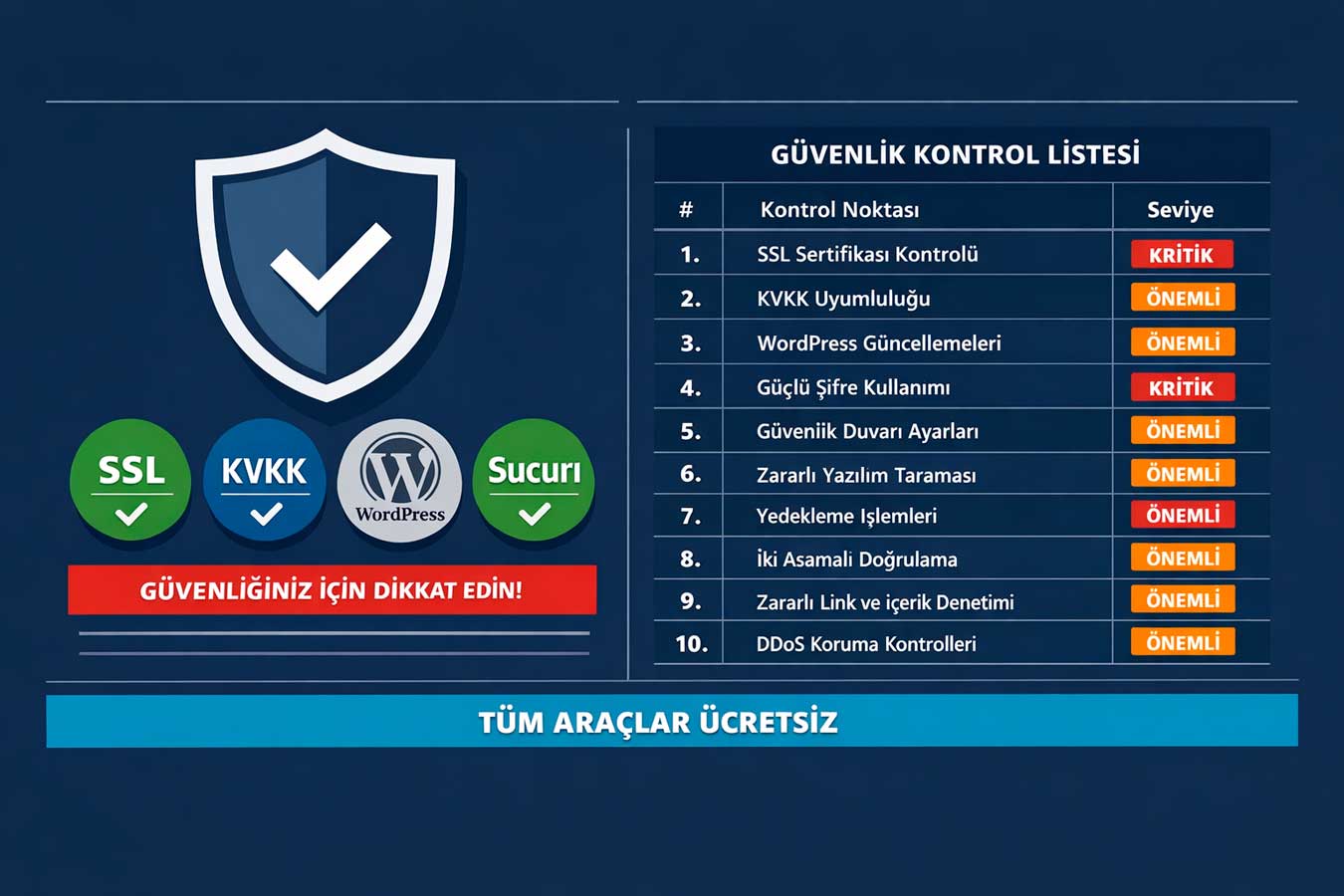
Your site was hacked yesterday and you still don’t know — how likely is this scenario? The most critical part of this audit is security; because security breaches happen silently. According to Sucuri’s 2024 report, 61% of hacked sites are not noticed by their owners until someone else tells them. During this time, your site is sending spam, infecting visitors with malware, and could be added to Google’s blacklist.
🔒 Cyberattacks targeting websites in Türkiye have increased by 40% in the last two years. On the other hand, under the Personal Data Protection Law (KVKK), fines of up to 7 million TL are imposed in case of data breaches. Security audits are no longer an optional technical check; It has exceeded the legal obligation dimension.
4.1 ✅ SSL Certificate and HTTPS Configuration
Question 13: Is your SSL certificate valid and correctly configured?
Test tool: SSL Labs (ssllabs.com/ssltest) — A+ to F scoring. Expected value: A or A+ grade. An expired SSL certificate, a mixed content error, or a missing chain displays a “Not Secure” warning. 85% of visitors leave the site when they see this warning. Having an SSL certificate installed isn’t enough; it must be correctly configured. An SSL test is the first security step in your website’s health check. Any result below an A+ grade in your website’s health check means a vulnerability that directly threatens visitor trust
⚠️ Critical threshold:SSL Labs B or below = serious security vulnerability + loss of customer trust
- Run SSL Labs test:A+ should be targeted;
4.2 ✅ WordPress and Plugin Security
Question 14: Are your WordPress and plugins up to date, and have they been scanned for malware?
Test tool: Wordfence (WordPress plugin, free) or Sucuri SiteCheck (sitecheck.sucuri.net). Expected result: clean scan result + all plugins are up to date. Every outdated plugin may contain a known security vulnerability. 94% of WordPress attacks come from plugin vulnerabilities. UnusedDisabling extensions is not enough; should be completely removed.
⚠️ Critical threshold:Unupdated plugin = open door — 94% of WordPress attacks are from plugin vulnerabilities
- WordPress → Updates:core, theme and all plugins must be up to date
- Sucuri SiteCheck scan:blacklist check + malicious code detection — free
- Delete unused plugins: Disabling is not enough; Remove
- Administrator password + 2FA: weak password + missing two-factor authentication = biggest risk
4.3 ✅ GDPR Compliance and Cookie Management
Question 15: Does your site correctly implement cookie management under GDPR?
Test tool: Cookie detection with CookieYes or the free Osano browser extension. Expected situation:Analytic and marketing cookies should not run without user consent. Google Analytics, Facebook Pixel, and live support tools use cookies; all of them should be connected to a consent mechanism. In 2024, the upper limit for GDPR violations was increased to 7,061,643 TL. GDPR compliance is now mandatory in your website’s health check. WordPress security should therefore be addressed as a separate topic in your website’s health check. Reviewing your plugin list while performing a health check on your website significantly reduces the risk of hacking.
⚠️ Critical threshold:KVKK violation: Up to 7 million TL fine + serious reputational damage
- Cookie banner:Analytic cookies should not run without consent
- Cookie categories:“Mandatory / Analytical / Marketing” distinction should be made
- Privacy policy: The current Turkish privacy policy is accessible from the banner
- Data processing log: According to the KVKK (Personal Data Protection Law), data processing activities must be kept on record
4.4 ✅ Backup and Disaster Recovery Plan
Question 16: Is your site regularly backed up and Has the backup restore been tested?
Test tool:Hosting control panel → Backup section or UpdraftPlus (WordPress). Expected status:Automatic daily or weekly backup, backups are stored off-server. Hacking, server failure or accidentally deleted content — in all these scenarios, restore is impossible without a backup. Many businesses think they have backups but have never tested them. Your website’s health check is completed with a backup test.
⚠️ Critical threshold:If there is no backup, the site may be completely lost after a hack or malfunction
👉 Let’s have your security audit done → Web Design Institution — Contact
🧠 Summary Box: 5 Critical Takeaways from This Article
5 critical takeaways for your website’s health check:
- Speed cannot be known without measurement:PageSpeed Insights and Core Web Vitals should be checked monthly — intuition is not enough
- Mobile testing is mandatory:72% of Turkey’s traffic is mobile; Google prioritizes mobile with mobile-first indexing.
- SEO losses are silent: Broken links, empty titles, missing Search Console — nobody notices while traffic is high
- Security cannot be delayed: 61% of hacked sites go unnoticed; monthly scans and updates