
Website Health Check: 10 Questions You Should Ask

Website Health Check is one of those topics where good information saves both money and months. This updated 2026 guide brings the essentials together: what it is, how to plan it, how to execute it step by step, what it costs, which mistakes to avoid and how to grow it sustainably.
Understanding Website Health Check: The Fundamentals 🛠️
This section covers the fundamentals of website health check with field-tested guidance. For the broader framework, see our guide on First Impression.
SECTION SUMMARY
- What It Really Means
- Why It Matters in 2026
- Who Should Consider It
- Key Terms Explained
What It Really Means
If you haven’t performed a health check on your website, it could be silently ailing — and you’re not even aware of it. A slow-loading, mobile-incompatible, or SEO-infected site is losing visitors and revenue every day, but this loss often grows unnoticed. Just as it’s unreasonable to expect to heal on its own without going to the doctor, it’s equally risky to expect problems to resolve themselves without auditing your site. The 10 questions in this guide reveal the true situation in minutes.
In practice, research and customer experience reinforce each other: progress in one accelerates the other. Document customer experience as you go; institutional memory is a competitive asset.
Why It Matters in 2026
🩺 According to HubSpot research, 61% of site owners haven’t technically audited their site in the last 12 months. During this time, a security vulnerability, slowdown, or mobile break can grow unnoticed.
The businesses that win treat planning as a system, not a one-off task. The gap between average and excellent pricing is usually discipline, not budget.
Who Should Consider It
This guide covers 10 questions you should ask in four critical areas: speed, mobile, SEO, and security. For each question, we provide a free test tool, expected score, and quick solution steps. All of these tools provide results in minutes and don’t require technical knowledge.
A written standard for execution turns individual talent into repeatable results. Review content quarterly with the same yardstick so trends stay visible.
Key Terms Explained
Have you ever measured your site’s speed — or are you assuming it’s “fast enough”? The first and most critical stop in a website health check is speed; because speed directly affects both user experience and Google ranking. According to Amazon’s research, every 1-second delay reduces the conversion rate by 7%. Google, on the other hand, penalizes pages exceeding 3 seconds in organic ranking. These two facts make the speed test the top priority in your website’s health check.
Without measurement, budgeting becomes opinion; with it, it becomes management. Pair the team with budgeting early; retrofitting them later always costs more.
Building Your Roadmap 📊
This section covers the planning layer of website health check with field-tested guidance. For the broader framework, see our guide on Having a Digital Presence.
SECTION SUMMARY
- Setting Clear Goals
- Research Before You Start
- Choosing the Right Model
- Timeline and Milestones
Setting Clear Goals
Question 2: Are your Core Web Vitals scores at Google’s “Good” threshold?
Without measurement, planning becomes opinion; with it, it becomes management. Pair pricing with planning early; retrofitting them later always costs more.
Research Before You Start
Test tool: Google Search Console → Core Web Vitals report. Expected values:LCP ≤ 2.5 sec / CLS ≤ 0.1 / INP ≤ 200 ms. These three metrics are the direct ranking factors Google has been using since 2021. The “Needs Improvement” or “Poor” label seriously impacts organic visibility.It creates loss. LCP measures large images, CLS measures displaced elements, and INP measures click delays.
Core Web Vitals is the most technical but most critical part of the speed section in this process.
Start small with execution, validate with data, then scale what works. Treat content as an investment line, not an expense line, and manage it accordingly.
Choosing the Right Model
⚠️ Critical threshold:Core Web Vitals directly affect Google ranking — red alert requires immediate action
Consistency beats intensity: a steady rhythm in budgeting outperforms sporadic bursts. What gets scheduled gets done: put the team on the calendar, not the wish list.
Timeline and Milestones
- Search Console → Core Web Vitals → Mobile:Red-marked URLs are priority targets
- CLS issues:Defining dimensions for images solves most CLS issues
- INP tracking: User interaction should be responded to within 200 ms
- Chrome DevTools Performance: For in-depth page-based analysis
Every decision about measurement should answer one question: does it serve the customer? Customer feedback is the cheapest consultant visibility will ever have.
Step-by-Step Implementation 🔍
This section covers the execution layer of website health check with field-tested guidance. For the broader framework, see our guide on Why Does a Cheap Website End Up Costly.
SECTION SUMMARY
- Getting Started Right
- Tools and Infrastructure
- Solid Digital Foundation
- Quality Standards
Getting Started Right
Test tool: PageSpeed Insights → “Opportunities” section — shows how many KB each image will save. Expected situation:Images are in WebP format, under 200 KB. A single large, unoptimized image can slow down the site by 2–3 seconds. Minifying CSS and JavaScript files and cleaning up render-blocking resources reduces page size by 40–60%.
Every decision about execution should answer one question: does it serve the customer? Customer feedback is the cheapest consultant content will ever have.
Tools and Infrastructure
Image and code optimization is the step that provides the fastest return on investment among these steps. Often, without changing hosting or themes, the score increases by 20-30 points with just optimization.
Document budgeting as you go; institutional memory is a competitive asset. Digital tools amplify the team; they never replace the thinking behind it.
Solid Digital Foundation
⚠️ Critical threshold:A single unoptimized image can slow down the site by 2-3 seconds
The gap between average and excellent measurement is usually discipline, not budget. A ninety-day plan turns visibility from ambition into an operating routine.
Whatever your niche, discoverability starts with technical health: fast pages, clean structure and content that machines can parse. Align your site with Google’s current search documentation so that every other investment on this list can actually be found.
Quality Standards
- WebP conversion:All images must be converted to WebP format; Approximately 30% smaller on average
- Lazy loading: Off-screen images should only load when scrolled
- CSS/JS minify: All style and script files should be served in compressed form
- Render-blocking cleanup: Non-critical resources should be loaded asynchronously or with defer
Review growth quarterly with the same yardstick so trends stay visible. In practice, operations and growth reinforce each other: progress in one accelerates the other.
Investment and Resource Planning 🧭
This section covers the financial side of website health check with field-tested guidance. For the broader framework, see our guide on Website Statistics 2026.
SECTION SUMMARY
- Startup Cost Breakdown
- Ongoing Expenses
- Pricing Your Offer
- Return on Investment
Startup Cost Breakdown
Question 5: Is your site Google’s Mobile-Friendly Does it pass the test?
Review budgeting quarterly with the same yardstick so trends stay visible. In practice, the team and budgeting reinforce each other: progress in one accelerates the other.
Ongoing Expenses
Test tool: search.google.com/test/mobile-friendly — A green confirmation of “Page is mobile-friendly” should be expected. If errors occur, they are directly visible in Search Console and negatively affect organic traffic. Text readability, clickable element proximity, and viewport configuration are particularly common sources of errors on small screens. This test is the first mobile step in your website’s health check.
Pair measurement with visibility early; retrofitting them later always costs more. The businesses that win treat visibility as a system, not a one-off task.
Pricing Your Offer
⚠️ Critical threshold:Mobile-Friendly failed = Google organic ranking penalty — urgent fix
Treat growth as an investment line, not an expense line, and manage it accordingly. A written standard for operations turns individual talent into repeatable results.
Return on Investment
- Test each homepage separately:homepage, services, contact pages — all checked separately
- Viewport meta tag:<meta name=”viewport”> must be present on all pages
- Horizontal scrolling test: No side scrolling should occur on any page
- Chrome DevTools Toggle device toolbar: Check iPhone 14, Galaxy S23 views
What gets scheduled gets done: put research on the calendar, not the wish list. Without measurement, customer experience becomes opinion; with it, it becomes management.
Common Mistakes to Avoid ⚠️
This section covers the risk side of website health check with field-tested guidance. For the broader framework, see our guide on What kind of A website for the manufacturing sector hav.
SECTION SUMMARY
- The Most Expensive Mistake
- Skipping the Research Phase
- Ignoring Measurement
- Underestimating Time
The Most Expensive Mistake
Test tool: PageSpeed Insights — compare desktop and mobile scores for the same URL. Expected difference:mobile score should be at most 15–20 points lower than desktop. A larger difference indicates a lack of mobile-specific optimization. Since mobile connection speed is lower than desktop, each additional KB feels much heavier on mobile.
What gets scheduled gets done: put measurement on the calendar, not the wish list. Without measurement, visibility becomes opinion; with it, it becomes management.
Skipping the Research Phase
- Mobile-specific images: Large images should be reduced in size on mobile using srcset
- Render-blocking resources: The impact is much more severe on mobile; async/defer should be added
- Font loading: font-display: swap should solve the invisible text issue
- Third-party scripts: chat widget, pixel, analytics — the biggest factor reducing mobile speed
Customer feedback is the cheapest consultant growth will ever have. Start small with operations, validate with data, then scale what works.
Ignoring Measurement
Question 8: Is your mobile menu usable with one hand and intuitively?
Digital tools amplify research; they never replace the thinking behind it. Consistency beats intensity: a steady rhythm in customer experience outperforms sporadic bursts.
Underestimating Time
Test tool: Manual test on a real device + Chrome DevTools logging feature. Expected situation: Hamburger menu opens in under 300ms, all home pages are accessible with one touch, menu depth maximum 2 levels. Menu structures that look great on desktop often cause problems on mobile: nested categories, small text, hidden search box are among the main issues.
A ninety-day plan turns planning from ambition into an operating routine. Every decision about pricing should answer one question: does it serve the customer?
Scaling and Long-Term Success 🚀
This section covers the growth layer of website health check with field-tested guidance. For the broader framework, see our guide on What kind of a website for the service sector.
SECTION SUMMARY
- Measuring What Matters
- Building Repeat Business
- Digital Visibility
- When to Scale
Measuring What Matters
- Hamburger menu loading time:Under 300ms, animation should be smooth
- Menu depth:Max 2 levels on mobile — deeper structures should be handled with a separate page
- Sticky header: Keep the menu fixed at the top while scrolling the page
- Search button: Mobile search box is mandatory on sites with 10+ pages
A ninety-day plan turns growth from ambition into an operating routine. Every decision about operations should answer one question: does it serve the customer?
Building Repeat Business
Do you know how many organic visitors you received from Google in the last 30 days? The SEO aspect of this audit is where invisible losses surface. Technical SEO errors are often traffic that is silently lost while the site appears to be “working”. Every error, from missing title tags to broken links, negatively impacts how Google evaluates your site.
In practice, research and customer experience reinforce each other: progress in one accelerates the other. Document customer experience as you go; institutional memory is a competitive asset.
Digital Visibility
🔍 According to Ahrefs’ 2024 research, 68% of websites have at least one critical technical SEO error. Most of these errors can be detected in minutes with free tools.
The businesses that win treat planning as a system, not a one-off task. The gap between average and excellent pricing is usually discipline, not budget.
When to Scale
Question 9: Your title tag and meta descriptions are complete and unique on every page Is that right?
A written standard for execution turns individual talent into repeatable results. Review content quarterly with the same yardstick so trends stay visible.
⚡ 67% of websites in Türkiye are still in the slow category. This statistic offers a significant competitive advantage to businesses that regularly perform this check. If your competitor is slow and you are fast, Google ranks you organically. Moreover, speed optimization is the most effective way to convert more visitors without spending an advertising budget.
Test tool: GTmetrix or WebPageTest — Check the “Time to First Byte” value. Expected value: Below 600 ms. If TTFB is high, all other speed optimizations become ineffective; because the browser cannot display anything without a response from the server. Cheap shared hosting usually increases TTFB to 1,500–3,000 ms. If this value is high, the hosting quality should be questioned. If this value is high, the hosting quality should be questioned. In your website’s health check TTFB reveals the weakest link in the chain — the infrastructure.
Did everything display correctly the last time you opened your site from your smartphone? A Website Health Check cannot be completed without mobile tests. In Türkiye, 72% of web traffic comes from mobile devices, and Google evaluates the site first from a mobile perspective with mobile-first indexing. So, in Google’s eyes, the mobile version of your site is the real version.
⚠️ Critical threshold:Tap targets below 44px = wrong click = frustration = exit from site
Mobile navigation quality is the most concrete indicator of the user experience section in this process. Give someone seeing your site for the first time 30 seconds on their phone; Navigation is successful if the contact page can be found.
Test tool:Screaming Frog SEO Spider (free, up to 500 URLs) or Search Console → Comprehensive report. Expected value:Each page should contain a unique title (50–60 characters) and meta description (150–160 characters). Duplicate or empty titles severely reduce organic click-through rates. Google displays its own automatic title in these cases — which means losing control over your brand message.
Test tool: PageSpeed Insights (pagespeed.web.dev) — Desktop and mobile scores are displayed separately when the URL is entered. Expected value:90+ points “Good”, 50–89 “Needs Improvement”, 0–49 “Slow”. Real user data and lab data are shown separately — see both. The “Domain Data” section, in particular, reflects the experience of real visitors.
⚠️ Critical threshold:If the server is slow, all speed optimization is wasted — infrastructure comes first..
📱 GAccording to Google’s research, 88% of users never return to a site after a bad mobile experience. The mobile experience isn’t just about “fitting on a small screen”: touch targets, font readability, lack of horizontal scrolling, and page speed — all of these influence a visitor’s decision to stay on the site. 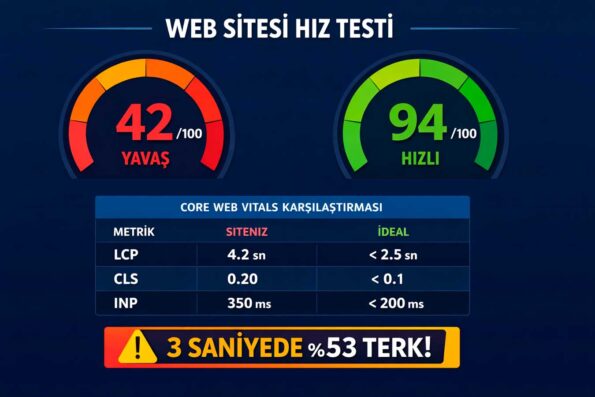
- Lighthouse Mobile check:Look for the “Tap targets are not sized appropriately” warning
- Test CTA buttons on phone:comfortable to click with thumb mu?
- Spacing between menu items: at least 8px between adjacent items
- Footer links: small font + frequent link = touch error — check
⚠️ Critical threshold:A complex mobile menu will drive the visitor away within 10 seconds
⚠️ Critical threshold:Emptyor duplicate title = Google writes its own title = loss of CTR control
- PageSpeed Insights desktop score: If below 90, immediate intervention is necessary
- Also check mobile score: often 20-30 points lower than desktop
- Check LCP value: Below 2.5 seconds “Good”, above 4 seconds “Bad”
- Second measurement with GTmetrix: The waterfall graph answers the question of which resource is slowing down
To wrap up: treat website health check as a system with a rhythm — audit where you stand, write the plan, execute in ninety-day cycles and measure with the same yardstick every month. That quiet discipline, more than any single tactic, is what separates lasting businesses from short-lived attempts. 🚀