

Website maintenance is like your car’s periodic maintenance: when done on time it’s cheap and preventative; when delayed it’s much more expensive and sometimes irrecoverable. Businesses don’t finish the job once they set up a website; the site becomes more outdated every day with security vulnerabilities, outdated content, and slowing performance. This guide explains what neglected sites cost and how to implement regular website maintenance with concrete steps.
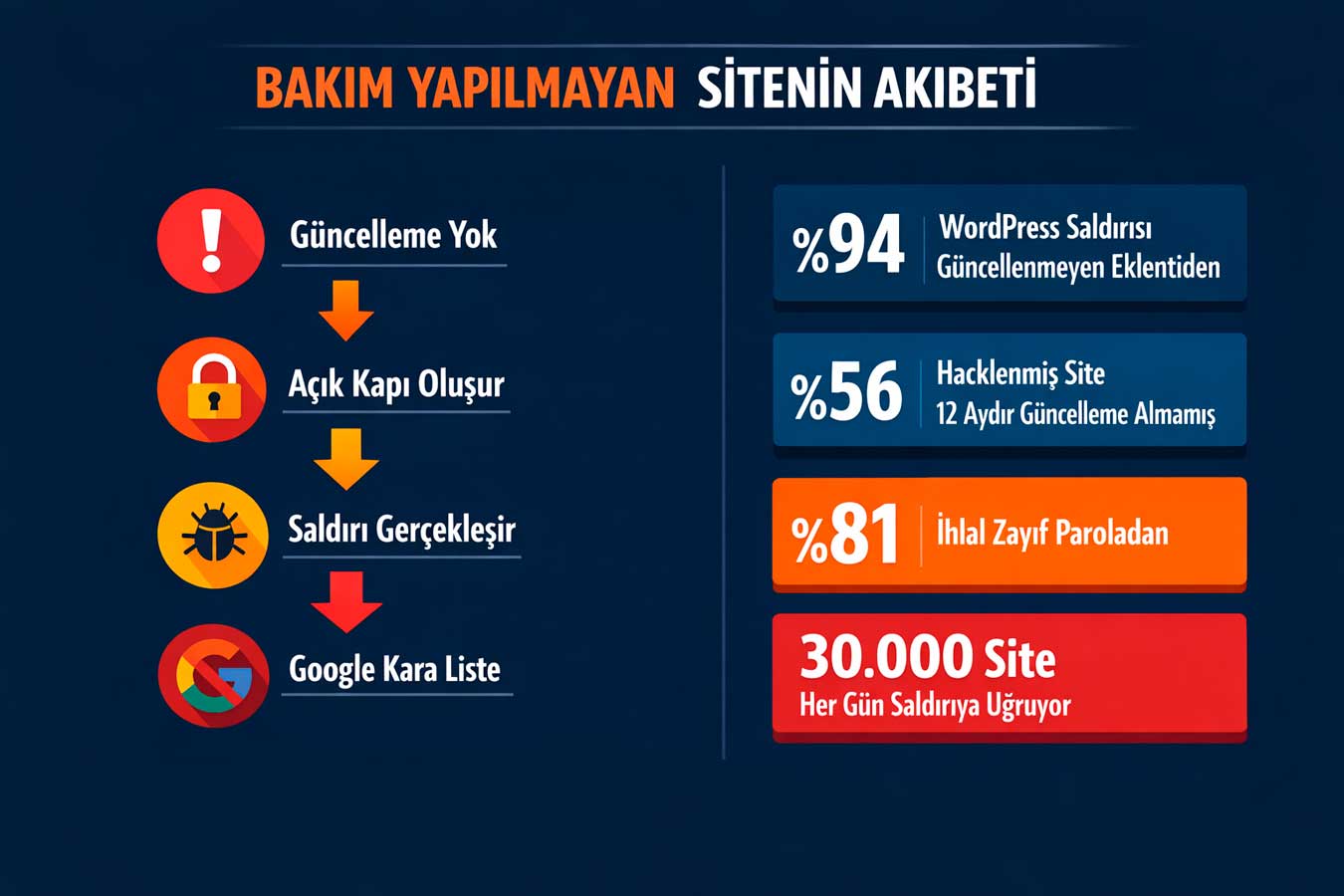
🔧 According to Sucuri’s 2024 report, 56% of hacked websites hadn’t received updates for at least 12 months. The same report shows that neglected sites are noticed on the blacklist on average 6 months later.
Your site may be hacked right now — and you may not know it yet. This is not an exaggeration; it’s a statistic. Every day, 30,000 websites (Forbes, 2024) are attacked, and the vast majority only realize it days or weeks later. The most critical aspect of website maintenance is security updates; because software vulnerabilities are new discovered every day.
🔒 According to 2024 data from WordPress security company Wordfence, 94% of WordPress attacks originate from outdated plugins and themes.
1.1 WordPress Core, Theme and Plugin Updates
How long can you wait for a WordPress update? Security researchers release vulnerabilities after discovering them; malicious actors begin exploiting these vulnerabilities within hours. The critical vulnerability discovered in WooCommerce in 2024 affected more than 100,000 sites within 72 hours before the patch.
Applying a core update within 48 hours of its release is a basic rule. The update is the first item on the maintenance schedule that cannot be postponed.⚠️ Critical threshold:Unupdated plugin = open door; 94% of WordPress attacks originate from here
- Weekly update scan: Dashboard → Updates — apply immediately if there is a red warning
- Test environment: Test major updates in staging first — protect the live site
- Delete unused plugins: Disabling is not enough; remove
- Automatic update: automatically updates minor security patches; manually updates major versions
1.2 SSL Certificate Renewal and HTTPS Check
When your SSL certificate expires, the browser gives a “Not Secure” warning. 85% of visitors (GlobalSign, 2024) leave the site immediately when they see this warning. Moreover, Let’s Encrypt certificates are renewed every 90 days; sites that leave them unattended fall into the “Not Secure” status without realizing it. Mixed Content errors are caused by loading HTTP resources even though SSL is installed. SSL check is a basic check that should be done monthly during website maintenance.
- SSL expiration date tracking: SSL Labs or hosting panel — set up a 30-day warning
- Automatic renewal: Cron job or hosting auto-renewal must be active for Let’s Encrypt
- Mixed Content scan: Chrome DevTools Console — Clean if no HTTP warning
- HSTS enable: Redirect HTTP to HTTPS permanently
1.3 Malware Scan
How do you know if your site has malicious code without knowing it? Most businesses don’t realize anything until Google gives a “This site contains malware” warning. At that point, organic traffic is zeroed, email IPs are blacklisted, and customer trust is damaged. Monthly scans with Sucuri SiteCheck or Wordfence prevent this scenario before it even starts. Regular malware scanning as part of website maintenance should be considered like insurance.
- Sucuri SiteCheck: Free — Enter URL, blacklist and malware check in 30 seconds
- Wordfence scan: For WordPress — File integrity + malicious code detection
- Google Search Console: “Security issues” report — Threats Google sees lists
- Server logs: detects abnormal traffic and suspicious request patterns
1.4 Strong Passwords and Two-Factor Authentication
“admin” username and “123456” password are still among the most commonly used login credentials. According to Verizon’s 2024 Data Breach Report, 81% of all security breaches are caused by weak or stolen passwords. Two-factor authentication (2FA) reduces this risk by 99.9% (Microsoft, 2024). Changing the admin panel URL directly prevents brute force attacks. These measures represent the lowest cost and most effective security layer. Password and 2FA checks in website maintenance routines are steps completed in minutes but provide protection for years.
- Password manager: Unique strong password for each account — 16+ characters, must include symbols
- 2FA activation: Google Authenticator or email verification — free, critical
- Admin URL change: Custom URL instead of wp-admin — reduces bot attacks by 95%
- Login attempt limit: IP block after 5 failed attempts — brute force prevention
👉 For security audit → Corporate Web Design Service
2. Content Freshness: Google Loves Up-to-Date Sites 📝
When did you last publish a blog post? When did you last update your service page? Google’s algorithm considers content freshness as a ranking factor. A site that remains inactive with the same content for 2 years loses a little more place in organic rankings every month to its competitor. Website maintenance requires constant attention not only to technical aspects but also to content dimensions.
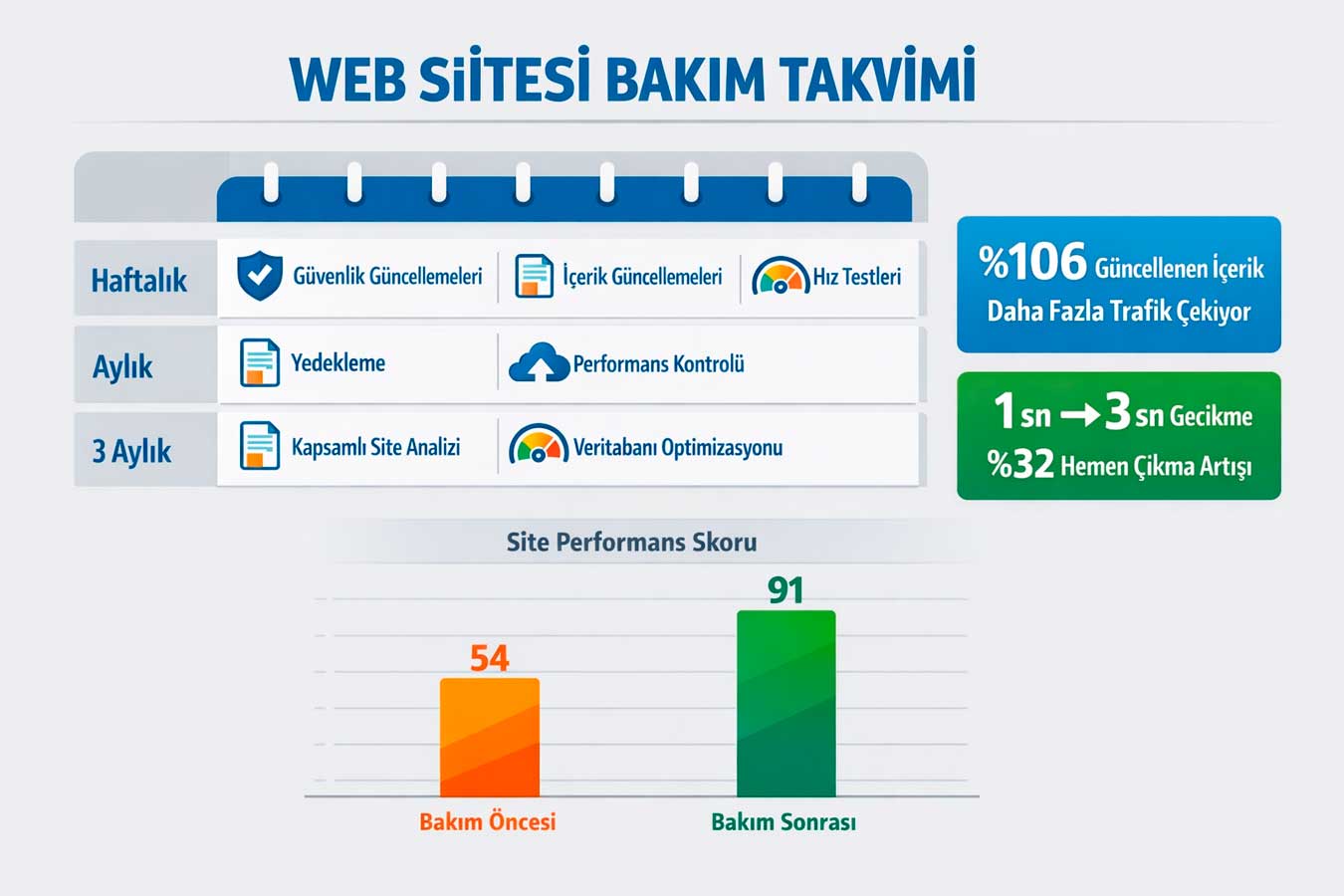
📝 According to HubSpot’s 2024 blog research, sites that update old content receive 106% more organic traffic. Google uses the last updated date for both quality signals and search relevance. Especially for years like “2024” or “2025”.In queries containing the phrase, “old content is rapidly becoming outdated,” a planned website maintenance schedule automatically turns content freshness into a discipline.
2.1 Updating Old Blog Posts
Is your “SEO guide” written in 2022 still valid? Algorithm changes, new tools, and statistics are making content quickly outdated. According to Ahrefs’ 2024 analysis, 60% of the most trafficked pages consist of content older than 3 years; but these are regularly updated versions. Updating existing content instead of writing new content from scratch yields much faster SEO results. Comprehensive content auditing is the maintenance activity that provides the highest SEO ROI. Updating content in the website maintenance calendar is the step that generates the most traffic with the least effort.
- Pages losing traffic:Search Console → Performance → Compare to 6 months ago
- Statistics update:Refresh figures from current sources instead of old year data
- Title and meta update:Add current year to H1 and meta description
- Internal linking: Link from old posts to new posts — link value is transferred
2.2 Keeping Service and Product Pages Up-to-date
Is the address of a closed branch still on the site? Has a changed service price not been updated? If a customer comes with incorrect information and experiences disappointment, trust is broken and they never return. Service prices, working hours, team roster, address information — these must be real-time accurate for both customer experience and legal compliance. A regular website maintenance routine ensures that this information is always up-to-date.
- Monthly content check: price, address, contact, team information — checked in list form
- Seasonal update: campaigns, working hour changes — planned in advance
- Photo renewal: replace old team photos with current visuals — increases trust
- Source scan: broken links and outdated external sources — detected by Screaming Frog
2.3 Blog Calendar and Regular Publishing
What does irregular content publishing tell Google? “This site is inactive.” According to Google Search Central’s documentation, regular content publishing is a signal that increases site authority. 2–4 blog posts per month means 24–48 newly indexed pages per year; This significantly increases organic traffic accumulation. Creating and adhering to a writing schedule is the most sustainable strategy in terms of content freshness. As part of website maintenance, a blog calendar makes organic growth systematic and measurable.
- Publication schedule: At least 2 posts per month — track with Trello or Notion
- Keyword planning: Set target keywords for each post — data-driven, not intuitive
- Evergreen content: Timeless guide articles — attract traffic for years
- Content transformation: Support the blog post with an infographic or video
2.4 Updating Images and Media
Are the images on your site from 2018? Stock photos, outdated design images, and low-resolution logos subtly convey the message to visitors that “this company is old.” According to Google PageSpeed Insights’ 2024 report, images affect 53% of page load time. Unoptimized images harm both user experience and SEO. Update images regularly.Adding and optimizing is a visible but often overlooked critical part of website maintenance.
- WebP conversion: all images WebP — 30% smaller on average, speed increased
- Alt text update: meaningful alt text for images — both SEO and accessibility
- Deleting unused media: clean the media library — frees up server space
- Original photo: Real team/product photo instead of stock image — increases trust
👉 For content strategy → Professional Web Design Service
3. Performance Tracking: You Can’t Optimize Without Measuring 📊
Your site’s speed score was 87 last month, it’s 54 this month. Did you know that? Most businesses don’t know that. A slowing site loses visitors and conversions every day; but it remains invisible without being measured. According to Google’s 2024 benchmark report, when page load time increases from 1 to 3 seconds, the bounce rate increases by 32%. Performance tracking within website maintenance detects this loss in real time.
📊 According to Portent’s 2024 conversion research, a page that loads in 1 second generates 3 times more conversions than one that loads in 5 seconds. When the PageSpeed score drops below 90, Google directly affects the ranking. Monthly performance measurement is the most profitable routine in the technical aspect of website maintenance.
3.1 Page Speed Monitoring and Core Web Vitals
The PageSpeed score was 92 yesterday, 58 today. What changed? A newly added heavy image, a loaded third-party script, or CSS bloat from an update — all of these are quietly lowering the score. The Core Web Vitals report in Google Search Console shows real user data on a page-by-page basis. When LCP, CLS, and INP values turn red, organic traffic starts to drop on every page. Monthly website maintenance routines and speed checks ensure these losses are detected before they escalate.
- PageSpeed Insights: monthly — measure desktop and mobile scores separately, aim for 90+
- Search Console CWV: prioritize red URL fix — direct ranking impact
- GTmetrix waterfall analysis: which resource is slowing you down — visual, script or server
- Uptime monitoring: UptimeRobot (free) — instant SMS/email when the site crashes
3.2 Google Analytics and Traffic Analysis
Your organic traffic dropped by 30% this month compared to last month. Can you see this? Google Analytics 4 shows which pages are losing traffic and which channels are declining, page by page. Traffic drops are often a sign of a technical problem, an algorithm update, or a competitor’s rise. Early detection = early intervention = less loss. A regular GA4 report is the essential tool for a maintenance schedule to avoid flying without a compass. GA4 analysis during website maintenance shows you what to fix and why.
- Weekly traffic summary: GA4 → Reports → Overview — trends and anomaliesli detection
- Page-based analysis: pages losing the most traffic — content update priority
- Conversion tracking: form submission, clicks, appointments — which page converts?
- Competitor comparison: Monthly competitive analysis with SimilarWeb or SEMrush
3.3 404 Error and Broken Link Check
The visitor clicks, sees “404 Page Not Found,” and leaves. Every 404 error negatively impacts both user experience and Google ranking. Especially if backlinks from external sites point to the deleted page, valuable link juice is wasted. The 404 report in Search Console lists which URLs are broken; redirecting them saves both traffic and ranking. Website maintenance calendar 404 checks are silently restoring the value of lost links.
- Search Console 404 report: monthly — fix broken URLs with 301 redirects
- Screaming Frog scan: scan all internal links — broken links should be reduced to zero
- External link check: Ahrefs Webmaster Tools — is the backlink target healthy?
- Custom 404 page: Elegant error page that redirects the user — reduces abandonment rate
3.4 Mobile Compatibility and Screen Test
Your site looks perfect on desktop; but on mobile, a button is in the wrong place, a form is moving. In Türkiye, 72% of web traffic is mobile; Google evaluates the site first from a mobile perspective with mobile-first indexing. Mobile compatibility testing after every major update catches invisible breaks early. Google’s Mobile-Friendly test and Chrome DevTools list mobile issues in minutes.
- Google Mobile-Friendly test: free — should be tested after every homepage update
- Chrome DevTools: iPhone 14, Galaxy S23 simulation — different screen sizes
- Touch targets: 44×44px and below button = accidental clicks = low conversion
- Speed × Mobile combination: PageSpeed Insights mobile tab — most neglected test
👉 For performance audit → Website Design Prices
4. The Importance of Backup: Before You Lose Everything 💾
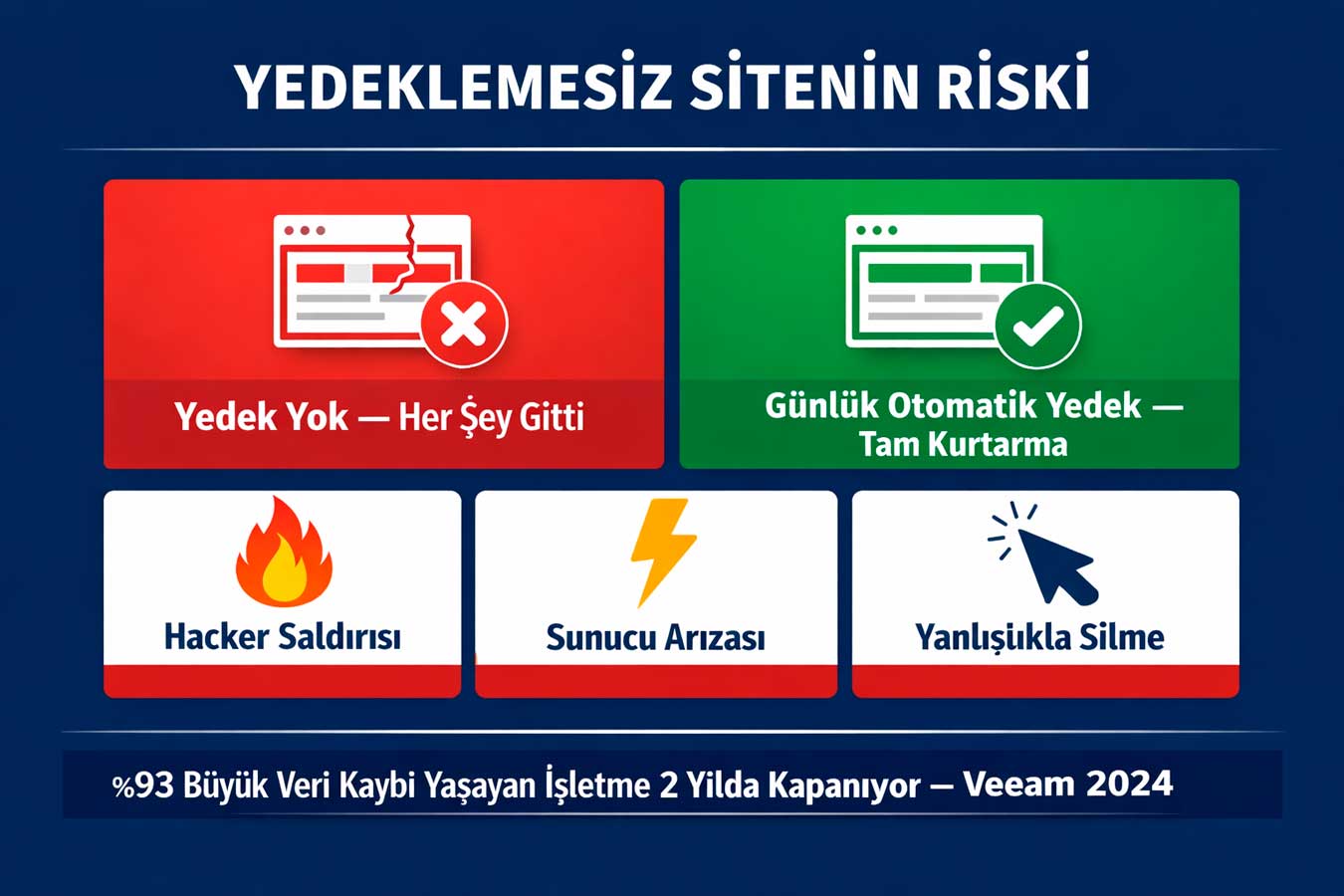
Your site was completely deleted today. Do you have a backup? This question isn’t theoretical; every year thousands of businesses lose their sites due to hosting errors, hacker attacks, or accidental deletions. Thinking you have a “backup” without regular website maintenance is very different from actually having a backup. A backup is done once; Backup management, however, requires constant discipline.
💾 According to Veeam’s 2024 data loss report, 93% of businesses cease operations within 2 years after experiencing one major data loss. For a website, this risk is tangible: hacking, server failure, incorrect plugin update — all can wipe out the entire site. Daily automatic backups turn this disaster into a recoverable event. BackupIt’s just like an insurance policy: you hope you won’t need it, but you can’t do without it.
4.1 Automatic Daily Backup Setup
Is taking manual backups safe? No. People forget, postpone, or give up on doing it. Automatic daily backups set up via UpdraftPlus, BackupBuddy, or your hosting panel work with zero human intervention. The important thing is where the backup is stored: a backup kept on the same server is useless in case of server failure. External storage such as Google Drive, Amazon S3, or Dropbox is required.
- UpdraftPlus (free): daily backup + Google Drive/Dropbox integration
- Hosting panel backup: cPanel or Plesk — parallel backup for added assurance
- Backup retention period: at least 30 days of history — rollback flexibility
- Backup size tracking: Large backups fill up storage — regular cleanup
4.2 Backup Restore Test
You have a backup; but have you tested it? Taking a backup and keeping a backup working are different things. A corrupted backup file is worse than not taking a backup — you are vulnerable while you think you are safe in a real disaster. Performing a backup restore in a test environment every 3 months turns the real crisis into a practice run. This test is the least performed but most critical routine of website maintenance.
- Quarterly restore test: Full restore in staging environment — does it work?
- Integrity check: Are the backup file password and size correct?
- Partial restore: Ability to restore a single file or database
- Disaster recovery plan: Who does what is written — valuable in case of panic
4.3 Database Optimization and Cleaning
The WordPress database swells over time: drafts of deleted posts, spam comments, old revision history, unused metadata. This swells both the backup size and slows down the site. Monthly database cleaning with WP-Optimize or Adminer provides an average size reduction of 20-40%. Clean database = fast query = fast site. In website maintenance database cleanup is a critical step that silently makes an impact in the background.
- WP-Optimize: revision, spam comments, temporary data — one-click cleanup
- Automatic revision limit: Limit the number of revisions in wp-config.php to 3–5
- Table repair: phpMyAdmin → “Optimize” — fixes corrupted table issues
- Post-backup cleanup: Take a backup before cleaning — then clean safely
4.4 Hosting and Domain Renewal Tracking
Your domain has expired and you are not aware of it. This scenario happens to thousands of businesses every year. A site with an expired domain becomes inaccessible within 24-48 hours; after the renewal period, the same domain can be purchased by someone else. Setting up automatic notifications before your hosting package expires and before SSL and domain renewal zeroes the loss. These details seem small; but they are the most overlooked critical aspect of maintenance.
- Domain renewal alert: Set up email alerts 60 days and 30 days in advance
- Automatic renewal: enabled for domain and hosting — zero risk of downtime
- Registry authority teyidi: Is the registrar information updated via email? This reduces the risk of data loss
- SSL renewal: Cron job for Let’s Encrypt; Calendar reminder for commercial SSL
👉 For backup infrastructure → Web Design Institution — Contact
📊 Website Maintenance: Monthly Checklist
Four main headings and periodic checks to be performed:
| Title | Check Frequency | Tools | Priority |
| Security Updates | Weekly | WordPress Dashboard, Wordfence | 🔴 Critical |
| SSL Certificate | Monthly | SSL Labs, Hosting Panel | 🔴 Critical |
| Malware Scan | Monthly | Sucuri SiteCheck, Wordfence | 🔴 Critical |
| Content Update | Monthly | Search Console, GA4 | 🟠 Important |
| Page Speed | Monthly | PageSpeed Insights, GTmetrix | 🔴 Critical |
| 404 Check | Monthly | Search Console, Screaming Frog | 🟠 Important |
| Mobile Test | Every Update | Mobile-Friendly Test | 🔴 Critical |
| Backup Check | Weekly | UpdraftPlus, Hosting Panel | 🔴 Critical |
| Restore Test | Every 3 Months | Staging Environment | 🟠 Important |
| Domain/Hosting | Annual | Registrar, Hosting Panel | 🔴 Critical |
🧠 Summary Box: 5 Critical Takeaways From This Article
5 critical points that should never be skipped:
- Security cannot be delayed:Outdated plugins are the source of 94% of WordPress attacks; Weekly update required
- Content freshness SEO: Updating older posts attracts 106% more organic traffic (HubSpot, 2024)
- You can’t optimize without measuring speed: Monthly PageSpeed and CWV checks catch losses before they grow
- No insurance without backup: Daily automatic backup + 3-month restore test — both mandatory
- Domain loss is irreversible:Automatic domain and hosting renewal + 60-day prior warning saves lives
❓ Frequently Asked Questions
How often should website maintenance be performed?
Security updates should be performed weekly, content audits and performance measurements monthly, and restore tests quarterly. Domain and hosting renewals should be scheduled annually.
Can I perform website maintenance myself?
Basic checks (updates, backups, speed tests) can be performed without requiring technical knowledge.
For malware scanning, server optimization, and comprehensive security audits, professional support is recommended.
How much does website maintenance cost?
The monthly professional maintenance package varies depending on the size of the site.
The cost of a security breach on a poorly maintained site — cleanup, SEO recovery, trust restoration — far exceeds the monthly maintenance fee.
What is the best tool for backing up?
UpdraftPlus (free) is a reliable starting point for WordPress. It’s essential to keep the backup off-site with Google Drive or S3 integration.
You shouldn’t rely solely on the hosting provider’s backup.
Site slowIf it’s a slowdown, what should I do first?
Run PageSpeed Insights, follow the suggestion in the “Opportunities” section. Then isolate the why it’s slowing down by disabling the most recently added plugin or update.
🚀 Result: Your Competitor Doesn’t Progress While Your Website Is Neglected
Website maintenance is not a one-time responsibility, but an ongoing one. From security updates to content freshness, performance monitoring to backup discipline, the four topics covered in this guide encompass the complete cycle that keeps your site healthy and competitive. A neglected site is waiting to be attacked, to fall in Google rankings, and to lose customer trust.
As Web Design Agency, we offer a monthly website maintenance package that includes security audits, speed optimization, content freshness, and backup infrastructure.
Your site is in our hands, always up-to-date, fast and secure.
👉 For maintenance packages → Web Design Institution
📋 About This Content:
This article was prepared by Adapte Digital for business owners, marketing managers and technical staff who have a website and want to protect it.
📹 Video Suggestion:Adapte Dijital · Web and Digital Marketing Agency
🌐 Professional Website:webtasarimkurumu.com.tr 🔗 Related Article:Your Website Health Check: 10 Questions You Should Ask