
Boutique website: the 9 pages a vintage or antique shop needs, with a checklist
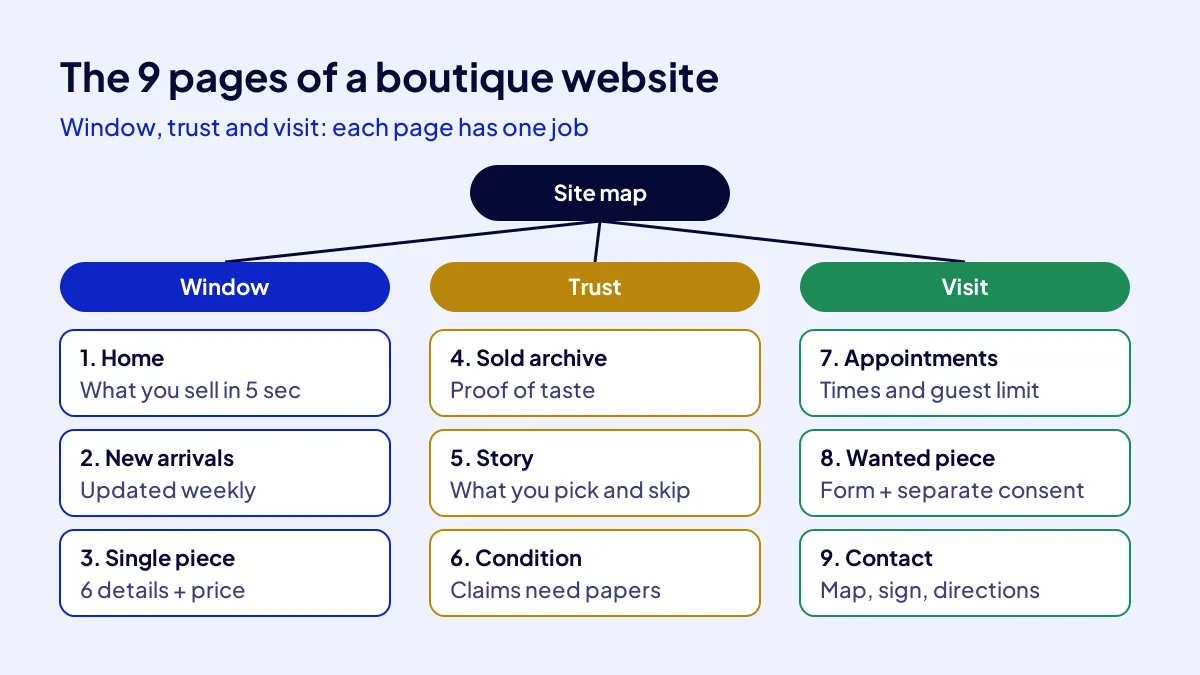
A boutique website for a niche, vintage or antique shop is built on nine pages: home, new arrivals, single-piece page, sold archive, story, condition and authenticity, appointments, a wanted-piece form and contact. The first three are the shop window, the middle three build trust, and the last three bring the customer to the door.
The site has one more special job: a shop that sells one-off pieces must be able to tell Google that a piece has sold. Google recognises ready-made values for this. Below, each page comes with prep time and what you need.
Which 9 pages should a boutique website have?
The nine pages fall into three groups: window, trust and visit. Each page has one job. Times are rough estimates for an owner who already has photos and text; gathering material, not building, eats the time.
| Page | What it does | Prep time | What you need |
|---|---|---|---|
| 1. Home | Says what you sell in 5 seconds | Half a day | One-line description, 3 photos, hours and address |
| 2. New arrivals | Gives a reason to come back | 1 hour a week | Weekly piece photos |
| 3. Single-piece page | The decision page | 15 minutes per piece | 6 details: period, size, material, condition, origin, price |
| 4. Sold archive | Proves the shop’s taste | 15 minutes a week | Photos of sold pieces |
| 5. Story | Says what you choose and reject | 1 day | Your photo, selection criteria |
| 6. Condition and authenticity | Ties claims to documents | Half a day | Documents, restoration notes |
| 7. Appointments and viewings | Invites a private visit | 2 hours | Calendar, guest limit |
| 8. Wanted piece | Puts collectors on the list | 2 hours | Form, consent box, privacy notice |
| 9. Contact and location | Brings people to the door | 1 hour | Map, photo of the sign, directions |
How do you prepare the window pages?
BU BÖLÜMÜN ÖZETİ
- Step 1: Home page (half a day)
- Step 2: New arrivals (1 hour a week)
- Step 3: Single-piece page (15 minutes per piece)
Window pages answer “what is here, what is new, what is this piece”. Home describes, new arrivals bring people back, the piece page carries the decision.
Step 1: Home page (half a day)
Put a one-line description, three photos, opening hours and address on the first screen. A clear line such as “1960s to 1980s Scandinavian furniture and objects in Beşiktaş” beats “unique pieces”.
Step 2: New arrivals (1 hour a week)
Update on the same day every week. Collectors learn the day. Instagram is the window, the site is where people decide; the difference is in is Instagram enough for a boutique.
Step 3: Single-piece page (15 minutes per piece)
Give every piece its own page with period, size, material, condition, origin and price written out. Add photos from at least three angles plus a close-up of any flaw. People trust a shop that shows the flaw.
How do you describe a single piece to Google?
BU BÖLÜMÜN ÖZETİ
- UsedCondition: the right way to say “pre-owned”
- SoldOut: do not delete the sold piece
- InStoreOnly: in the shop only
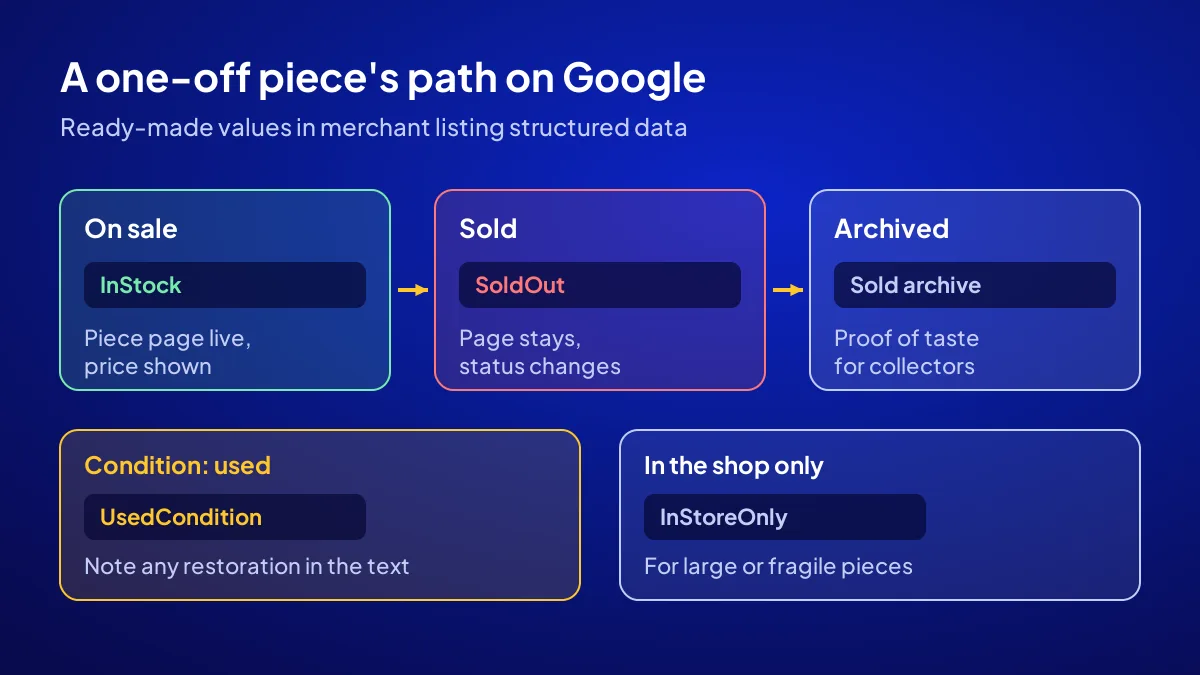
Google recognises merchant listing structured data for pages where products are sold. In this data, a product’s condition and availability are written with ready-made values. Three are useful for a one-off shop: UsedCondition for a used item, SoldOut for a sold piece and InStoreOnly for a piece sold only in the shop.
UsedCondition: the right way to say “pre-owned”
The condition values Google lists separate new, refurbished and used products. For vintage and antique pieces the right value is used. If a piece has been restored, say so separately in the description.
SoldOut: do not delete the sold piece
When a piece sells, change its availability to sold out and move the page to the sold archive instead of removing it. The page keeps showing what the shop chooses.
InStoreOnly: in the shop only
This value suits large or fragile pieces you do not sell online and that should not be bought unseen.
Common mistake: Deleting the page of a sold piece. Links break and the proof of your taste disappears. Change the status instead.
How do you write the trust pages?
BU BÖLÜMÜN ÖZETİ
- Step 4: Sold archive (15 minutes a week)
- Step 5: Story (1 day)
- Step 6: Condition and authenticity (half a day)
Trust pages answer “does this shop know its business?”. The sold archive shows taste, the story page shows selection criteria, and the condition and authenticity page shows documents. Keep sales language out, even when the till is quiet.
Step 4: Sold archive (15 minutes a week)
Keep sold pieces without prices or with a “sold” label. Collectors browse it and join the wanted list.
Step 5: Story (1 day)
Write which periods and origins you choose and what you never buy. Put your photo here. Selective customers trust the owner before the shop.
Step 6: Condition and authenticity (half a day)
Explain how you grade condition, restore and document. Trading antiques and items that may count as cultural property may require a permit under Turkey’s Law No. 2863; ask your museum directorate or the Ministry of Culture and Tourism about the current requirement.
How do you set up the visit pages?
BU BÖLÜMÜN ÖZETİ
- Step 7: Appointments and private viewings (2 hours)
- Step 8: Wanted-piece form (2 hours)
- Step 9: Contact and location (1 hour)
Visit pages move the customer from the screen to the door: appointments, collectors’ requests and the route. For a side-street shop in Sarıyer or Mavişehir, they solve half of the “nobody walks in” problem.
Step 7: Appointments and private viewings (2 hours)
List available times and how many people you receive at once. Announce private viewing days on the same page.
Step 8: Wanted-piece form (2 hours)
Name, piece wanted, period and contact channel are enough. Add a privacy notice for personal data and a separate consent box for commercial messages; do not merge the two into one box.
Step 9: Contact and location (1 hour)
Map, a photo of the sign, the nearest stop and a parking note. Address, hours and phone must match your Google profile letter for letter; the profile fields are covered in boutique Google Business Profile.
Who builds the site, and how long does it take?
Most of the work is material: photos, text, documents. If you also sell online, distance-selling and returns information needs its own page; check current requirements in Ministry of Trade regulations. For the own site or marketplace question, see own site or marketplace.
Having it built as a package
The Start a Business Online campaign builds a site with 6 main and 12 sub-pages, the domain and 1 year of hosting, structured data, Google Business Profile, WhatsApp Business and 108 articles across 6 keyword groups. The domain is registered in your name; second-year hosting renewal is yours.
Price and places
TRY 36,000 + VAT, paid upfront at a fixed price; with 20 percent VAT that is TRY 43,200, so check the current rate on the invoice. There is a 10 percent coupon; mention the code when you apply. Places are limited to 12 businesses, the last application day is 1 November 2026, and the delivery schedule is given in writing. Details are on the campaign page.
Which 9 items do you check before going live?
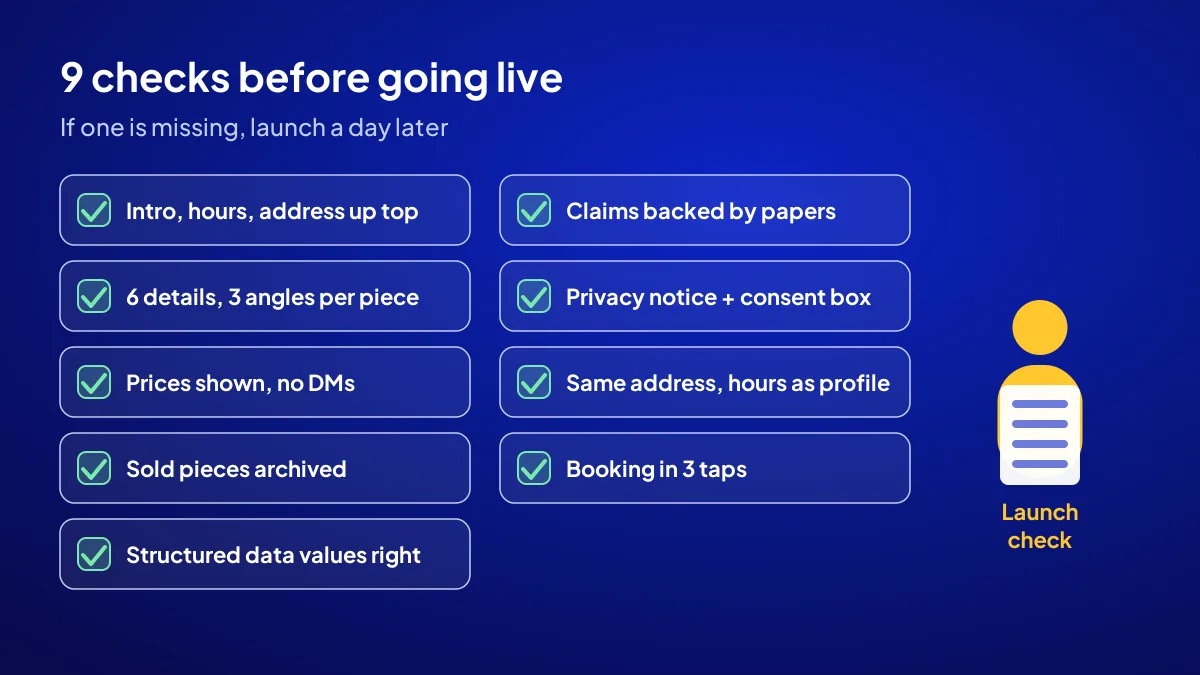
Tick off the nine items below before launch. If even one is missing, delay by a day; a broken page costs more than an unpublished one. Where the site sits in the first three months is in the first 90 days plan.
- Home page shows the one-line description, hours and address on the first screen.
- Every piece page has the 6 details and photos from at least 3 angles.
- Prices are written; no “message us for price”.
- Sold pieces are not deleted but archived as “sold”.
- Condition and availability values in structured data are correct.
- “Original” and “period piece” claims are backed by documents.
- The form has a privacy notice and a separate commercial message consent box.
- Address, hours and phone match the Google profile.
- On a phone, booking is reachable in three taps.
Quick Summary
- A boutique site has 9 pages: 3 window, 3 trust, 3 visit.
- Every piece shows period, size, material, condition, origin and price.
- Structured data uses UsedCondition, SoldOut and InStoreOnly values.
- Sold pieces are archived, not deleted.
- Forms carry a privacy notice and a separate consent box.
- Check the current permit requirement for antique trading and claims.
Short Glossary
Structured data: Structured data is the code used to tell Google a product’s condition, price and availability in a machine-readable way.
SoldOut: SoldOut is the availability value used to show that a product is no longer in stock while its page stays live.
Privacy notice: A privacy notice is the text used to tell people why and how the personal data collected in a form is processed.
Next Step
To have the nine pages built with a domain, structured data and a Google profile, apply for the Start a Business Online campaign. After you apply, a name and plan proposal follows.
Frequently Asked Questions
Source: Google Search Central — Merchant listing (Product, Offer) structured data
Sık Sorulan Sorular
A one-page site goes silent on half of a selective customer’s questions; a fifty-page catalogue cannot stay current when stock changes weekly. Where the site fits in the overall plan is covered in the new boutique promotion guide.
Nine pages are enough for a niche boutique, vintage or antique shop: home, new arrivals, single-piece page, sold archive, story, condition and authenticity, appointments, a wanted-piece form and contact.
No. Change its availability to sold out and move it to the sold archive. Google’s merchant listing structured data has a SoldOut value for this.
The domain is registered in the customer’s name. The package includes the domain and 1 year of hosting; second-year hosting renewal is the customer’s. The price is TRY 36,000 + VAT, fixed and paid upfront.
Updated: October 2026