
How to add an opening date on Google: 6 steps to appear as opening soon
To add an opening date on Google, open your Google Business Profile, tap “Edit profile”, find the “Opening date” row, press Edit, enter the year and month, and save. You can set a date up to 1 year ahead. Once the profile is verified, it becomes visible to everyone on Google 90 days before your opening day.
So even while the shutters are still down and the renovation is going on, your place exists on the map. After opening, the profile carries a “Recently opened” tag for 90 days. Those two 90-day windows are the scaffolding for a new business’s first six months. Below are the six steps, each with the time, cost and paperwork it takes.
What should you have ready before entering an opening date?
You need three things: the name that will be on your sign, the real address, and a phone or camera you can complete verification with. The date field is free and takes 5 minutes. But until the profile is verified, no customer can see it. The real work happens before the date, in setting up the profile itself properly.
Step 1: Create the profile (15 minutes, TRY 0)
We will not repeat profile setup from scratch; it is covered step by step in how to set up a Google Business Profile. One thing matters here: write the name on your sign and nothing else. Adding “cheapest” or “best in Beylikdüzü” to the name breaks Google’s rules.
Step 2: Finish verification (can take a few days)
Google decides which verification method fits your business; a video recording is one of them. If you film a shop under renovation, show the sign, the address plate and the interior. The point is to prove the business really exists at that address, and the clearer the footage, the smoother it goes.
Which menu do you use, and in what order?
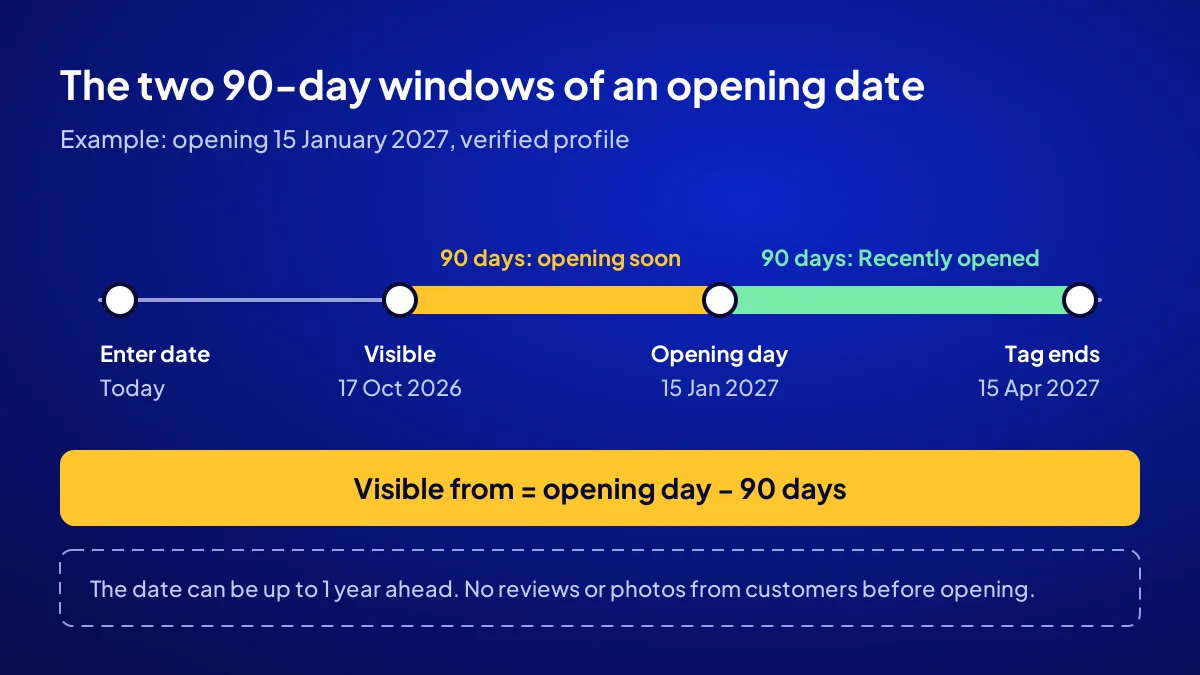
Open your profile from Google Search or the Maps app. Tap “Edit profile”, find the “Opening date” row and tap Edit next to it. Year and month are required; the day is optional. Press Save and you are done.
Step 3: Enter the date (5 minutes)
If you know the day, enter it. When only the month is given, the help page does not say clearly which day Google will use. If the day is still uncertain, enter the month first and add the day once the lease and renovation are settled.
How does the 90-day rule change the date you pick?
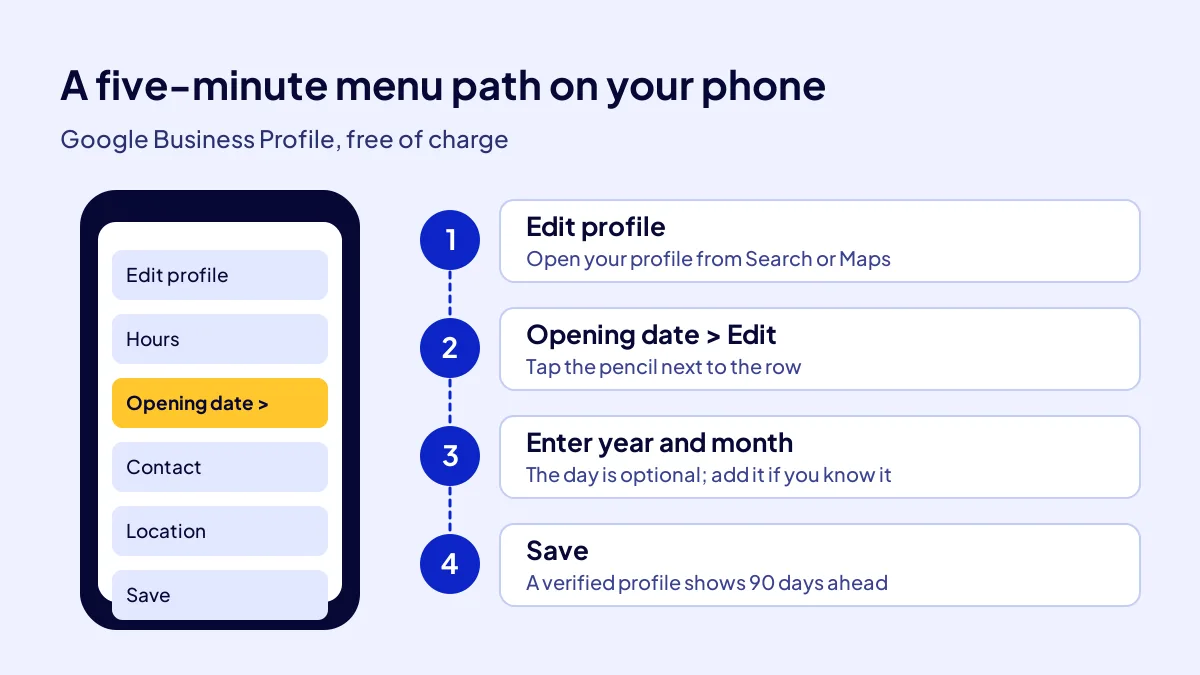
The profile becomes visible 90 days before the opening date. Enter a date 8 months away and the profile shows up not today but 3 months before opening. An early date does no harm, but it does not make you visible earlier. Work backwards: count 90 days back from opening day and put that date in your calendar.
Step 4: Work out your visibility date (2 minutes)
The table below uses three example businesses preparing to open in autumn 2026. Dates follow the 90-day rule; you can find yours the same way.
| Opening date | Profile becomes visible | Last day of the “Recently opened” tag |
|---|---|---|
| 21 October 2026 | As soon as verification is done | 19 January 2027 |
| 15 January 2027 | 17 October 2026 | 15 April 2027 |
| 1 March 2027 | 1 December 2026 | 30 May 2027 |
What can you add in the 90 days before opening?
In the 90 days before opening, Google lets you share posts, add photos and write a business description. Customers cannot leave reviews or photos or suggest edits in this period. The shop window is entirely in your hands.
Step 5: Fill the window (20 minutes a week)
One post a week is enough. Renovation progress, the day the sign goes up, the first product on the shelf. In the description, write plainly what you sell and which district you serve.
The other half of the map
Some customers do not open Google Maps but another map app on their phone. You will find the Yandex and Apple side step by step in how to add a new business to maps.
What changes on the profile on opening day?
On opening day the profile stops being a place that is coming soon and carries a “Recently opened” tag for 90 days. Customers can now add reviews and photos. This is when first reviews are gathered. Hours, phone number and website link should get a final check that morning.
Step 6: Opening-morning check (10 minutes)
Enter your opening hours, ask a friend to call and confirm the phone rings, and tap the website link on the profile to see it load. Once the till starts ringing, there is no time for this.
Common mistake: Entering the opening date and leaving verification half done. The date is saved, but the profile is visible to no one. The owner thinks the business is on the map because they see it when signed in to their own account. Check from another phone that is not signed in.
Does an opening date bring customers on its own?
It does not, but it opens the first door through which customers can find you. When the map listing, website, social account and AI answers work together, a new business becomes visible for good. We cover all four layers, with the first 90 days, in the new business visibility guide.
If you would rather hand over the setup
In Adapte’s Get Visible Online campaign, the Website Recipe sets up a mobile-friendly sales page, contact buttons, a Google Business Profile, basic SEO and visitor tracking together. The fee is TRY 36,000 + VAT, paid upfront at a fixed price, for a 3-month period. With 20 percent VAT that is TRY 43,200; check the current rate on your invoice. Details are on the Get Visible Online campaign page.
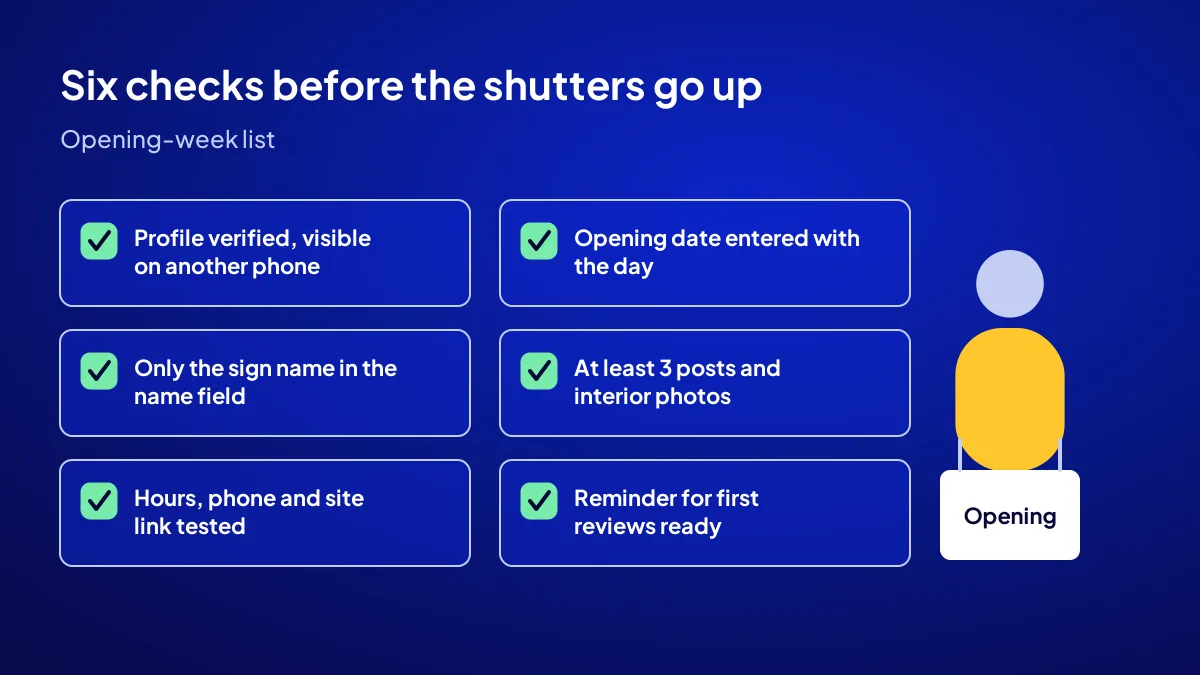
A checklist for one last look before the shutters go up:
- The profile is verified and visible on a phone that is not signed in.
- The opening date is entered with the day, and the visibility date is in your calendar.
- The name field holds only the name on your sign, no extra words.
- At least 3 posts and interior photos are added before opening.
- Hours, phone and website link are tested on opening morning.
- A reminder for first reviews is ready at the till and on the tables.
Quick Summary
- The opening date is entered under “Opening date” inside “Edit profile”, free of charge.
- Year and month are required, the day is optional; the date can be up to 1 year ahead.
- A verified profile becomes visible 90 days before opening.
- Before opening, customers cannot add reviews or photos; the window is yours.
- After opening, a “Recently opened” tag shows for 90 days.
- Check from another phone that is not signed in.
Short Glossary
Opening date: An opening date is the profile field used to make a business that has not opened yet appear on Google in advance.
Verification: Verification is the step Google uses to confirm that a profile really belongs to the business at that address.
Post: A post is the short content area on a business profile used to share announcements, photos or offers.
Next Step
If you want the profile, website and tracking set up by one team before you open, apply for the Get Visible Online campaign; a recipe is suggested based on your needs form.
Frequently Asked Questions
Source: Google Business Profile Help — Add a business opening date
Sık Sorulan Sorular
You change it from the same menu. A renovation running a month late is very common: the builder promises and does not show up, materials arrive late. What matters is that the date on the map matches reality. A customer who finds a locked door rarely comes back.
It does. The 90-day window only works for a verified profile. If verification is not finished 3 months before opening, the day you become visible is the day verification ends. So start verification the moment the lease is signed.
Being visible and ranking high in searches are not the same thing. We gathered the typical timelines from verification to first search in when a new business shows on Google.
There is an order to how much effort each channel gets in the first month. You will find six channels ranked in where a new business should appear first.
No. Google lets you set the date up to 1 year ahead. Since the profile becomes visible 90 days before opening anyway, an earlier date adds nothing to visibility.
No. Until the official opening, customers cannot add reviews or photos to the profile or suggest edits. Reviews start on opening day.
Yes, in the Website Recipe. It covers a mobile-friendly sales page, contact buttons, a Google Business Profile, basic SEO and visitor tracking. The fee is TRY 36,000 + VAT, upfront at a fixed price, for a 3-month period.
Updated: October 2026