
Choosing a location for a shop: reading district demand in Search Console and GA4
Beylikdüzü and Esenyurt are neighbouring districts in Istanbul. Two shops a few stops apart sell to the same customers, yet on Google they are searched under two different district names: “beylikdüzü kuaför” is one search, “esenyurt kuaför” another. That is why choosing a location for a shop now happens in search as well as on the street. Before signing a lease, you can read which district is looking for you with Search Console, GA4 and Google Business Profile.
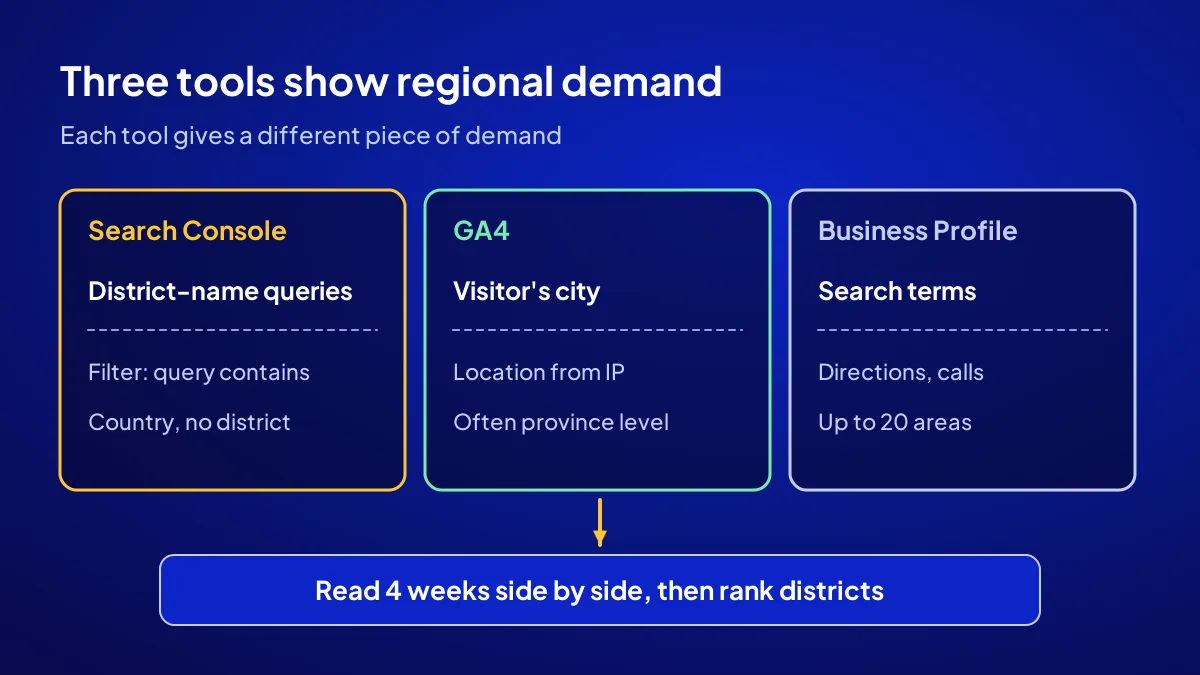
All three tools are free, and each shows a different piece of demand: district names in searches, visitors’ cities and the terms used to find you. Reading them side by side for 4 weeks lowers the risk of pulling up the shutters in the wrong neighbourhood.
Why does location choice now start with a district name?
Because people looking for a nearby business often add a district or neighbourhood name to the search. Queries like “avcılar terzi” (tailor) or “büyükçekmece veteriner” are the clearest trace of how many people want that service in which area. You can read this trace before you read a single shop-to-let ad. The ad tells you the rent; search tells you the demand.
Passing customers and searching customers
A shop window on a main road catches passing customers. Searching customers ask their phone and go to the nearest, most visible business. When choosing a location, weigh the two separately.
A local observation
In Beylikdüzü, the last metrobus stop links the district to the rest of Istanbul. A shop near the stop is visible to everyone riding the line, not only to residents. This does not appear in a rental ad, but it can show up in demand data.
How does Search Console show regional demand?
Search Console does not give a district report. The Performance report groups data by queries, pages, countries, devices, search appearance and dates; there is no city or district dimension. So you read regional demand through a query filter: set “query contains: beylikdüzü” and look at impressions. Repeat the same filter for every district name.
Impressions signal demand, clicks signal interest
An impression tells you your site was listed for that search. A click tells you the searcher chose you. A new site gets few clicks; in the first weeks, impressions are the better demand signal.
Long, intent-rich queries rise fast
In Adapte’s own Search Console data for 14 June to 13 September 2026, the query “diş deposu nasıl açılır” (how to open a dental supply store) shows 219 impressions, an average position of 2.5 and 11 clicks. Over the same period a broad query like “dijital ajans” sits at position 66 on average despite 478 impressions. District-name queries are also long and intent-rich; they are usually the first searches a new site catches.
How does GA4 tell you where visitors come from?
GA4 estimates a visitor’s location from the connection’s IP address and shows it as a city in user reports. In Turkey this city data often stays at province level; it says “Istanbul”, not the district. So GA4 answers “which province and which page” better than “which district”. Leave the district question to Search Console queries.
Read page and city together
Look at which city visitors come from and which page they land on. If an article mentioning “Esenyurt” draws visits from outside Istanbul, the topic interests people but the customer may not be local. Local visits point to the right neighbourhood.
Read the mobile share separately
In the same 3 months of Adapte data, roughly three quarters of clicks come from mobile. Keep the device breakdown open in GA4.
What clue does Business Profile add?
The Google Business Profile performance screen shows the search terms used to find your profile, plus interactions such as directions, calls and website clicks. If you have no shop, you can add up to 20 service areas. According to Google, these areas should not extend beyond roughly 2 hours of driving time from where the business is based.
Search terms reveal local language
Check whether people find you with “near me” or with a neighbourhood name. If a neighbourhood name appears often, that area knows you.
Start the service area narrow
Starting narrow shows more clearly which district is turning. We explain the logic of service areas in what is a service-area business.
How do you read regional demand in 4 weeks?
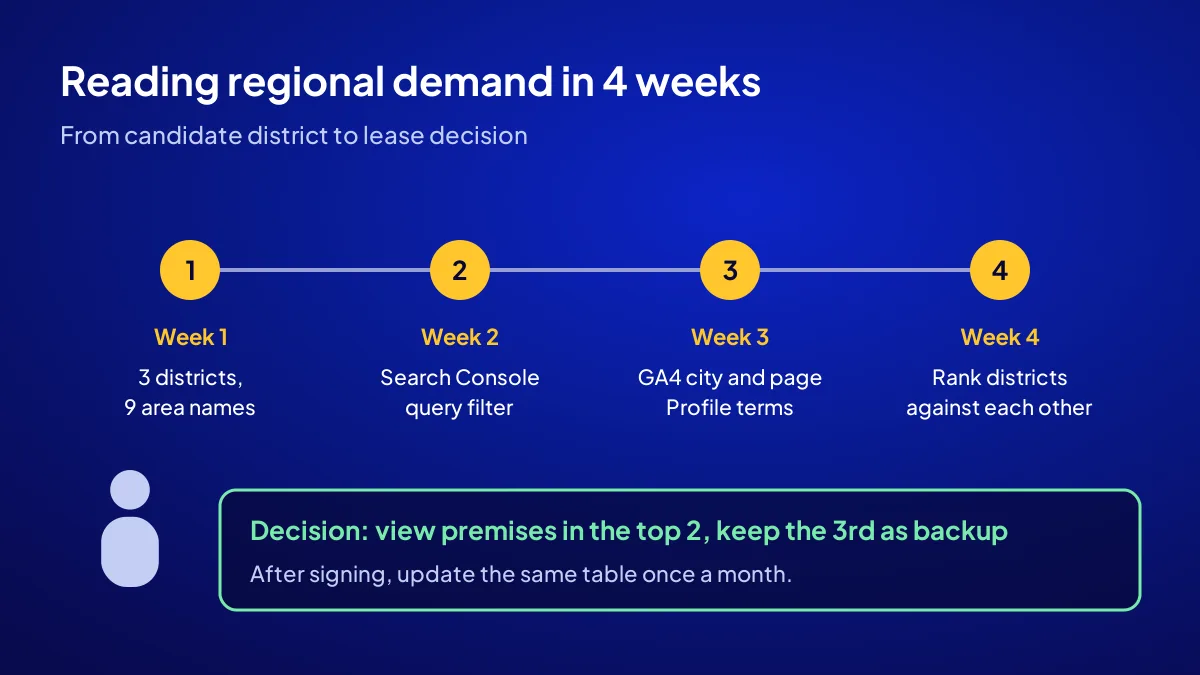
In week one you list candidate districts and the neighbourhood names people would search. In weeks two and three you note impressions for each district name in Search Console, the city and page breakdown in GA4 and the search terms in Business Profile. In week four you rank the districts against each other. Look at the gap between districts, not at absolute numbers.
- Week 1: Write down 3 candidate districts and 3 neighbourhood names for each.
- Week 2: In Search Console, record impressions for each name with a “query contains” filter.
- Week 3: Add the GA4 city and page breakdown and Business Profile search terms.
- Week 4: Rank the districts by impressions, clicks and profile interactions.
- Decision: View premises in the top two districts and keep the third as a backup.
- Check: After signing the lease, update the same table once a month.
How does the demand table become a lease decision?
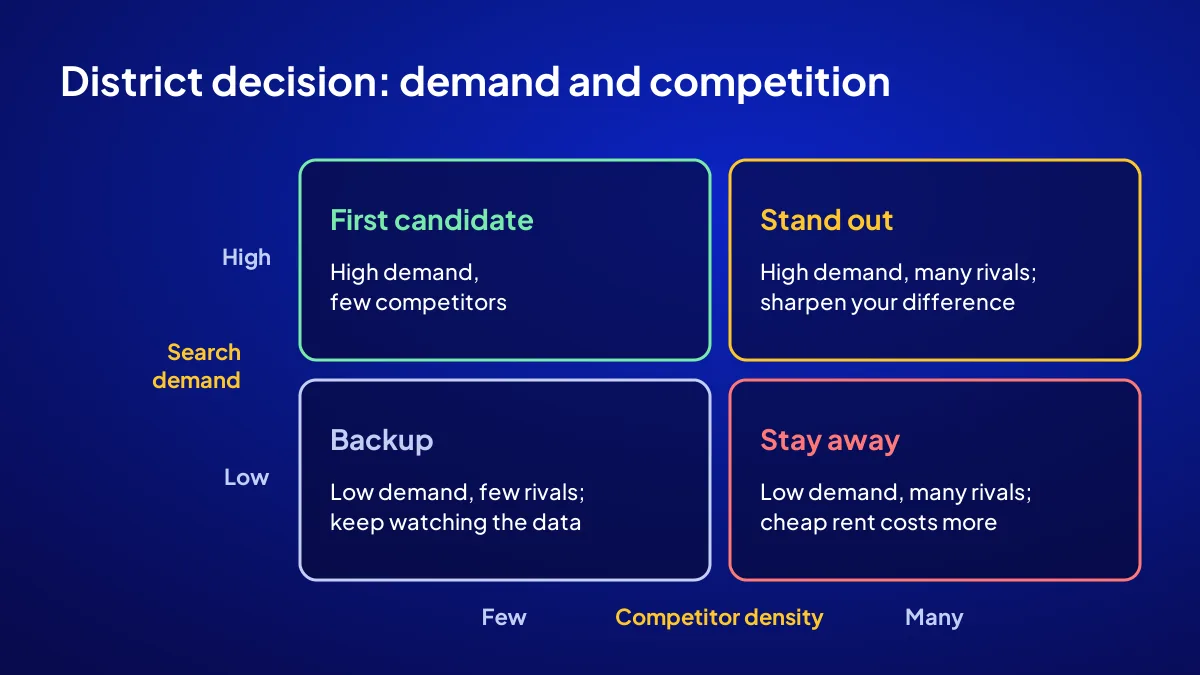
To turn the demand table into a lease decision, place each district on two axes: search demand and competitor density. A district with high demand and few competitors is your first candidate. In a district with high demand and many competitors, you need a reason to stand out. In a low-demand district, however cheap the rent, if customers are not walking in, cheap rent ends up expensive.
Count competitors on the map
Search Google Maps for the same business with the district name and count the results. Old profiles with many reviews are strong competitors.
The cheap-rent trap
Rent is low on a back street because few people walk past. If search demand is high, a back street can work; if it is low, the till will not turn. For the wider steps of getting a site live, see how a website is built.
Which mistakes put your rent in the wrong district?
The three costliest mistakes are looking only at rental ads, creating empty copy pages for each district and deciding on a single week of data. Pages that swap the district name and repeat the same text are treated as doorway pages under Google’s spam policies. The right way is content that carries real information about each area and an honest service area.
Copy district pages
The campaign’s 108 articles are written across 6 keyword groups. If regional demand is to be measured, the district becomes the natural topic of one of those groups; no copy pages are made.
Demand but no customers
If you open in a high-demand district and still wait for customers, the cause lies elsewhere. We cover that in why a new shop gets no customers. Regional and demand measurement comes with the GA4 and Search Console setup in the Start a Business Online campaign; the whole approach is in open online before you open a shop.
Quick Summary
- Search Console has no district report; district demand is read with a query filter.
- GA4 estimates location from IP and in Turkey often stays at province level.
- Business Profile shows search terms; you can add up to 20 service areas.
- Read 4 weeks of data and rank districts against each other.
- Put demand and competitor density side by side on two axes.
- Do not create a copy page per district; it counts as a doorway page.
Short Glossary
Impression: An impression is the Search Console measure used to count each time a page is listed in Google search results.
Query filter: A query filter is the Search Console filter used to isolate searches containing a specific word.
Doorway page: A doorway page is the spam term used for pages made only to rank for slightly different searches without giving the reader new information.
Next Step
If you want to see which district is searching for you before you sign a lease, apply to the Start a Business Online campaign; applications close on 1 November 2026, and your setup schedule is given in writing after the project plan is approved.
Frequently Asked Questions
Source: Search Console Help — Performance report (Search results)
Sık Sorulan Sorular
A new site gets few impressions in its first weeks. Four weeks give you a direction, not a verdict.
Common mistake: Deciding on one week of data. A public holiday, the start of school or a change in weather can inflate that week’s searches; read at least 4 weeks together.
Yes. The fixed price of TRY 36,000 + VAT includes regional and demand measurement with GA4 and Search Console, a Google Business Profile, the website and 108 articles.
No. It has a country dimension but no district dimension. Type the district name into the query filter instead.
In Business Profile you can add up to 20 areas as your service area. Start narrow and widen based on 4 weeks of data.
Updated: October 2026