
How to set up a Google Business Profile and get it verified in 6 steps
Here is the short answer to how to set up a Google Business Profile: go to business.google.com/add, fill in your business details and verify with one of the methods Google offers. Creating a profile is free. If your details are ready, the work on your side takes about 1 hour.
The real wait is verification. Google says the verification review can take up to 5 business days and that postcard codes generally arrive within 14 days. The 6 steps below give the time, cost and requirement for each step. At the end there is a checklist to run before going live.
Is a profile free, and how long does it take?
Yes, it is free; Google charges nothing for it. Your side takes around 1 hour: 30 minutes on the form, 30 on photos and description. Verification sets the overall timeline. Phone or email can move fast; the postcard route can take two weeks.
Where money goes, and where it does not
The profile is free and map rank cannot be bought. Money only buys ad space in search results. Be wary of anyone knocking on the door to open your profile for a fee.
Which 6 details should be on the table first?
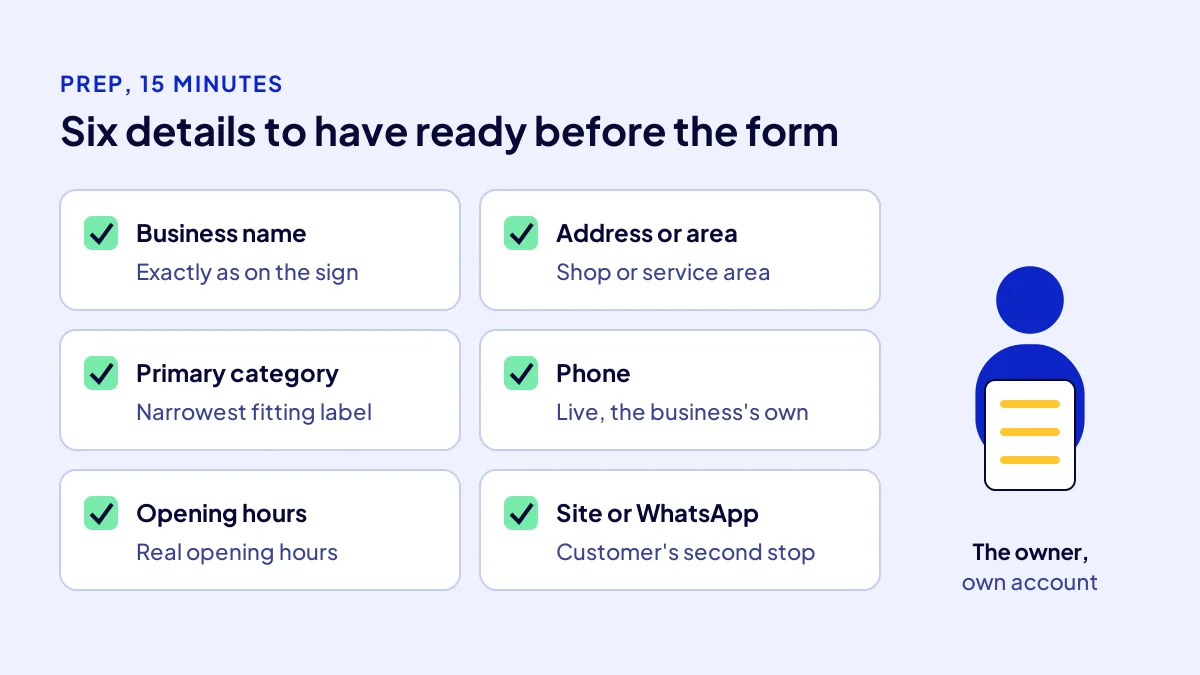
Prepare 6 details in advance so you do not stall halfway. Preparation takes 15 minutes and saves the most time. Write the name and address exactly as they appear on your sign, invoices and site. Later edits can delay verification.
- Business name: as on the sign, without district or slogan.
- Address or service area: an address if customers come to you, districts if you go to them.
- Primary category: the single narrowest label for your work.
- Phone: a live number that belongs to the business.
- Opening hours: the hours you are actually open.
- Website or WhatsApp link: the customer’s second stop.
Common mistake: Adding “cheapest”, a district or a campaign line to the business name. A word that is not on your sign should not be in the name; Google can treat such additions as a guideline breach.
Steps 1–3: how do you create the profile?
BU BÖLÜMÜN ÖZETİ
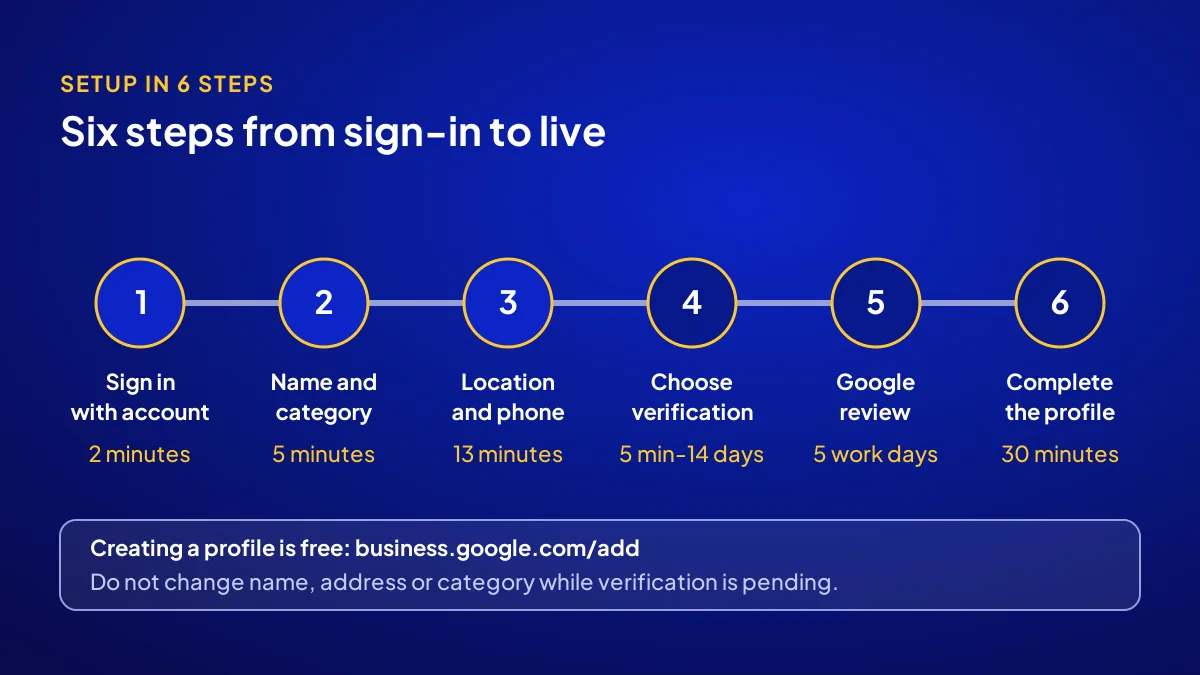
- Step 1: sign in with your account (2 minutes, free)
- Step 2: enter name and primary category (5 minutes)
- Step 3: add location, phone and website (13 minutes)
The first three steps build the profile’s frame and take 20 minutes in total. You need a Google account, a computer or phone and your 6 details. The cost is zero. At this stage the profile is not yet under your control; control comes with verification.
Step 1: sign in with your account (2 minutes, free)
Go to business.google.com/add with the business’s Google account. If your business already appears on Google, the system suggests it; then you request ownership instead of creating a new profile.
Step 2: enter name and primary category (5 minutes)
Write the name as it is on your sign. Start typing your trade in the category box and choose the narrowest suggestion. Add extra categories later.
Step 3: add location, phone and website (13 minutes)
If customers visit, enter the address and set the map pin on your door. If you go to them, hide the address and choose a service area. Then add phone and website.
Steps 4–6: how do you verify and complete it?
BU BÖLÜMÜN ÖZETİ
- Step 4: choose a verification method (5 minutes to 14 days)
- Step 5: wait for the review (up to 5 business days)
- Step 6: complete the profile (30 minutes)
Verification is where Google makes sure the business really is yours. Google decides which methods to offer and shows the ones available to you on screen. Your job is to pick one and provide the proof. After that, you complete the profile.
Step 4: choose a verification method (5 minutes to 14 days)
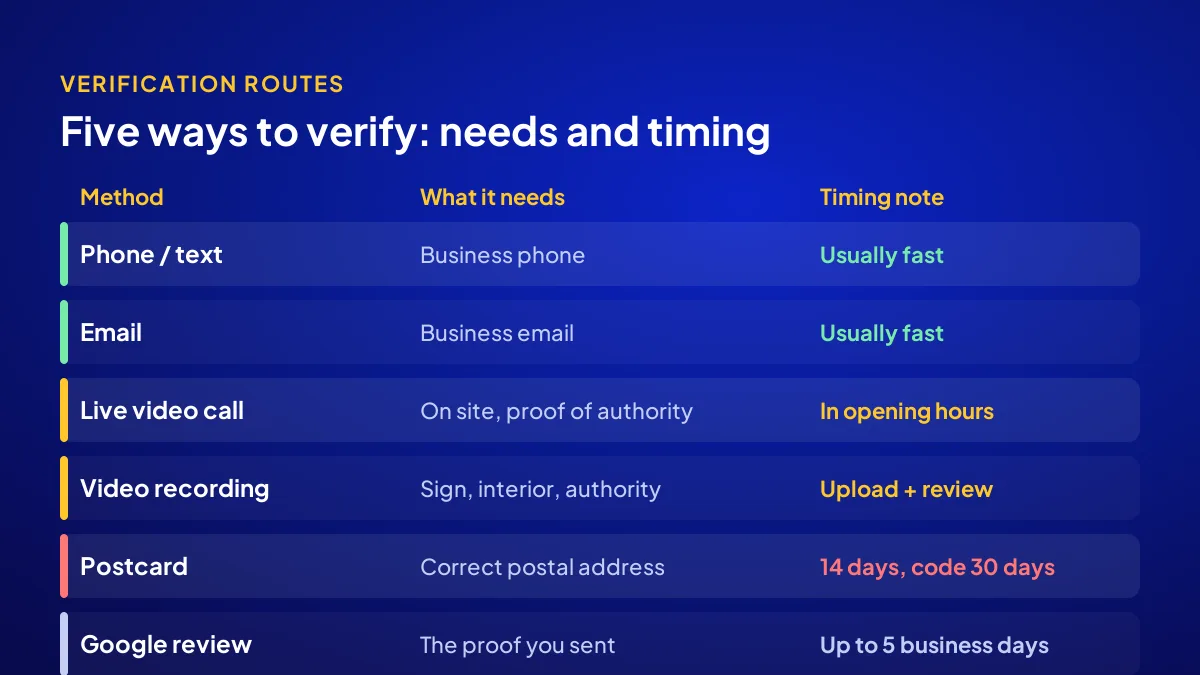
Google’s help page lists phone or text, email, live video call, video recording and postcard. Choose the fastest one available. The table below compares them.
Step 5: wait for the review (up to 5 business days)
Once you send the proof, Google reviews the details, which can take up to 5 business days. A confirmation email arrives when verification is complete. Do not change name, address or category while you wait.
Step 6: complete the profile (30 minutes)
Add opening hours, at least 3 photos, a service list and a 2–3 sentence description. Photos should show the shopfront, the interior and the work. Reviews start here; we explain how they shape choice in why Google reviews matter.
Which verification method takes how long?
Speed depends on how quickly you can provide proof. Phone and email codes usually arrive fast. Video methods need you on site. The postcard is slowest and its code is valid for 30 days; the table draws on Google’s help page.
| Method | What it needs | Timing note |
|---|---|---|
| Phone or text | Access to the business phone | Code usually arrives fast |
| Access to the business email | Code usually arrives fast | |
| Live video call | Being on site, proof of authority | Only during listed opening hours |
| Video recording | Sign, interior and proof of authority | Review follows the upload |
| Postcard | A correct postal address | Generally 14 days; code valid 30 days |
| Google review | The proof you sent | Can take up to 5 business days |
What if verification gets stuck?
BU BÖLÜMÜN ÖZETİ
- If the postcard does not arrive
- If the video is rejected
- If someone else holds the profile
Most snags come from three places: the code never arrives, the video is rejected or someone else holds the profile. All three can be fixed, and none costs money. They do need patience. Opening a new profile in a panic doubles the problem.
If the postcard does not arrive
Wait the 14 days, then request a new code. Do not change name, address or category meanwhile; Google says the code will not work after such edits.
If the video is rejected
In a new recording, show the sign, the interior and the till or a business document in one take. It must prove the business is there and that you manage it.
If someone else holds the profile
A former employee or agency may have opened it. Request access from the same address; Google notifies the current owner. A new profile only creates a duplicate.
A 6-point checklist before going live
Run this list once after verification; it takes 10 minutes. Mark each point yes or no. Every no is a reason you fall behind on the map. How a profile rises in local results is covered in showing up in near me searches.
- Is the name identical to your sign?
- Is the map pin on the right door?
- Is there one narrow primary category?
- Is the phone live and the business’s own?
- Are the opening hours real?
- Are there at least 3 current photos?
Open it yourself, or leave it to a recipe?
If your details are ready, you can open the profile yourself; all 6 steps are free. But a profile alone does not bring customers. After seeing it, they go to your site, phone or WhatsApp. If that path is not built, they leave empty-handed.
Profile and site work together
The Website Recipe in the Get Visible Online campaign sets up the Google Business Profile together with a mobile-friendly sales page, contact buttons, basic SEO and visitor tracking. The package is TRY 36,000 + VAT, paid upfront at a fixed price, for a 3-month period. Recipe choice and the needs form are on the Get Visible Online campaign page.
Quick Summary
- A profile is opened free at business.google.com/add.
- Your side takes about 1 hour; verification sets the timeline.
- Google’s review can take 5 business days, a postcard 14 days.
- Do not change name, address or category while verification is pending.
- If someone else holds the profile, request access instead of opening a new one.
- The profile sends customers to your site or phone; that path must be built too.
Short Glossary
Verification: Verification is the step Google uses to confirm that a profile really belongs to that business and to you.
Service area: A service area is the profile setting used by businesses that travel to customers to hide their address and show the places they serve.
Ownership request: An ownership request is the application used to take over management of a profile someone else opened or left unattended.
Next Step
If your profile is open or ready to open, build the page that greets customers in the same period. Fill in the needs form on the Get Visible Online campaign page; Adapte suggests the right recipe and delivery starts with payment.
Frequently Asked Questions
Source: Google Business Profile Help — Verify your business on Google
Sık Sorulan Sorular
The owner should open it with their own Google account. An agency or employee gets added as a manager later. The shutters are yours, so keep the key.
Profile, site or ads: the answer depends on your trade. Settle it with which channel do I need. What each package solves in the first 3 months is in the digital marketing packages guide.
Yes. The Website Recipe covers the Google Business Profile together with a mobile-friendly sales page, contact buttons, basic SEO and visitor tracking. The package is TRY 36,000 + VAT, upfront and at a fixed price.
No, it is free. Money only goes to ad space in search results. Map rank cannot be bought.
Google says the review can take up to 5 business days. A postcard code generally arrives within 14 days and is valid for 30. Phone and email codes usually arrive fast.
Updated: October 2026