
GA4 ChatGPT traffic: how to measure ChatGPT, Gemini and Perplexity visits in 6 steps
GA4 ChatGPT traffic is measured in two places: the AI Assistant channel in the default channel group, and a custom channel group you build yourself. According to Google’s help page, the AI Assistant channel collects visits from sources like ChatGPT, Gemini, DeepSeek, Copilot or Grok. To avoid missing Perplexity, Claude and any assistant that is not on Google’s list, you write your own rule.
The setup has 6 steps and takes about 30 minutes. Editor or Administrator access is enough and no extra software is needed. Custom channel groups apply retroactively, so you see results the same day.
Where does AI traffic show up in GA4 today?
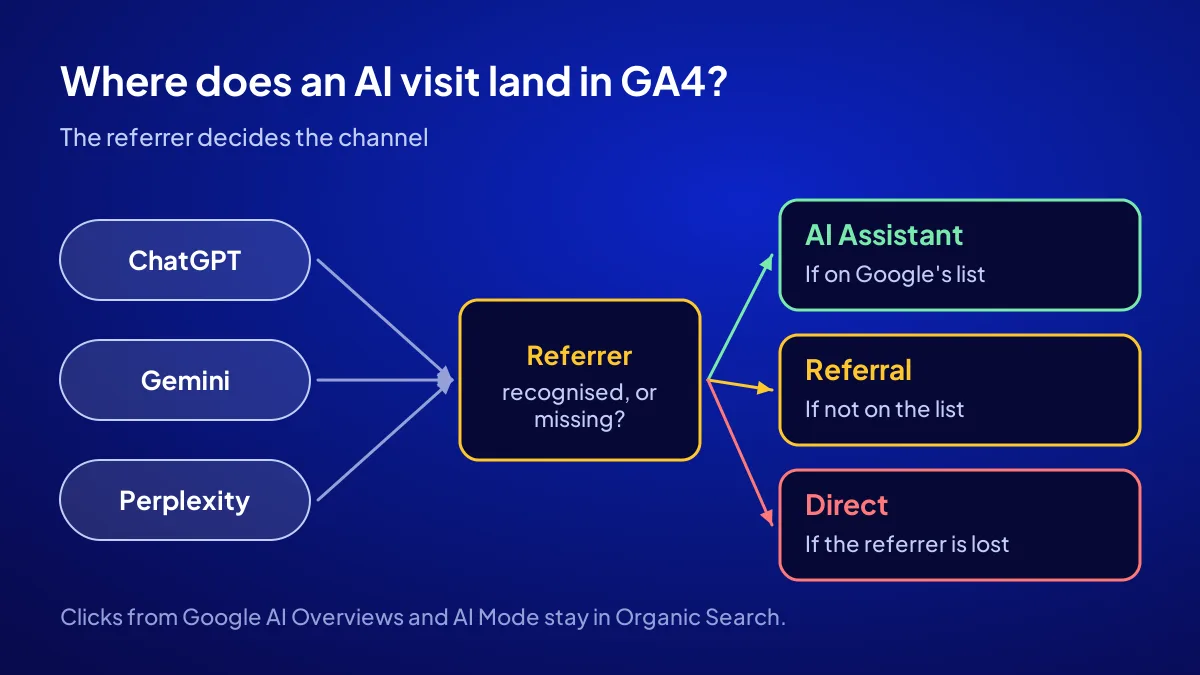
In 2026 the GA4 default channel group has a separate channel called AI Assistant. If the referrer is on Google’s list of recognised assistants, the session medium is set to “ai-assistant” and the visit lands there. An assistant missing from the list lands in Referral, and a visit that loses its referrer lands in Direct. One channel never shows the whole picture, so read your AI number as a floor.
Google’s own AI answers are not counted separately
Clicks from Google AI Overviews and AI Mode stay inside Organic Search with google as the source. In Search Console they are reported under the Web search type, not as a separate line.
Where to see your current numbers
Open Reports, then Acquisition, then Traffic acquisition. Set the primary dimension to “Session default channel group”. If an AI Assistant row exists, that is your first raw number. The wider question of how your brand is mentioned in AI answers is covered in how does my brand appear in AI.
Which 3 things should you prepare before the setup?
BU BÖLÜMÜN ÖZETİ
- Access: Editor or Administrator
- Baseline: the last 90 days
- Key event: phone, form, WhatsApp
Before you start, put three things on the table: the right access level, a baseline date range and the key event you will measure. Without them the channel gets built but the number says nothing. Preparation takes under 10 minutes.
Access: Editor or Administrator
Channel groups live in the Admin menu and do not open with read-only access. If your account lacks the Editor role, ask the property owner for it.
Baseline: the last 90 days
Pick a period to compare yourself against, at least 90 days long. Thirty days overweights one busy week. Ninety days gives a steadier start.
Key event: phone, form, WhatsApp
Counting visits is not enough; you need to count the action that reaches the till. Phone clicks, form submissions or the WhatsApp button should be marked as key events. If not, do that first.
How do you build an AI channel in 6 steps?
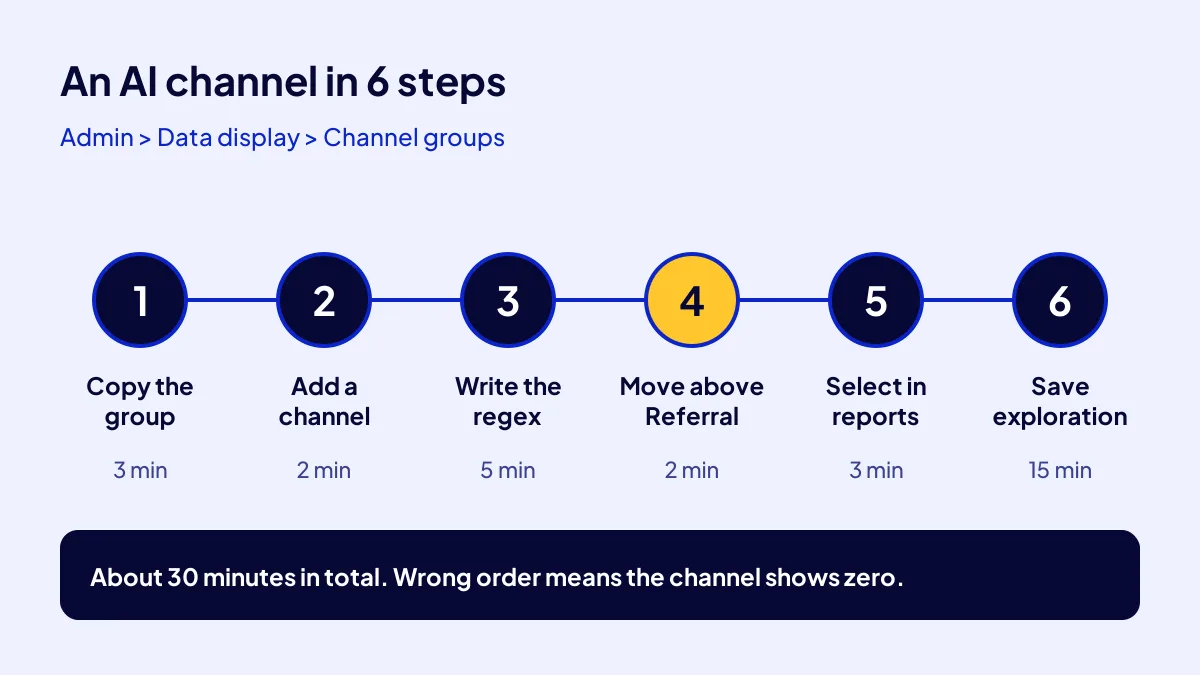
The core idea is to collect sessions whose source looks like an AI assistant into one channel. Google’s documentation says a standard property can have 2 custom channel groups and that they apply to reports retroactively. Traffic is assigned to the first channel it matches in the list order. That is why moving the new channel above Referral is essential.
- Copy the channel group (3 minutes). Go to Admin, Data display, Channel groups. Copy the default group and name it “AI Included”.
- Add a new channel (2 minutes). Click “Add new channel” and name it “AI Assistants”.
- Write the condition (5 minutes). Choose Source as the dimension, set the match type to “matches regex” and paste the pattern below.
- Fix the order (2 minutes). Click “Reorder” and drag the new channel above Referral and Organic Search.
- Select the group in reports (3 minutes). In Traffic acquisition, switch the primary dimension to your new channel group.
- Build an exploration (15 minutes). Put session source in rows, key events in columns, and save the report.
The regex to paste
Type this pattern into the Source condition: chatgpt|openai|perplexity|gemini\.google|copilot|claude\.ai|deepseek|grok|meta\.ai. The match is case-insensitive. Add new assistants with a pipe.
The UTM tag on ChatGPT links
ChatGPT adds a source tag to most links it gives, so the visit appears with “chatgpt.com” as the source. Visits without the tag can still fall into Direct, which is why the exploration in step 6 matters.
The most common mistake: Leaving the new channel at the bottom of the list. GA4 assigns traffic to the first matching channel, so a chatgpt.com visit gets caught by the Referral rule first and your channel shows zero.
Which thresholds should you use to read the numbers?
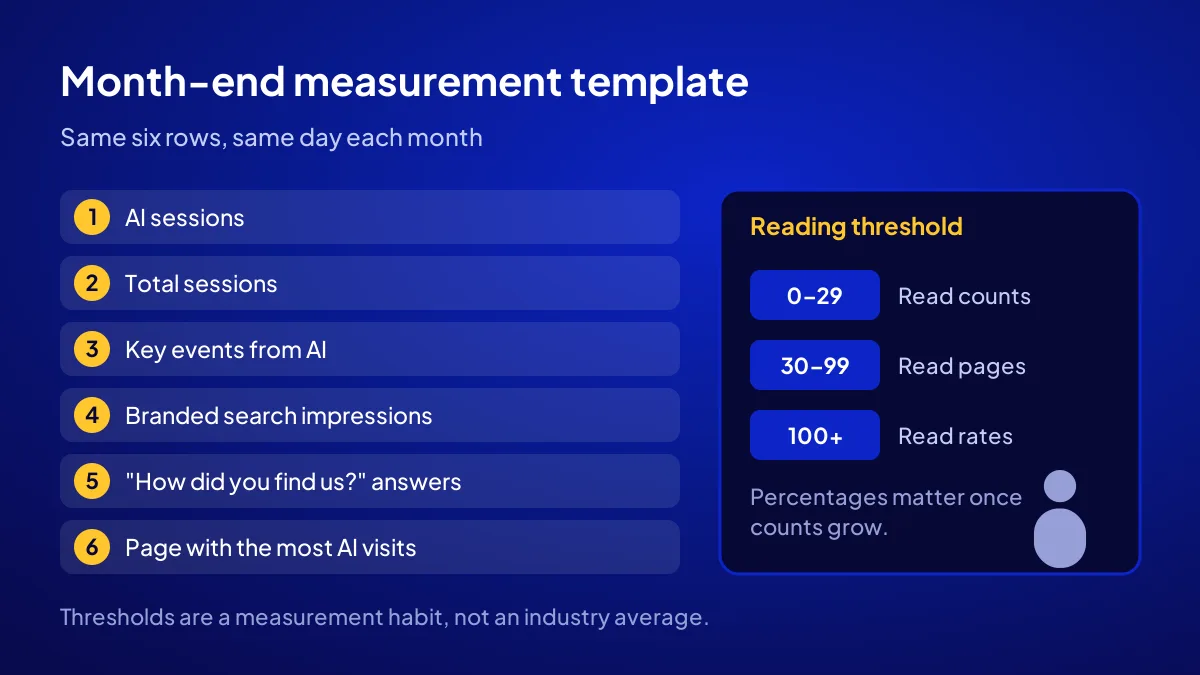
Once the channel exists, the real job is reading the number correctly. My rule is simple: while sessions are few, look at counts, not percentages; switch to ratios once the count grows. The thresholds below are a measurement habit, not an industry average.
| Monthly AI sessions | What to look at | What to do |
|---|---|---|
| 0–29 | Count and which assistant | Skip percentages, note the sources |
| 30–99 | Landing page | Find which page gets cited and build more like it |
| 100 and above | Key event rate | Compare AI visits with the Organic Search rate |
A three-column spreadsheet is enough
Each month, note three numbers: AI sessions, total sessions and key events from AI. Divide the first by the second to get your share. Divide the third by the first to see that audience’s intent.
Example: a hypothetical law office
Say you run a law office in Kadıköy, Istanbul, with 2,400 sessions a month. Of those, 48 come from AI assistants, which is 2 percent. If 6 of those 48 people tap the phone button, the key event rate for AI sessions is 12.5 percent. Sample figures only.
Where does the invisible AI traffic go?
Many AI-driven visits that cannot be measured land in Direct. People read your name in an assistant, then type your site or search your name. That visit shows up as Direct or as branded Organic Search, so track branded impressions in Search Console monthly. If the till is ringing but the channel shows zero, the trail is somewhere else.
“How did you find us?” still works
Ask one question to everyone who calls or fills in the form, and add “an AI assistant” to the options. Three months of answers fill the gap GA4 cannot see.
Connect the Bing side too
GA4 does not show how often you are cited in Copilot or Bing’s AI summaries. For that you need Bing’s own dashboard. The steps, with timings, are in Bing Webmaster Tools setup.
Where does this measurement fit in the AI SEO campaign?
In Adapte’s AI SEO campaign, measuring AI traffic in GA4 is one of the items included in the setup. It comes at a fixed TRY 36,000 + VAT, is delivered in 30 days, alongside the Bing Webmaster Tools and Search Console setup. A diagnosis card is produced at the start and at the end. There is no recommendation guarantee; the measurement shows numbers that reach the till.
Start and end numbers
The diagnosis card puts the before and after tables side by side; see its items in AI-SEO Diagnosis Card. For the full scope and the 12-business quota, see the AI SEO campaign page.
Where measurement sits in the chain
The setup order and the 6 question groups are explained in AI SEO with 108 articles. Measurement is the last link.
Here is the month-end template: 1) AI sessions, 2) total sessions, 3) key events from AI, 4) branded search impressions, 5) number of “AI assistant” answers to “how did you find us”, 6) the page with the most AI visits. Fill in the six rows on the same day every month.
Quick Summary
- GA4 has an AI Assistant channel, but it does not catch every assistant.
- A custom channel group takes 6 steps and about 30 minutes.
- If the new channel is not moved above Referral, it shows zero.
- Clicks from Google AI Overviews and AI Mode stay in Organic Search.
- Under 100 sessions, read counts, not percentages.
- Branded searches and “how did you find us” catch what tracking misses.
Short Glossary
Channel group: A channel group is the list of rules GA4 uses to classify visits by where they come from.
Regular expression (regex): A regular expression is a text rule used to match several source names with one pattern.
Key event: A key event is a marker used in GA4 to count valuable actions, such as calls or forms, separately.
Next Step
You can set up the measurement yourself; if you also want the infrastructure worth measuring, apply to the AI SEO campaign and share your site and target questions.
Frequently Asked Questions
Source: Google Analytics Help — Default channel group
Sık Sorulan Sorular
The campaign sets up AI traffic measurement in GA4, plus Bing Webmaster Tools and Search Console. A diagnosis card is produced at the start and at the end, and the two tables are compared. There is no recommendation guarantee; the effect of the infrastructure is measured.
Google’s help page lists ChatGPT, Gemini, DeepSeek, Copilot and Grok as examples and does not publish the full list. To avoid missing Perplexity and Claude visits, build a custom channel with a regex on the Source dimension.
Yes. Google’s documentation says custom channel groups apply to reports retroactively. On the day you build it, you can view the last 90 days through the new group.
Updated: October 2026