
Bing Webmaster Tools setup: 6 steps for AI visibility, with the time each one takes
Bing Webmaster Tools setup is free and takes about 20 minutes for a site that already uses Search Console. You sign in with a Microsoft or Google account, import your site from Search Console, check your sitemap and open the AI Performance report. That report counts how often your content is cited as a source in Copilot and in Bing’s AI summaries.
Google offers no report that gives you this number, so set up the Bing dashboard early.
Why does the Bing dashboard matter for AI visibility?
BU BÖLÜMÜN ÖZETİ
- A sign on both streets
- What Bing counts and what it does not
- Why AI might not be recommending you
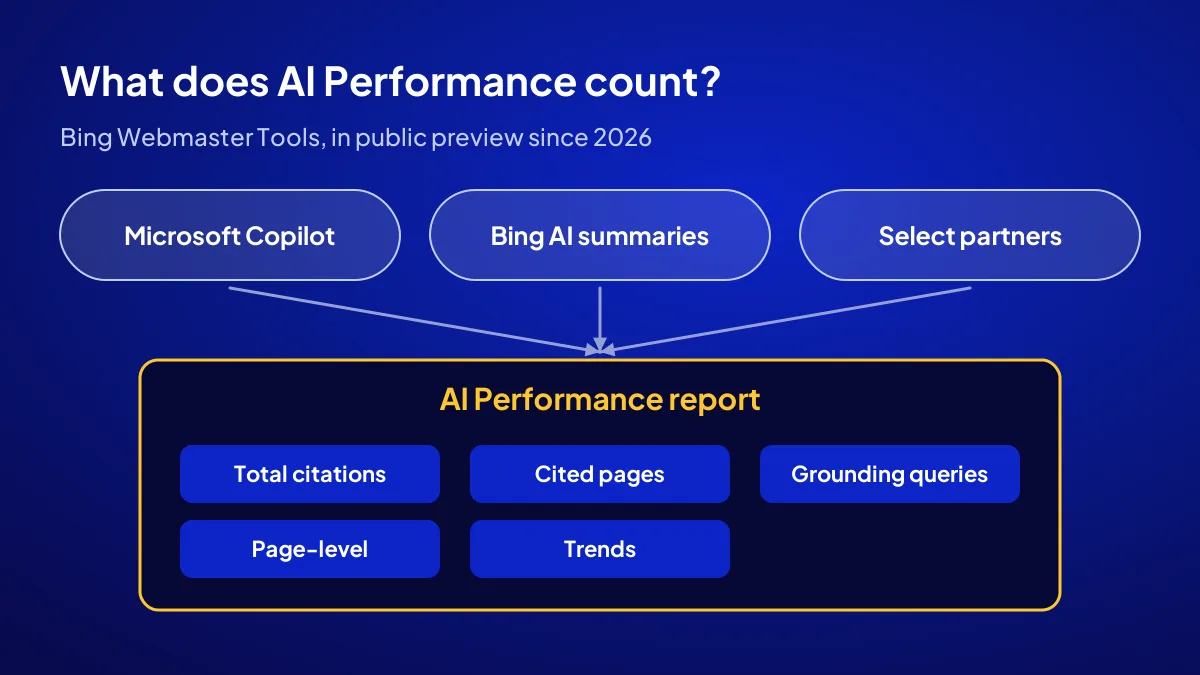
Since February 2026, Bing has offered a report called AI Performance inside Webmaster Tools as a public preview. It shows how often your site is cited across Microsoft Copilot, AI-generated summaries in Bing and select partner integrations. It turns AI citations into a number you can track.
A sign on both streets
A site registered only with Google is like a corner shop with a sign on one street only. The shutters are up, but people on the other street walk past without seeing you. Registering with Bing is the second sign, and it costs nothing.
What Bing counts and what it does not
The report covers Copilot and Bing’s own AI experiences, not ChatGPT or Gemini. You measure visits from those in GA4, so the two dashboards complete each other.
Why AI might not be recommending you
Registration is only one condition for being recommended. The general reasons are covered in why isn’t my website recommended by AI.
What should be on the table before you start?
With three things ready, setup is done in 20 minutes: the account you will sign in with, a site verified in Search Console and your sitemap address. It costs nothing. Without Search Console, you verify manually and need access to your domain panel.
- A Microsoft or Google account. What you need: the business’s shared email, not a personal one.
- A site verified in Search Console. What you need: Owner permission in Search Console.
- Your sitemap address. What you need: usually yourdomain.com/sitemap.xml or sitemap_index.xml.
How to find your sitemap
Type your domain into the browser and add /sitemap.xml. On WordPress sites, most SEO plugins use /sitemap_index.xml.
Setup in 6 steps: from sign-in to the first report
BU BÖLÜMÜN ÖZETİ
- Why importing from Search Console is the shortest route
- Manual verification: three ways
- Turn on IndexNow
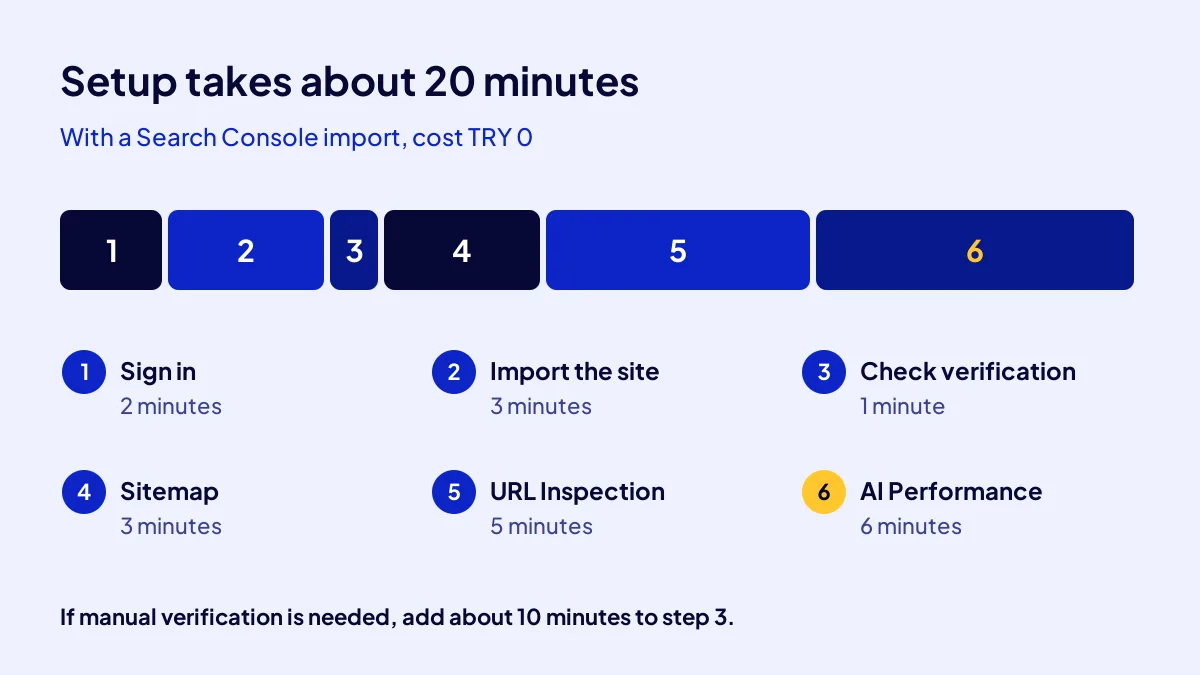
All six steps take about 20 minutes on a site with Search Console, and all are free. The shortest route is importing from Search Console, because the site is verified automatically. If manual verification is needed, step 3 takes about 10 minutes longer.
- Sign in (2 minutes, TRY 0). Go to bing.com/webmasters and sign in with your account.
- Add the site (3 minutes, TRY 0). Choose “Import from Google Search Console” and allow access to your Google account.
- Check verification (1 minute, TRY 0). The imported site should appear as verified. If not, switch to manual verification.
- Confirm the sitemap (3 minutes, TRY 0). In the Sitemaps menu, look for the imported sitemap; if it is missing, paste the address and submit.
- Inspect a page (5 minutes, TRY 0). Use URL Inspection on your home page and your most important service page.
- Open the AI Performance report (6 minutes, TRY 0). Pick a date range and take a first screenshot; that is your baseline.
Why importing from Search Console is the shortest route
According to Bing’s announcement, imported sites are verified automatically and their sitemaps come along. You can import up to 100 sites at once.
Manual verification: three ways
Without Search Console, pick one of three ways: upload the XML verification file to the site root, add a meta tag to the home page header, or add a CNAME record to your domain. On WordPress the meta tag is fastest.
Turn on IndexNow
IndexNow is a protocol that tells search engines immediately when a page on your site is new or changed. Bing supports it, and many WordPress SEO plugins switch it on with a single setting.
Common mistake: Adding the site with mixed https and www versions. If your site opens at https://www, give Bing exactly that address. The wrong version leaves the report empty.
What does the AI Performance report tell you?
The report shows five things: total citations, average cited pages per day, grounding queries, page-level citations and trends over time. Grounding queries matter most. These are the phrases the AI used to find your content while preparing an answer, which shows you the customer’s question.
| Report item | What it tells you | What you do |
|---|---|---|
| Total citations | How often you are cited as a source | Note it monthly and watch the trend |
| Average cited pages | How many different pages get cited per day | See whether you depend on a single page |
| Grounding queries | The phrase AI used to find you | Turn these questions into new article titles |
| Page-level citations | Which URL gets cited | Keep that page current and link to it |
| Visibility trends | Change over time | Compare the weeks after each update |
What an empty report means
An empty report does not mean the setup is broken. Most often it says your content has not yet been cited in any AI answer. That is a baseline too: zero.
The report is in preview
Menu names and items may change while the report is in preview. Keep a dated screenshot from setup day.
In what order should you check during the first 30 days?
BU BÖLÜMÜN ÖZETİ
- Day 1: verification and sitemap
- Day 7: crawled pages
- Day 30: citations and grounding queries
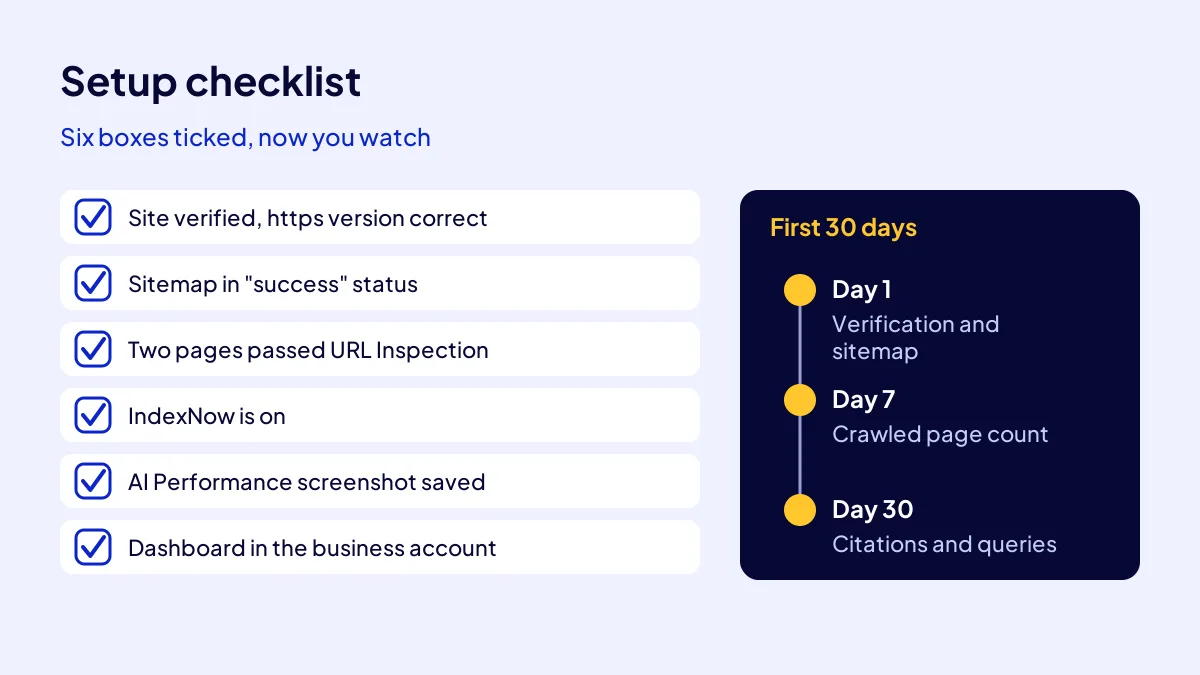
Follow the first 30 days in three stops: day 1, day 7 and day 30. Five minutes per stop is enough, at the same interval each time. If the numbers never move, the problem is the content, not the dashboard.
Day 1: verification and sitemap
Is the site verified, is the sitemap in “success” status, how many URLs were discovered?
Day 7: crawled pages
Check how many of your pages Bing has crawled and compare that with the sitemap count. If the gap is large, test the missing pages one by one with URL Inspection. For the bigger picture on crawling rhythm, see how often AI crawlers read your site.
Day 30: citations and grounding queries
Write down total citations and the top 3 grounding queries in AI Performance. On the same day, note your AI sessions in GA4. That setup is explained step by step in measure AI traffic in GA4.
How is this set up in the AI SEO campaign?
In Adapte’s AI SEO campaign, the Bing Webmaster Tools and Search Console setup is part of the delivery. It comes at a fixed TRY 36,000 + VAT and is delivered in 30 days. With 20 percent VAT the total is TRY 43,200; check the current rate on your invoice. The campaign works with 12 businesses per period and gives no recommendation guarantee.
Setup, measurement and diagnosis together
The start and end diagnosis cards place Bing and GA4 numbers side by side. The full scope is on the AI SEO campaign page.
- The site is verified in Bing and the https version is correct.
- The sitemap is submitted and in “success” status.
- The home page and one service page have passed URL Inspection.
- IndexNow is on.
- A setup-day screenshot of AI Performance is saved.
- The dashboard sits in the business account, with the agency added as a user.
Quick Summary
- Bing Webmaster Tools is free and setup takes about 20 minutes.
- A site imported from Search Console is verified automatically.
- AI Performance counts citations in Copilot and Bing AI summaries.
- Grounding queries are the most valuable item.
- An empty report is not a broken setup but a zero baseline.
- Check the first 30 days on day 1, day 7 and day 30.
Short Glossary
Citation: A citation is the measure used to count how often a page is shown as a source in an AI answer.
Grounding query: A grounding query is the search phrase an AI uses to find content while preparing an answer.
IndexNow: IndexNow is the protocol used to notify search engines immediately about new or changed pages.
Next Step
You can set up the dashboard today; if you want the content and structure that will show up in it built for you, apply to the AI SEO campaign.
Frequently Asked Questions
Source: Bing Webmaster Blog — Introducing AI Performance in Bing Webmaster Tools
Sık Sorulan Sorular
Set up the dashboard with an account opened in the business’s name. Access stays with you when staff or agencies change.
The dashboard is opened in your account and Adapte is added as a user. It stays with you after the campaign. You can see where the setup fits in the whole campaign in AI SEO with 108 articles.
Checklist: when you finish, all six boxes should be ticked.
The campaign sets up Bing Webmaster Tools, Search Console and AI traffic measurement in GA4. A diagnosis card is produced at the start and at the end. There is no recommendation guarantee; the effect of the infrastructure is measured.
No. Bing Webmaster Tools is free. With an import from Search Console, setup takes about 20 minutes.
No. The report shows citations in Microsoft Copilot, AI summaries in Bing and select partner integrations. You measure visits from ChatGPT and Gemini in GA4.
Updated: October 2026