
Medical practice Google Business Profile: right category, profile count and 6 key fields
A medical practice Google Business Profile opens with the name on your licence and the fewest categories that describe your main work. In a polyclinic with two to four physicians, the practice gets its own profile and each doctor may add one. Category, name, address, hours, booking link and photos are the six key fields.
Most people do not know this: Google treats a doctor as an “individual practitioner” and asks for a separate profile for the organisation when several doctors share an address. And Turkish rules ban a facility from using any name online other than its licensed one. The profile is a declaration first.
Which category does a medical practice Google Business Profile use?
BU BÖLÜMÜN ÖZETİ
- A category is the first line of a business card
- Extra categories only from your licence
- Do not upgrade your facility type
The primary category says what the practice is, in one phrase. A multi-specialty polyclinic usually takes a general medical clinic category; a single-doctor office takes the category for the doctor’s specialty. Google asks you to choose as few categories as possible to describe your core business.
A category is the first line of a business card
Fit every procedure onto the first line of a business card and you end up with a medicine leaflet. Categories work the same way.
Extra categories only from your licence
The activity permit is the official document that lists which specialties a facility may accept patients in. Add a secondary category only for a specialty on that permit. What is not on the permit cannot go on the sign or online, the profile included.
Do not upgrade your facility type
A polyclinic does not pick a category that suggests another licence type, such as “hospital” or “medical centre”. A medical centre is a separate facility type under Turkish rules. Misleading upgrades invite trouble on opening day.
How many profiles does a practice or polyclinic need?
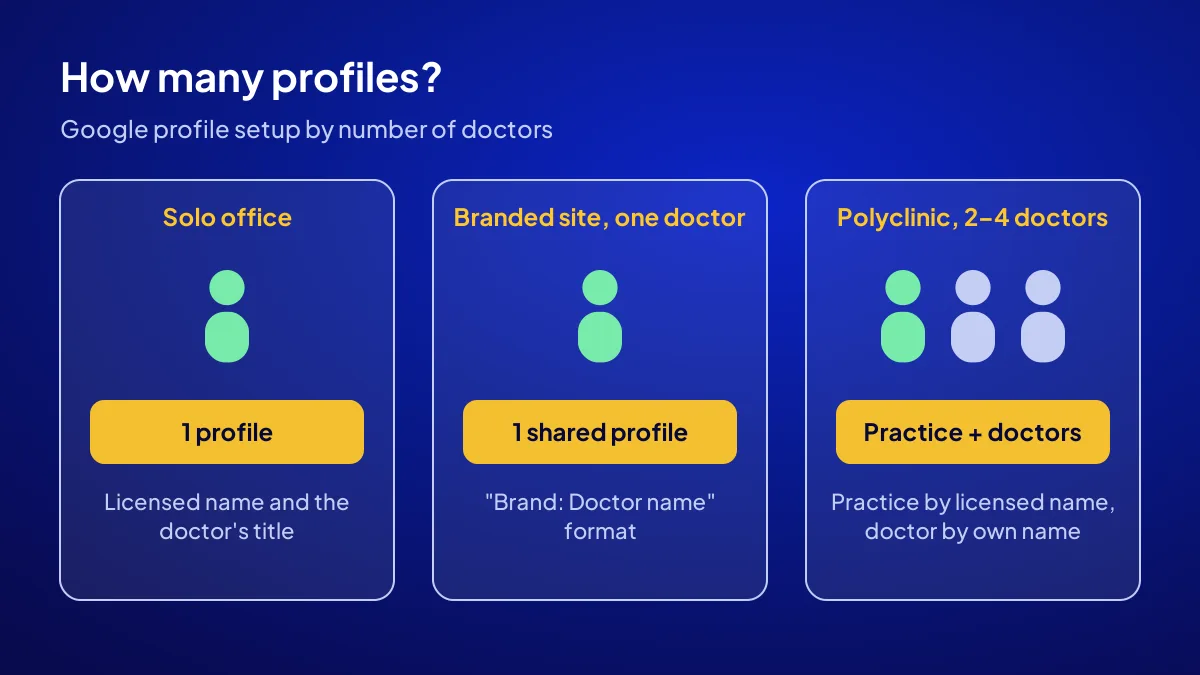
A single-doctor office usually needs one profile, while a polyclinic opens a profile for the organisation. If you are the only doctor who meets patients face to face, Google recommends sharing one profile with the practice. If several doctors work at the same address, the organisation gets a profile separate from theirs.
| Situation | Profile setup | How the name is written |
|---|---|---|
| Single-doctor office | 1 profile | Licensed name and the doctor’s title |
| Branded location, one doctor sees patients | 1 shared profile | “Brand: Doctor name” format |
| Polyclinic with 2–4 doctors | Practice profile, optional doctor profiles | Practice by licensed name, doctor by own name |
| Unit with its own name and entrance | Department profile | Distinct name and category; check the licence |
Say you are opening a three-doctor polyclinic in Teşvikiye
The practice profile opens under the licensed name, and the primary category names the facility type. If internal medicine, dermatology and gynaecology are on the permit, they become secondary categories. Each doctor who sees patients daily may open a profile at the practice address.
Why must the profile name match the licence exactly?
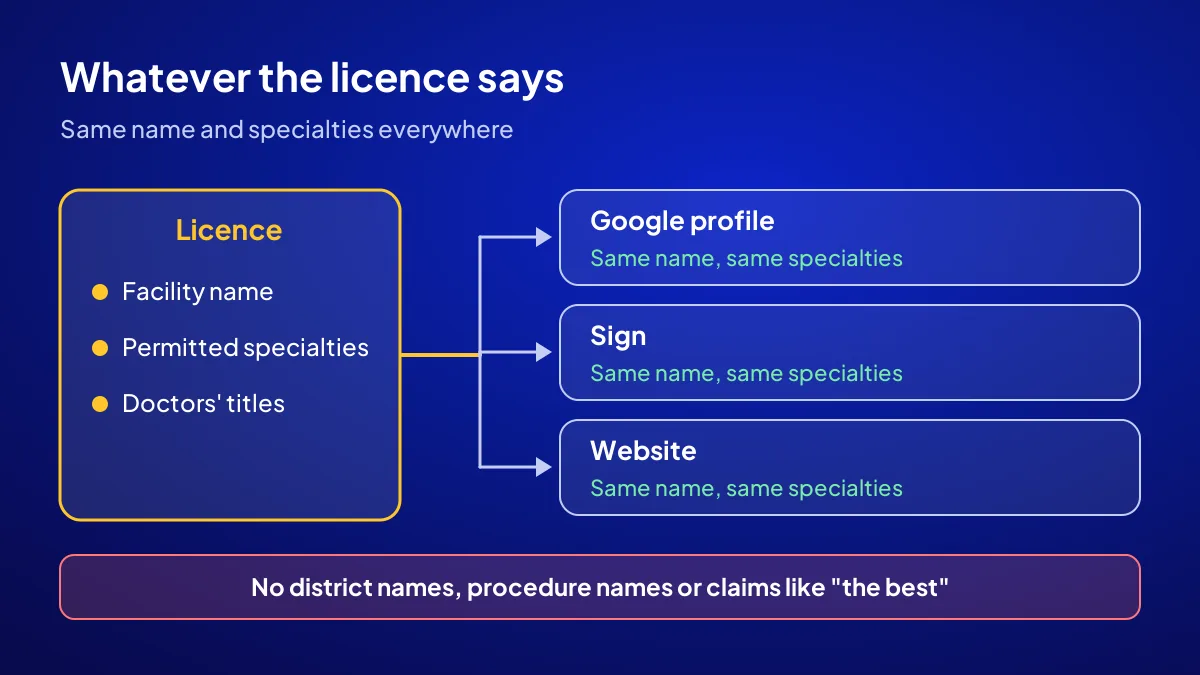
Two rules meet here. Turkey’s regulation on private outpatient health facilities bans writing any name or title other than the licensed one on the facility’s sign, printed material or online presence. Google also forbids adding unnecessary information to a business name and warns it can lead to suspension.
No district names, no procedure names
A name like “Nişantaşı Check-up and Aesthetics” breaks both rules at once if that is not the licensed name. The district already shows in the address.
Make the sign and the profile agree
A selective patient arriving at the building looks for the name they saw on their phone. If it does not match, that two-second doubt at the door is a patient who walks away. The line between information and advertising is set out point by point in advertising rules for medical practices.
Which patient question does each of the six fields answer?
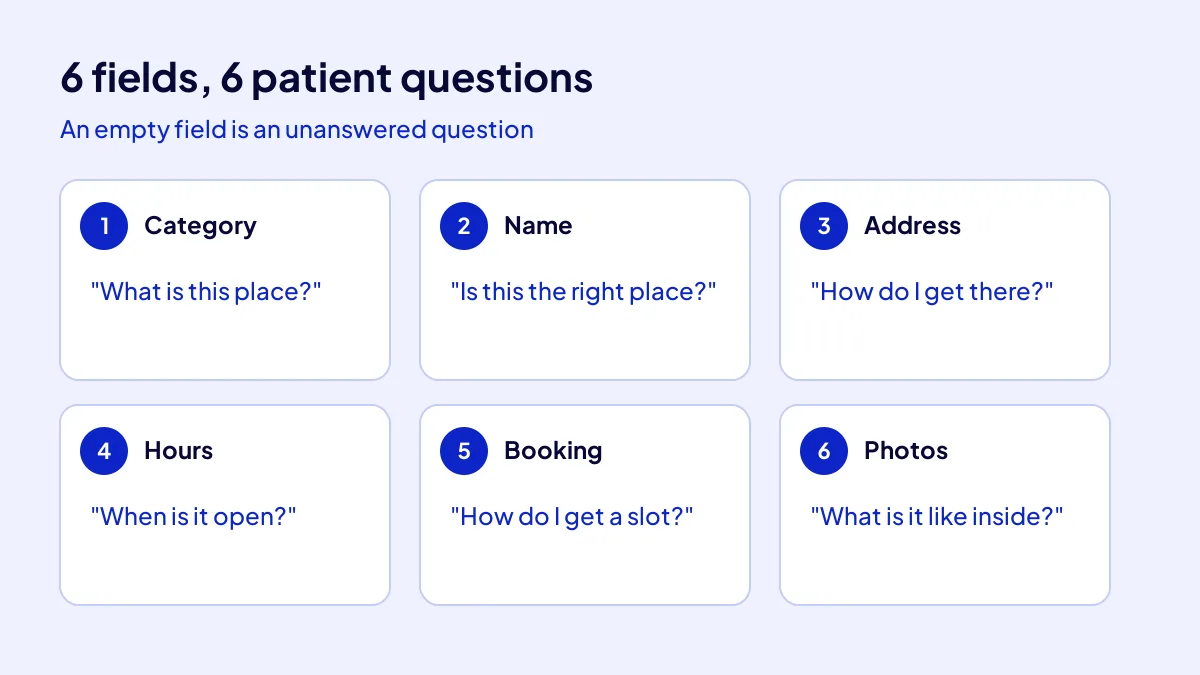
Category answers “what is this place”, name “is this the right place”, address “how do I get there”, hours “when is it open”, booking link “how do I get a slot”, and photos with description “what is it like inside”. Leave a field empty and the patient moves to the next profile.
- Category, “What is this place?”: facility type and the specialties on the permit.
- Name, “Is this the right place?”: the licensed name, nothing more.
- Address, “How do I get there?”: floor, block and entrance details.
- Hours, “When is it open?”: patient hours and holiday hours.
- Booking link, “How do I get a slot?”: a one-tap appointment page.
- Photos and description, “What is it like inside?”: entrance, waiting area, exam room.
Floor and entrance in the address
If you are on the fourth floor of an office block on Bağdat Caddesi, put the floor and unit number in the address line. Give parking or valet details in the description.
Practice hours, not doctor hours
The profile shows the practice’s patient hours. Set special hours for public holidays; a locked door turns into a review.
What does a booking link tell a selective patient?
A booking link says “I can reserve a slot without chasing anyone”. Google lets you add links for actions such as appointments and reservations, and choose one as the preferred link that shows first. Point it to your own appointment page.
Check third-party links
If you are listed on doctor booking platforms, their links may also show on your profile. Google states that providers must remove third-party links within 5 days of receiving a removal request.
For the profile, a mobile booking page and visitor tracking together, the Website Recipe in the Get Visible Online campaign covers all three: TRY 36,000 + VAT, paid upfront at a fixed price for 3 months. Details are on the campaign page.
Where do health rules start in photos and the description?
The rule starts where information turns into promotion. Turkey’s health promotion regulation allows a facility to share its address, contact details, working days and hours, and the specialties it accepts patients in. Fees, discounts, campaigns and promotions are banned. Search engine listings are accepted if they are not paid or designed to push you ahead, and keywords must follow the same principles.
Photos show the place, not patients
Three shots are enough to start: building entrance, waiting area, exam room. Patient images need written consent; a new practice is best off avoiding them. Check the regulation and your provincial medical chamber first.
Description: doctors, specialties, access
The description lists doctors’ academic titles, specialties accepted, access and the booking route. “The best”, “painless” or “guaranteed” stay out. How to show up in district searches is covered in visibility in affluent districts.
Now you know: the category is a declaration, the name comes from the licence, and six fields answer six questions. See the profile’s role in the first 90 days of a new practice plan and the full path in the new medical practice promotion guide.
Quick Summary
- The primary category names the facility type; secondary categories name permitted specialties.
- A solo office needs one profile; a polyclinic opens a practice profile.
- The profile name is the licensed name, with no district or procedure added.
- Six fields answer the patient’s six questions.
- The booking link goes to a page on your own website.
- Fees, discounts and campaigns never appear on the profile.
Short Glossary
Practitioner profile: A practitioner profile is the profile type used on Google to show a doctor who serves patients one to one separately from the practice.
Activity permit: An activity permit is the official document used to show which specialties a health facility may accept patients in.
Preferred link: A preferred link is the setting used to choose which booking link appears first on the profile.
Next Step
To set up the six profile fields, the booking page and visitor tracking within the rules in one go, apply for the Get Visible Online campaign. Fill in the needs form to get a recipe.
Frequently Asked Questions
Source: Google Business Profile Help — Guidelines for representing your business on Google
Sık Sorulan Sorular
Google accepts a practitioner profile for someone who serves patients one to one and can be reached at a verified location during stated hours.
Name, phone, preferred day and specialty are enough. Skip symptoms. Under Turkey’s data protection law (KVKK), health data is a special category of personal data; it belongs on the phone or in the exam room. For the account and verification steps, see how to set up a Google Business Profile.
No. When several doctors share an address, the practice opens its own profile. A doctor profile is optional and, under Google’s rules, requires the doctor to be directly reachable at that location during stated hours.
No. Turkey’s health promotion regulation bans fees, discounts, campaigns and promotions in promotion and information. Fees are explained face to face when a patient asks.
Yes. The Website Recipe includes a mobile-friendly page, contact buttons, Google Business Profile, basic SEO and visitor tracking. The package is TRY 36,000 + VAT, fixed and paid upfront; at 20 percent VAT that is TRY 43,200, so check the current rate on your invoice. Results are reviewed together at the end of the first month.
Updated: October 2026