
Adding a new business to maps: 6 steps on Google, Yandex and Apple Maps
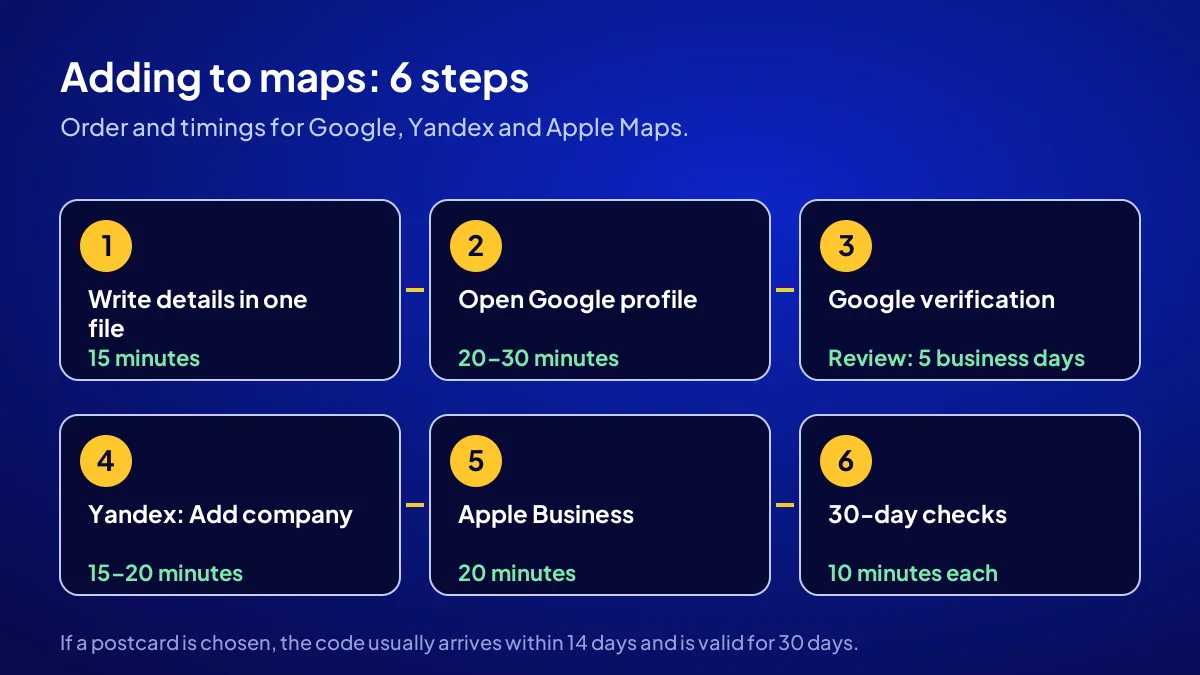
Adding a new business to maps takes 6 steps: you prepare your details, open a Google Business Profile, complete Google verification, open an organisation listing on Yandex, add a place card to Apple Maps and check the listings for the first 30 days. Basic listing is free on Google and Apple, and unpaid on Yandex. What you spend is a few hours of work, not money.
Verification sets the timeline. Google’s help page says the review can take up to 5 business days, and a postcard code usually arrives within 14 days. So start before you lift the shutter. Below is each step with its time and threshold.
What should be on the table before you start?
Step 1 is 15 minutes of preparation: write name, address, phone, hours, category and website in one document. Copy into all three maps from it, never by hand, so three spellings are not born on day one. Why this document matters so much is covered in business name, address and phone consistency.
The name as on the sign
Enter the name on your sign. Do not add a district, “cheapest” or a service keyword. No sign yet? Settle it first.
Have 3 photos ready
Shopfront, interior and one product or service shot are a good start. The shopfront photo should show the sign so customers recognise your door.
How do you add and verify a new business on Google Maps?
BU BÖLÜMÜN ÖZETİ
- Step 2: open the profile (20 to 30 minutes)
- Step 3: finish verification (day 0 to day 14)
- 5 business days after verification
Steps 2 and 3 happen on Google. Start the profile flow at business.google.com, paste your prepared details, then verify with the method Google offers. Opening takes 20 to 30 minutes. Google picks the method: phone or SMS, email, live video call or postcard. A screen-by-screen walkthrough is in how to set up a Google Business Profile.
Step 2: open the profile (20 to 30 minutes)
Enter the name, category, address or service area, phone and website. Choose the narrowest correct category: “bakery”, not “shop”; “hair salon”, not “salon”.
Step 3: finish verification (day 0 to day 14)
Phone and email methods finish in minutes. For video, be ready to show your sign, premises and a business document. If a postcard is chosen, expect the code within 14 days; the code is valid for 30 days.
5 business days after verification
Google says the review after verification can take up to 5 business days. Do not keep editing in the meantime; each change can trigger a new review.
The most common mistake: Opening a second profile while waiting for verification. Two listings at the same address create a duplicate profile problem and weaken both. Wait, and do not open a new listing before the 5 business days are up.
How do you open an organisation listing on Yandex Maps?
BU BÖLÜMÜN ÖZETİ
- Copy the same details
- Enter the hours in full
- Follow the moderation
Step 4 runs through Yandex Business and takes 15 to 20 minutes. Sign in with your Yandex account and use “Add company”. Yandex moderates the details before publishing. Customers who use Yandex Maps, such as drivers navigating with it, will then find you there.
Copy the same details
Copy the name, address and phone from your preparation document. Check the map pin yourself on Yandex; a pin in front of your door matters as much as the written address.
Enter the hours in full
Include weekends and lunch breaks. A customer who meets a locked door may not come back.
Follow the moderation
Track the status in the Yandex Business panel. If a field is rejected, fix only that field.
How do you add a business to Apple Maps?
Step 5 takes 20 minutes through Apple Business. On 24 March 2026, Apple announced it was combining three services, including Business Connect, under the name Apple Business; the service has been free since 14 April 2026 in more than 200 countries and regions, Türkiye included. iPhone users see you on Apple Maps with a place card. We track the latest changes on the Apple and Yandex side in Apple and Yandex Maps business listing: latest.
Fill in the place card
Enter name, address, phone, hours, logo and photos from your preparation document, in the same format.
Complete the verification step
Apple asks you to confirm your right to manage the location. Complete it and add no second location until approved.
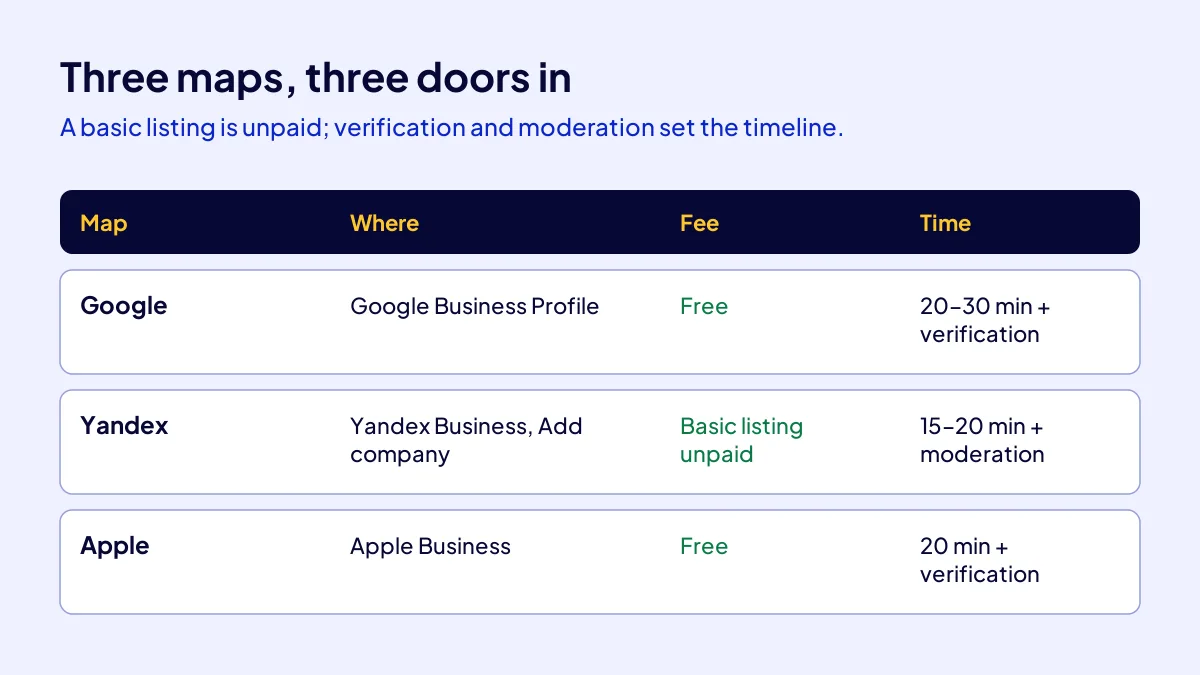
| Map | Where you add it | Fee | Estimated working time |
|---|---|---|---|
| Google Maps | Google Business Profile | Free | 20 to 30 minutes + verification |
| Yandex Maps | Yandex Business, “Add company” | Basic listing unpaid; paid promotion optional | 15 to 20 minutes + moderation |
| Apple Maps | Apple Business | Free | 20 minutes + verification |
What do you check in the first 30 days after listing?
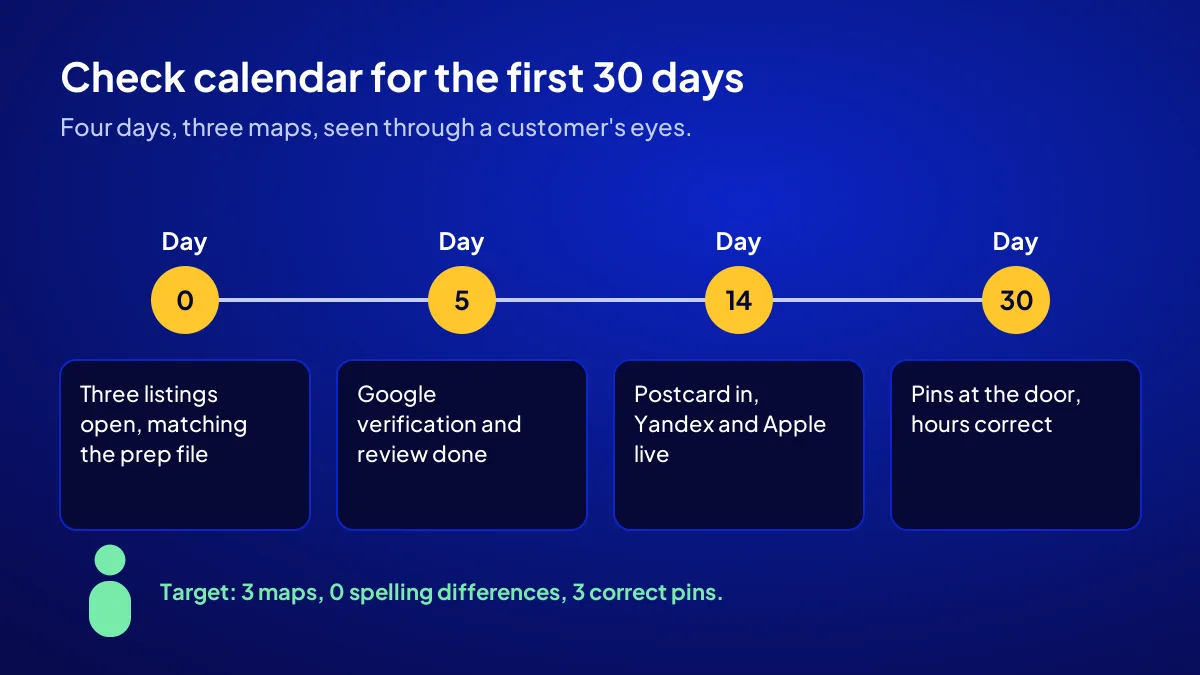
Step 6 is a 30-day follow-up of 10-minute checks. When customers are not walking through the door, the cause is often a detail that is published but wrong. On the four days below, open all three maps through a customer’s eyes, ideally from someone else’s phone.
| Day | Check | Threshold |
|---|---|---|
| Day 0 | Are all three listings open and identical to the preparation document? | 3 listings, 0 spelling differences |
| Day 5 | Are Google verification and review complete? | 5 business days |
| Day 14 | Has the postcard arrived, are Yandex and Apple live? | 14 days |
| Day 30 | Are the pins at the door, the hours right, do you appear when your name is searched? | 3 maps, 3 correct pins |
Value card: a repair shop example
Say you are opening a phone repair shop in Esenyurt. On day 0 you open all three listings and Google asks for a postcard. On day 14 the code arrives and you enter it. On day 30 you spot the Yandex pin one street behind and fix it. A few hours of effort, zero paid for listing.
If you do not appear when your name is searched
A new listing takes time to settle in search. If you want to show as “opening soon” before launch, you can add an opening date on Google.
Should you open all three maps on the same day or one by one?
One by one, within the same week. Google first, since verification takes longest and you can do the others while waiting. Then Yandex and Apple. Listings opened a month apart are more likely to drift in spelling.
Template: maps listing checklist
- Preparation document written: name, address, phone, hours, category, website
- Google Business Profile opened and verification started
- Listing opened on Yandex Business with “Add company”
- Location added and verified on Apple Business
- On every map, the pin sits in front of the door
- Day 5, 14 and 30 checks written in the calendar
Quick Summary
- Adding a new business to maps takes 6 steps; a basic listing costs nothing on all three maps.
- Write one preparation document first and copy from it into all three maps.
- Google verification is the longest step: review up to 5 business days, postcard up to 14 days.
- On Yandex, the listing is opened with “Add company” in Yandex Business and goes through moderation.
- Since April 2026, Apple Maps listings are made through the free Apple Business service.
- Check all three maps through a customer’s eyes on day 0, 5, 14 and 30.
Short Glossary
Verification: Verification is the approval step used to prove you have the right to manage a map listing.
Service-area business: A service-area business is the listing type used by businesses that go to the customer, hiding the address and showing the area served.
Moderation: Moderation is the process used by a platform to check a listing before it is published.
Next Step
If you want your map listing built together with a sales page and tracking, apply for the Get Visible Online campaign and get the recipe that fits your needs form.
Frequently Asked Questions
Source: Google Business Profile Help — Verify your business on Google
Sık Sorulan Sorular
If customers come to you, list an address. If you go to them, as a plumber or home cleaner does, choose a service area and hide the address. Decide this at the start.
Yes, with the steps above. If you are short of time, or want the listing built with a sales page, contact buttons and visitor tracking, the Website Recipe in Adapte’s Get Visible Online campaign also covers the Google Business Profile.
A map listing is one of six channels for a new business. The order is covered in where a new business should appear first, and the full picture in the new business visibility guide.
Not for a basic listing. Google Business Profile and Apple Business are free; a basic organisation listing on Yandex is unpaid too, with paid promotion options optional. Costs arise only if you advertise or hire an agency to do the work.
Phone, SMS and email finish in minutes. The review after verification can take up to 5 business days. A postcard code usually arrives within 14 days and is valid for 30 days.
The Website Recipe covers a mobile-friendly sales page, contact buttons, Google Business Profile, basic SEO and visitor tracking. The fee is TRY 36,000 + VAT, paid upfront and fixed; with 20 percent VAT it comes to TRY 43,200, so check the current rate on your invoice.
Updated: October 2026