
New business digital setup guide: 9 steps and checkpoints for the first 30 days
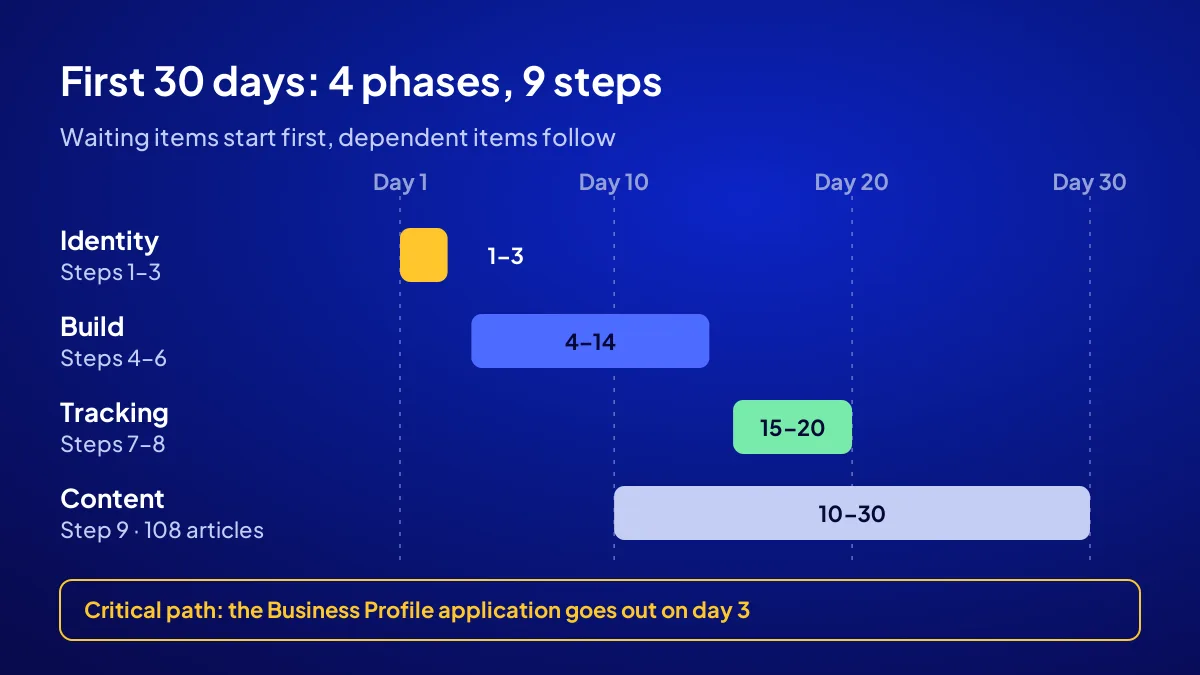
A new business digital setup fits into 30 days, as long as the order is right. Name, domain and hosting come first. The Google Business Profile application goes out the same day, because Google says verification can take up to 5 business days. The website, WhatsApp line, social accounts, tracking, structured data and content then follow in sequence.
Each of the 9 steps below has a day range, a threshold and a check. If you want it done for you, Adapte’s Start a Business Online campaign delivers the same list for a fixed TRY 36,000 + VAT; the setup schedule is given in writing once the project plan is approved.
Why does the order of the first 30 days decide the result?
BU BÖLÜMÜN ÖZETİ
- Waiting items start first
- Dependent items come later
- It works before you sign a lease
Order matters because some items wait on someone else. Business Profile verification depends on Google, Search Console data arrives a few days late, and a new site takes time to get indexed. The rule is the same for a business opening in Istanbul in 2026: put the waiting items first and you have a working system on day 30. Leave them for last and the shutters go up while the phone stays silent.
Waiting items start first
Any task whose timing is out of your hands goes into the first 3 days. Domain registration, the Business Profile application and submitting the site to Google all belong here.
Dependent items come later
Tracking code sits on the site, and the site sits on the domain. Ground first, then floors.
It works before you sign a lease
If you have no shop yet, you start with a service area. We explain why opening online first makes sense in open online before you open a shop.
Days 1–3: how do you start the name, domain and Business Profile?
BU BÖLÜMÜN ÖZETİ
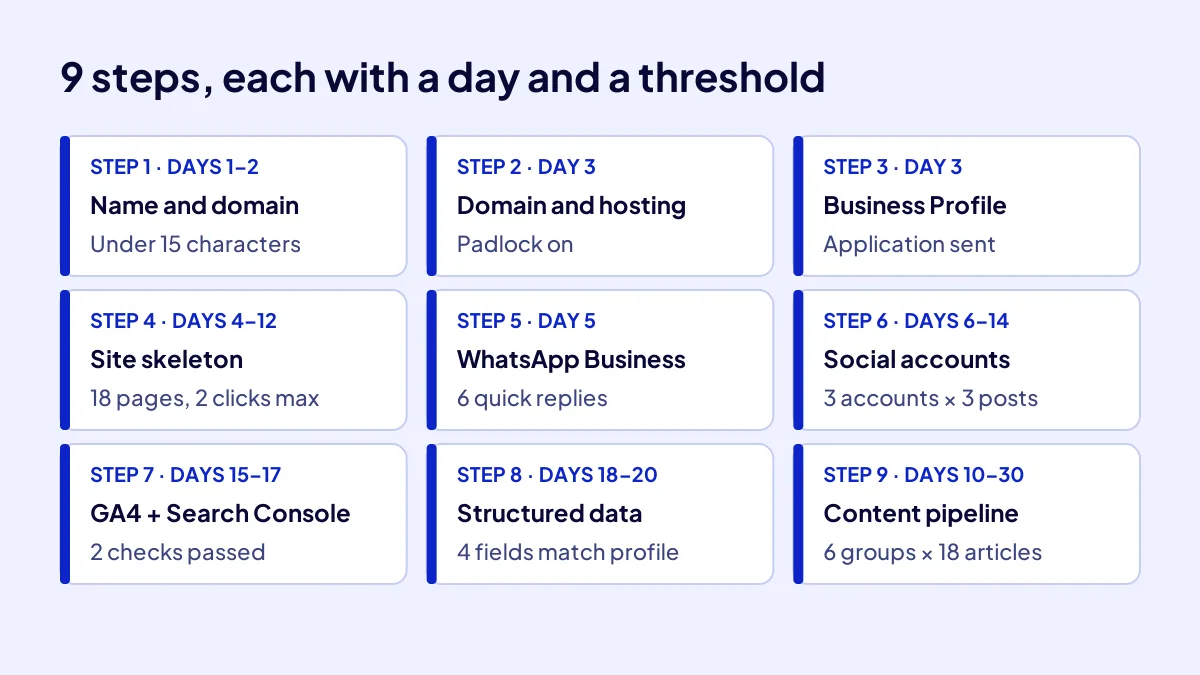
- Step 1: Name and domain (days 1–2)
- Step 2: Domain and hosting (day 3)
- Step 3: Business Profile application (day 3)
The first three days are identity days. The business name is fixed, the domain is registered, hosting goes live and the Business Profile application is sent. All three must be in the owner’s name, not the agency’s or a relative’s.
Step 1: Name and domain (days 1–2)
Do this: write down three candidate names and read each one aloud. The threshold is 15 characters; anything longer gets misspelled over the phone. The selection rules are laid out step by step in how to choose a business domain.
Step 2: Domain and hosting (day 3)
Point the domain at the server and switch on the SSL certificate. The check is one line: does the padlock show in the address bar? If not, do not move on to day 4.
Step 3: Business Profile application (day 3)
Send it today; the verification clock starts here. No address? Choose a service area instead; what is a service area business explains how that works.
Days 4–14: in what order do the site, WhatsApp and social accounts go up?
BU BÖLÜMÜN ÖZETİ
- Step 4: Site skeleton (days 4–12)
- Step 5: WhatsApp Business line (day 5)
- Step 6: Three social accounts (days 6–14)
These eleven days are the build phase. The site skeleton comes first, then the contact line, and finally the social accounts with the same name and the same image. The test is consistency: name, phone, address or service area and opening hours are written exactly the same everywhere. One wrong number somewhere and the customer knocks on the wrong door.
Step 4: Site skeleton (days 4–12)
The campaign standard is 6 main and 12 sub pages, so 18 pages. Threshold: every page within 2 clicks of the home page, each with a call button and a WhatsApp button. The general build flow is covered in how is a website built.
Step 5: WhatsApp Business line (day 5)
Open a separate business number and add hours and area to the profile. The threshold is 6 quick replies: price, hours, location, delivery, payment and booking.
Step 6: Three social accounts (days 6–14)
Three accounts go up, all with the same username and the same profile image. Threshold: each one links to the site and has at least 3 posts ready. An empty shop window turns customers away at the door.
Days 15–20: why not open without tracking and structured data?
Without tracking, you cannot answer “where did that customer come from” at the end of month one. GA4 counts behaviour on the site, Search Console counts visibility on Google. Structured data tells Google the business name, area and hours in a language machines read. Opening without these three is like running a shop where nobody counts the till.
Step 7: GA4 and Search Console (days 15–17)
Do this: set up both tools and submit the sitemap to Search Console. The threshold is 2 checks: can you see your own visit in GA4’s realtime report, and does the sitemap show as “success”?
Step 8: Structured data (days 18–20)
The business markup gets at least 4 fields: name, phone, address or service area, and opening hours. These four must match the Business Profile exactly.
Days 10–30: how do 108 articles split into 6 groups?
A new site cannot hold its ground on Google with a handful of pages; it needs pages that answer what people actually search. In the campaign, 108 articles are split into 6 keyword groups of 18. Adapte’s writing team writes them.
Step 9: Content pipeline (days 10–30)
Say you are opening a patisserie in Beylikdüzü. The groups could be birthday cakes, boutique cookies, breakfast platters, corporate catering, gluten-free products and local delivery. Eighteen questions per group means 108 doors in total.
| Group | The reader’s question | Articles |
|---|---|---|
| 1. Core product | What does it cost, how do I order? | 18 |
| 2. Side products | Which one suits whom? | 18 |
| 3. Service mode | Delivery, booking, packages | 18 |
| 4. Special days | Holiday, school, New Year orders | 18 |
| 5. Area | Which district, how fast? | 18 |
| 6. Decision | Why here, what will it cost? | 18 |
| Total | 6 groups | 108 |
A threshold for publishing pace
108 articles in 20 days averages 5 to 6 a day. That pace is hard to hold by hand, so the pipeline is planned ahead and tied to a calendar.
What should you receive at the end of day 30?
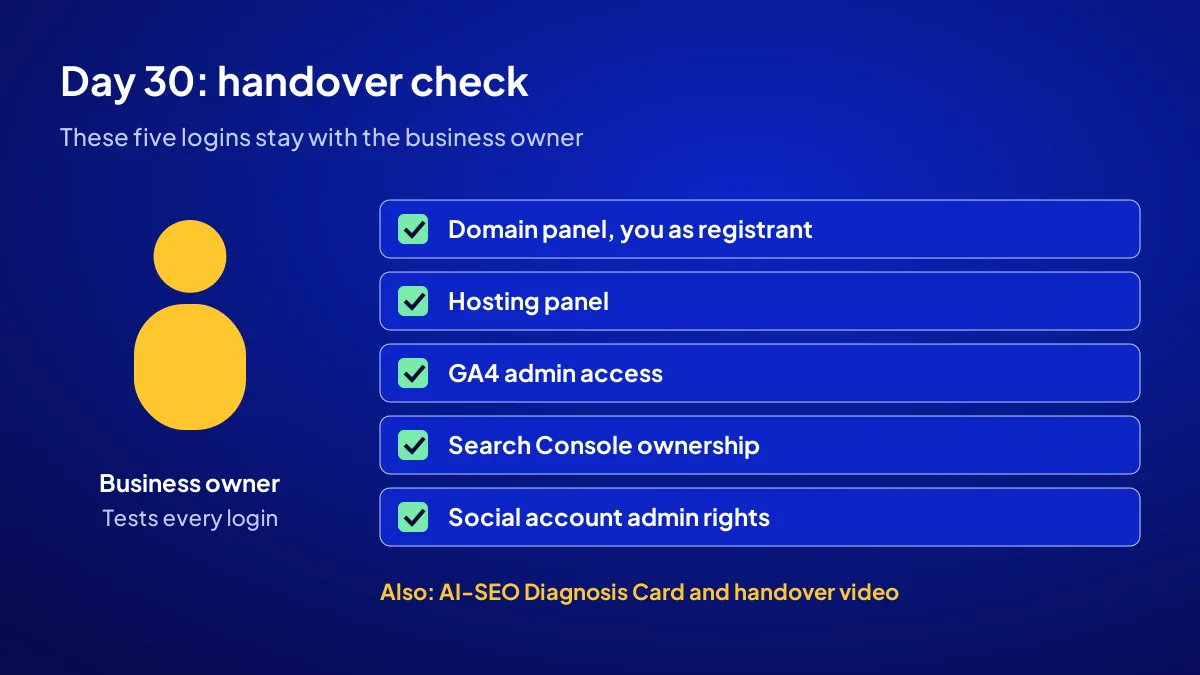
Day thirty is handover day, and you should receive a list, not a promise. The table below sums up each of the 9 steps in a single row. If any check is not a “yes”, the handover is incomplete. The handover also includes an AI-SEO Diagnosis Card and a handover video showing how to run the site.
| Step | Day | Threshold / check |
|---|---|---|
| 1. Name and domain | 1–2 | Under 15 characters, reads aloud cleanly |
| 2. Domain and hosting | 3 | In your name, padlock on |
| 3. Business Profile | 3 | Application sent |
| 4. Website | 4–12 | 18 pages, 2 clicks max |
| 5. WhatsApp Business | 5 | 6 quick replies |
| 6. Social accounts | 6–14 | 3 accounts, 3 posts each |
| 7. GA4 and Search Console | 15–17 | 2 checks passed |
| 8. Structured data | 18–20 | 4 fields match the profile |
| 9. Content pipeline | 10–30 | 6 groups × 18 articles |
The most common mistake: leaving the Business Profile application until the site is finished. Verification depends on Google, can take several days and slips past day 30. You are missing from the map in opening week, and the till stays quiet.
If you want this list done for you
To have all nine steps built in one place, at a fixed price and on a written schedule, see the Start a Business Online for TRY 36,000 campaign page. Places are limited to 12 businesses.
Quick Summary
- Put waiting items first: the Business Profile application goes out on day 3.
- Domain and hosting are registered in the owner’s name.
- The site has 18 pages, each within 2 clicks.
- Six quick replies on WhatsApp, same name and image on three social accounts.
- Tracking and structured data go in before opening.
- 108 articles split into 6 groups of 18.
Short Glossary
Structured data: Structured data is code markup used to tell search engines a business’s name, hours and area in a machine-readable form.
Sitemap: A sitemap is a file used to tell Google about all the pages on a site in one go.
Critical path: The critical path is a planning concept used to show which items will delay the whole schedule if they slip.
Next Step
You can follow the list yourself or have it built in one place. To reserve one of the places, apply to the Start a Business Online campaign and get your name and plan proposal.
Frequently Asked Questions
Source: Google Business Profile Help — Verify your business on Google
Sık Sorulan Sorular
Admin access to the domain, hosting, GA4, Search Console and social accounts must stay with the owner. In the campaign, the domain is registered in the customer’s name. On handover day, try each of those five logins yourself.
In the campaign, the setup schedule is given to you in writing once the project plan is approved. After you apply, you receive a name and plan proposal and a place is reserved for the setup. Applications are open for 30 days, the last day is 1 November 2026.
Verification depends on Google and can take a few days. Google says you may need to wait up to 5 business days for it to complete. That is why the application goes out in the first days.
Yes. Without a shop, the business appears with a service area. That way you start measuring demand before you sign a lease.
Updated: October 2026