Local ad types compared: maps, search and social ads side by side for a new business
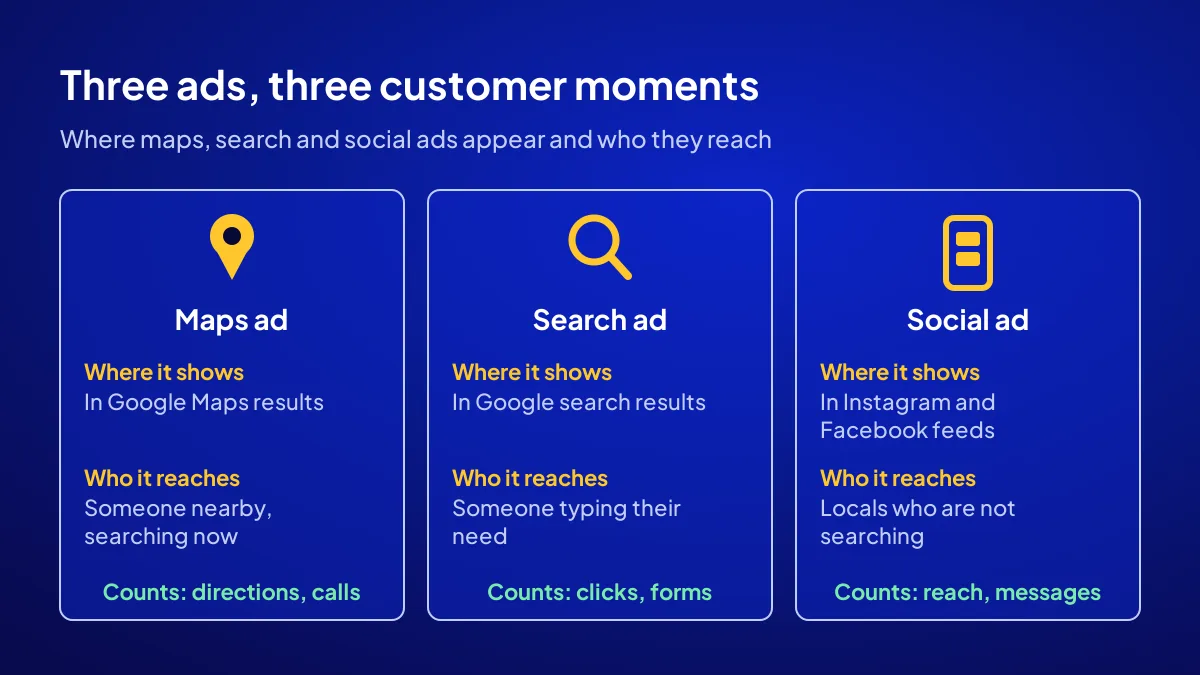
A local ad types comparison comes down to three options: maps ads, search ads and social ads. A maps ad shows your address to someone nearby who is searching right now. A search ad appears as an answer to someone who has typed their problem into Google. A social ad reaches people who live around you but are not looking for you yet. In all three you set the budget and pay the platform directly.
For a newly opened business with a street address, the winner is usually the maps ad; the reasons and exceptions are in the tables below. First come the criteria, then the three types side by side, then which business suits which. For the whole first 90 days, see the new business visibility guide.
Which 6 criteria do we weigh the three ad types by?
BU BÖLÜMÜN ÖZETİ
- Intent and distance
- Prerequisite and fit
- Measurement and budget
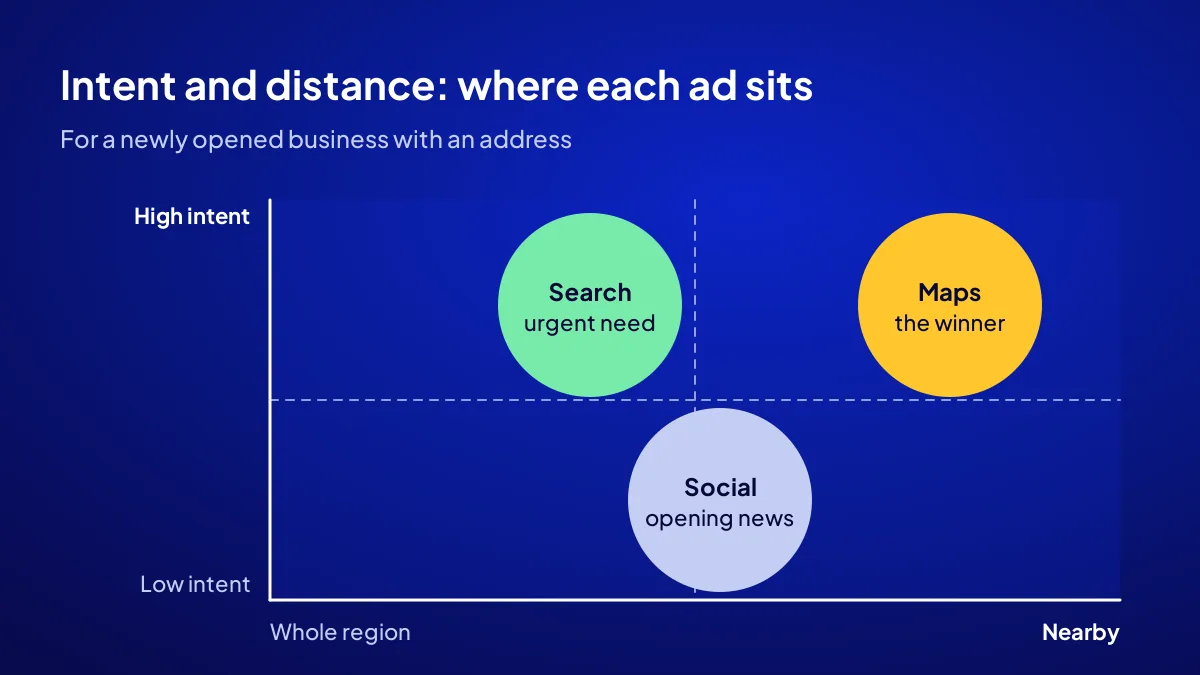
Six criteria: customer intent, where the ad appears, setup prerequisite, fit for a new business, measurable result and budget control. The first two weigh most. In local trade, two things bring a customer in: needing something now and being close to you. A comparison made without criteria mistakes the cheapest click for the best ad.
Intent and distance
A searcher has stated a need; a scroller has not. Distance matters just as much. For a bakery opening in Beylikdüzü, a click from Kadıköy is money down the drain.
Prerequisite and fit
Each type needs groundwork: a verified profile, a web page or good visuals. In a new business that groundwork is thin, with few reviews and few photos. So start with the type whose groundwork is ready.
Measurement and budget
Maps ads count directions and calls, search ads count clicks and forms, social ads count reach and messages. The budget is yours in all three. What matters here is which result each type counts.
What does a maps ad give a new business?
A maps ad is a Google Ads ad with a location asset showing on Google Maps. Google’s help page says your locations can appear beside, above or below search results on Google Maps, including the app. To do this, a location source such as your Business Profile is linked to the ad account. The customer gets directions or calls you with one tap.
Strength: intent and distance at once
Someone typing “hair salon” into Maps has stated a need and is nearby. No other type catches both together. It brings the customer who never walks past your shop but lives two streets away.
Weakness: only as strong as the profile
The ad shows your profile. A profile with three reviews and no photos may not get clicked even when promoted. Getting onto the map at street and district level is covered in district-level business visibility.
Who does a search ad answer?
A search ad answers someone who typed their problem into Google: “emergency plumber”, “boiler service”, “kids’ haircut”. Location targeting shows it only where you serve. It takes the customer to a web page, a call button or a form. That is why it needs a good landing page.
Strength: urgent need
Someone with a leak does not browse Instagram; they search. For services that go to the customer’s address, search is the fastest door. Even if nobody walks in, the phone rings.
Weakness: no page, wasted money
If the click lands on a slow page with a hidden phone number, the visitor leaves. Before search ads, you need a mobile page with a call button.
How does a social ad reach customers who are not searching?
A social ad reaches people on Instagram and Facebook who live in your target area but are not looking for you. On Meta you can show an ad around an address or within a region. Its strength is visual: a plate, a haircut, a shop window. Its weakness is intent; the person may not need you right now. It is tailor-made for an opening announcement.
Strength: “a new place just opened here”
The neighbourhood does not know you have opened. Nobody searches for a place they have never heard of. A social ad carries the news and sparks the first visit.
Weakness: likes do not ring the till
Likes and reach look big but are not sales. Without conversion tracking on Meta, you cannot read results. Social ads that count no messages or visits are like a crowd glancing at the window and walking on.
Three types side by side: which does what better?
The table applies the six criteria to the three types. “Strong” and “weak” are written for a new business with a street address. For services that go to the customer, the search column strengthens; for a shop selling visual products, the social column does. This is a comparison of character, not of numbers.
| Criterion | Maps ad | Search ad | Social ad |
|---|---|---|---|
| Customer intent | Strong: searching now | Strong: typing the need | Weak: scrolling |
| Distance | Strong: shows what is near | Medium: region targeted | Medium: region targeted |
| Setup prerequisite | Verified profile | Mobile landing page | Photos and video |
| Fit for a new business | Weaker with few reviews | Works at once if the page is good | Strong for an opening |
| Result measured | Directions, calls | Clicks, calls, forms | Reach, messages |
| Best for | Walk-in shop | Service at the customer’s address | Visual product, new opening |
Which ad type suits which business?
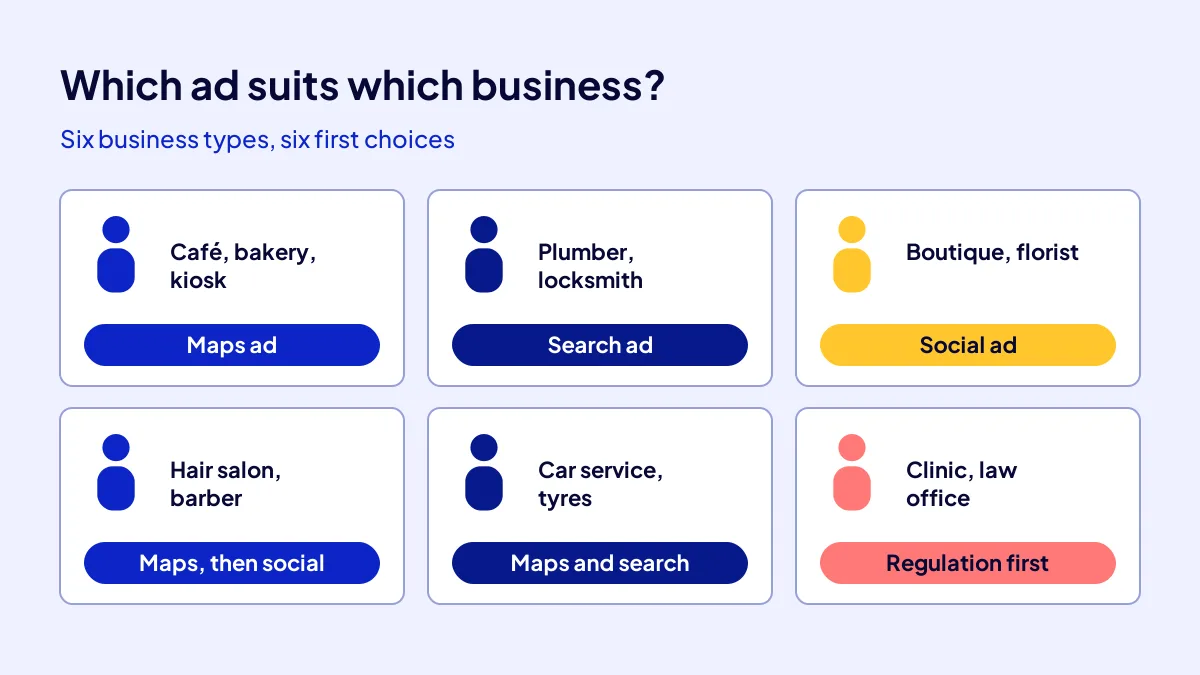
The type of business decides. Maps leads for walk-in shops, search for services at the customer’s address and social for visual products. The six profiles below are business types often opened in Istanbul, not named businesses. Find the line closest to yours.
- Café, bakery, kiosk: maps ad. The customer is near, hungry and deciding now.
- Plumber, locksmith, boiler service: search ad. Nobody walks in; the phone must ring.
- Boutique, florist: social ad. Photos sell the product and the opening news must spread.
- Hair salon, barber: start with maps, announce the opening on social.
- Car service, tyre shop: maps and search together. Urgent and direction-led.
- Dental clinic, law office: regulation first. Check the health advertising regulation or your bar’s professional rules.
What to check first in regulated professions
Advertising in health and law is restricted. Price ads, before-and-after photos or discount promises may break the rules. Read the Regulation on Promotion and Information Activities in Health Services, or your bar association’s rules, before choosing a type.
If channel choice still confuses you
The broader choice, including non-ad channels, is in which channel do I need.
Which wins for a newly opened business, and why?
For a new business with a street address, the maps ad wins. Three reasons: it catches intent and distance at once, it measures actions close to the till such as directions and calls, and it builds on the free Business Profile. If the profile is weak, strengthen it first. For services at the customer’s address, search wins; social is the opening week’s supporting act.
Quick Summary
- Maps ads catch intent and distance at once.
- Search ads lead for urgent needs and services at the customer’s address.
- Social ads carry opening news to a neighbourhood that is not searching.
- For a new business with an address, the maps ad wins.
- In health and law, read the regulation and bar rules first.
- In all three the budget goes to the platform; setup is separate.
Short Glossary
Location asset: A location asset is an extension used to show a business’s address and map position in a Google Ads ad.
Location targeting: Location targeting is a setting used to show an ad only to people in a chosen area.
Landing page: A landing page is the web page used to greet someone who clicks an ad and steer them to one action.
Next Step
Found the line that fits your business? Time to turn it into a recipe. Apply for the Get Visible Online campaign and learn whether the Google Ads or Meta Ads Recipe fits.
Sık Sorulan Sorular
Visual product: social. Urgent need: search. While the shutters are going up, test one type for 4 weeks, count the results, then expand. The opening order of non-ad channels is in where a new business should appear first.
All three send the budget to the platform; setup is a separate cost. All nine free and paid channels are in the business visibility cost table.
In Adapte’s Get Visible Online campaign, the Google Ads Recipe sets up the maps and search side and the Meta Ads Recipe the social side. TRY 36,000 + VAT, upfront and fixed, for 3 months; the ad budget is paid separately to the platform. To find your recipe, fill in the needs form on the Get Visible Online campaign page.
To use location assets in Google Ads, a location source is linked to the ad account; for a local business this is usually the Business Profile. It should be verified and up to date.
No. TRY 36,000 + VAT is the package fee. With the Google Ads or Meta Ads Recipe, the ad budget is paid separately to Google or Meta.
No need. For a new business, testing one type for 4 weeks and counting results tells you more than opening all three on small budgets.
Updated: October 2026