
My business is not showing on Google: 9 steps to check and fix it
If your business is not showing on Google, first pin down which search you are missing from: your name, your trade or the map. Missing from a name search means Google does not know you; missing from a trade search means it knows you but does not put you first. Missing from the map points to your Business Profile.
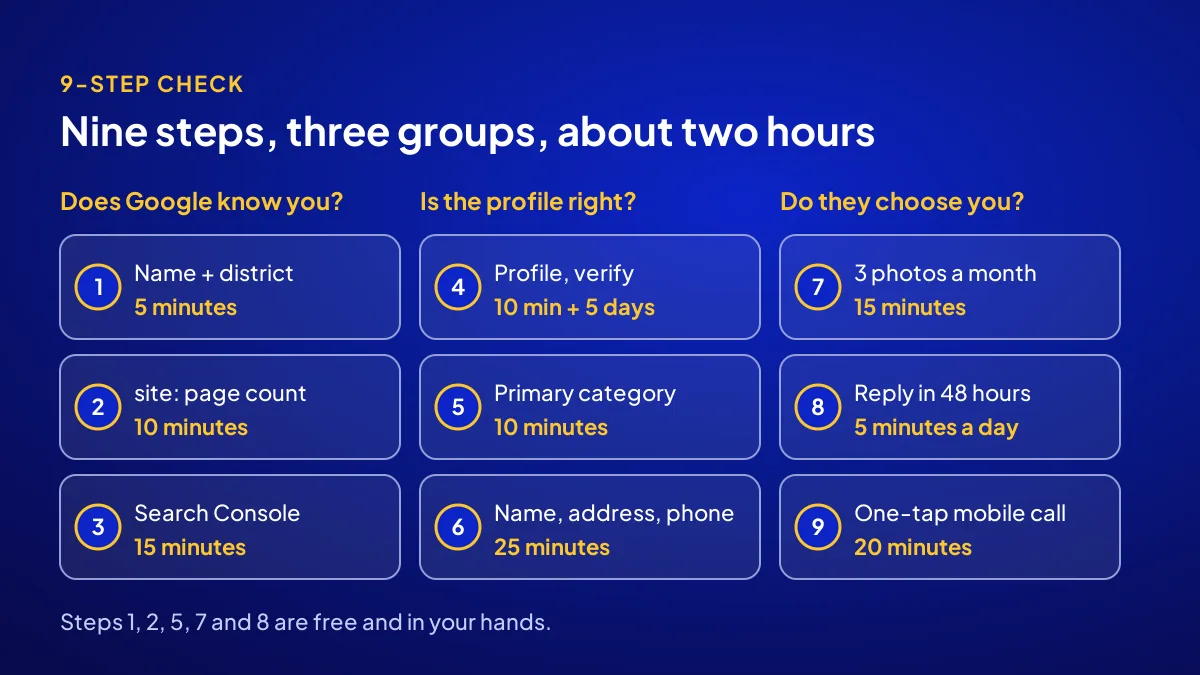
You can run this check yourself in 9 steps, in about 2 hours. Every step has a time, a number or a threshold. Part of the fix is free and in your hands; part of it takes 3 months of skilled work.
Which search are you actually missing from?
BU BÖLÜMÜN ÖZETİ
- Missing when people search your name
- Missing when people search your trade
- Missing from the map altogether
In a private tab on your phone, run three searches: your exact name, “trade + district” (say “hairdresser Beylikdüzü”) and the same trade search in Google Maps. Mark each “shows” or “missing”. Those three notes send you to the right step.
Missing when people search your name
Google has no record of you, or a scattered one. Start with steps 1, 2 and 4.
Missing when people search your trade
Google knows you but finds the shop next door more relevant. Start with steps 5, 7 and 8. Shutters up, nobody walking in: look here.
Missing from the map altogether
The profile may be missing, unverified or suspended. Go straight to step 4.
What 3 factors does Google use to rank local results?
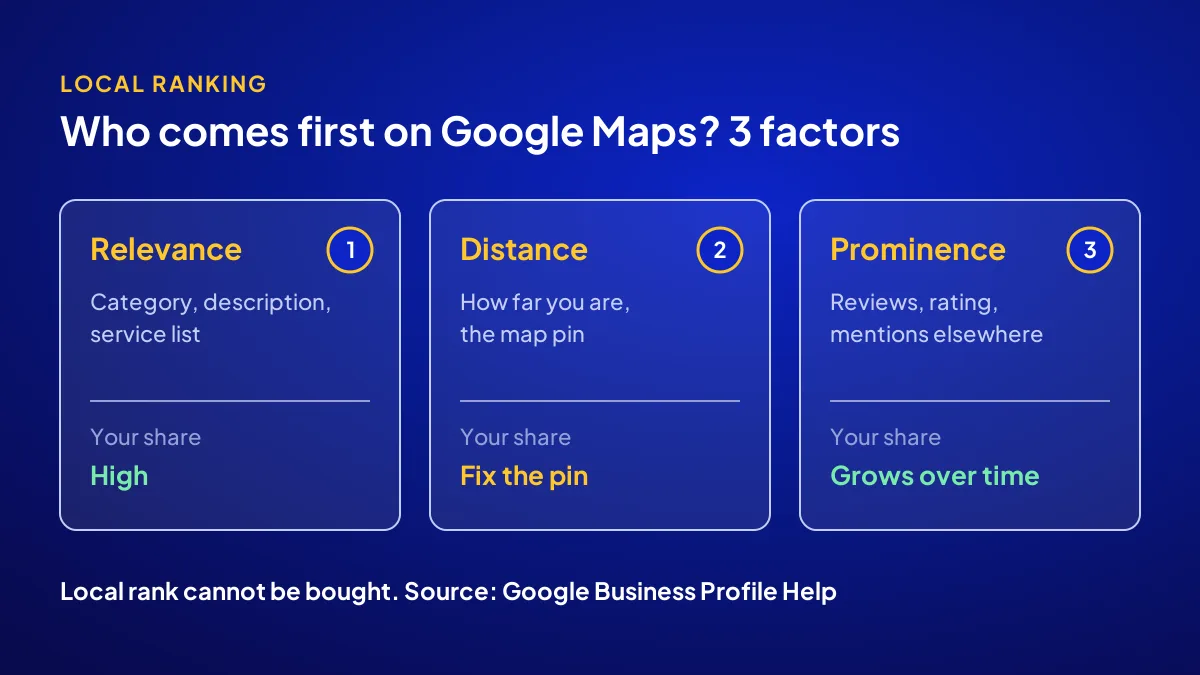
Google Business Profile Help names three local ranking factors: relevance, distance and prominence. Relevance is how well your profile matches the search; distance is how far you are from the person searching. Prominence is how well known you are; reviews and rating feed it. Google also states that better local ranking cannot be bought.
Distance: the one factor you cannot change
You cannot change distance without moving the shop. But you can make sure the map pin sits on the right door.
Steps 1–3: does Google know you at all?
BU BÖLÜMÜN ÖZETİ
- Step 1: search your name with your district (5 minutes)
- Step 2: count how many pages are indexed (10 minutes)
- Step 3: set up Search Console and inspect the home page (15 minutes)
These three steps check whether Google has a record of you; 30 minutes in total. No website? Skip to step 4. You do not need a site to appear on the map, but customers check it before they decide.
Step 1: search your name with your district (5 minutes)
Type “business name + district” in a private tab. Note any listing on page one that gets confused with you: an old address, a closed branch, a similar name.
Step 2: count how many pages are indexed (10 minutes)
Search “site:yourdomain.com”. The result count roughly shows your indexed pages. Threshold: at least your home and contact pages appear. Zero means your site does not yet exist for Google.
Step 3: set up Search Console and inspect the home page (15 minutes)
Search Console is free. Verify your domain, then enter your home page in the URL Inspection tool. If it is not on Google, request indexing.
Most common mistake: A redesign leaves old page addresses without redirects. Years of visibility vanish overnight. After any redesign, list the old addresses first.
Steps 4–6: is your profile set up correctly?
BU BÖLÜMÜN ÖZETİ
- Step 4: does a profile exist, and is it verified? (10 minutes + waiting)
- Step 5: choose one clear primary category (10 minutes)
- Step 6: write name, address and phone the same way in 3 places (25 minutes)
Missing the map usually comes down to the profile: never created, never verified or wrongly categorised. These steps take about 45 minutes on your side; Google says verification review can take up to 5 business days.
Step 4: does a profile exist, and is it verified? (10 minutes + waiting)
Go to business.google.com. Create a profile if none exists, or check its verification status. An unverified profile shows you no performance data. The full setup is in the 6-step Google Business Profile setup guide.
Step 5: choose one clear primary category (10 minutes)
There is one primary category, and it drives relevance. Pick the narrowest one that fits. Threshold: one primary, extras only for work you really do.
Step 6: write name, address and phone the same way in 3 places (25 minutes)
Profile, website and social accounts should carry the exact same name, address and phone. The trade calls this NAP consistency. When one place says “Cad.” and another says “Caddesi”, Google has a harder time matching you as one business.
Steps 7–9: do customers choose you once they see you?
BU BÖLÜMÜN ÖZETİ
- Step 7: at least 3 new photos in the last 30 days (15 minutes)
- Step 8: reply to reviews within 48 hours (5 minutes a day)
- Step 9: open your site on a phone and make calling one tap (20 minutes)
Customers spot you in a list and decide in seconds. These steps feed prominence and clicks. Adapte’s own Search Console data shows 1,699 clicks against 142,296 impressions over 3 months. Being seen and being chosen are separate jobs.
Step 7: at least 3 new photos in the last 30 days (15 minutes)
Shopfront, interior, the work itself. Google lists photos among its local ranking tips. Three a month is the threshold we use.
Step 8: reply to reviews within 48 hours (5 minutes a day)
Replying to reviews is on the same list. Answer a bad review calmly, briefly, with a fix on offer. New customers read your manner from that reply.
Step 9: open your site on a phone and make calling one tap (20 minutes)
In Adapte’s data, 1,267 of 1,699 clicks come from mobile, roughly three quarters. No call or WhatsApp button on the first screen, and the customer moves on before a second tap. We look at what a site is really for in what does my website actually do.
Which symptom points to which step?
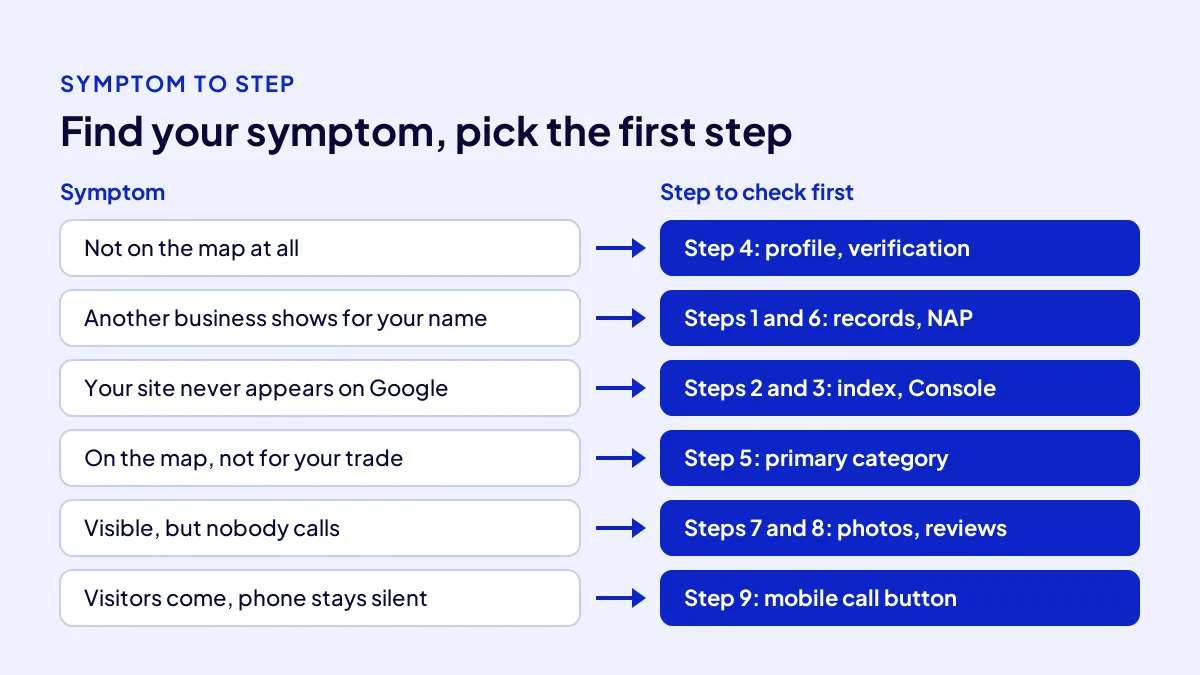
This template is a shortcut from symptom to step. Find your situation on the left, start with the middle step and book the time on the right. Rows run in order of importance.
| Symptom | Step to check first | Time on your side |
|---|---|---|
| You are not on the map at all | Step 4: profile and verification | 10 minutes + up to 5 business days of review |
| A different business shows for your name | Steps 1 and 6: records and NAP | 30 minutes |
| Your site never appears on Google | Steps 2 and 3: index and Search Console | 25 minutes |
| On the map, but not for your trade | Step 5: primary category | 10 minutes |
| Visible, but nobody calls | Steps 7 and 8: photos and reviews | 15 minutes a month + 5 minutes a day |
| Visitors come, the phone stays silent | Step 9: mobile and contact button | 20 minutes |
Fix it yourself, or use a recipe?
Steps 1, 2, 5, 7 and 8 are free. With no site, a site that breaks on a phone or a messy profile, the work takes weeks. The Website Recipe in the Get Visible Online campaign covers exactly this: a mobile-friendly sales page, contact buttons, Google Business Profile, basic SEO and visitor tracking.
Do it yourself if
Your profile is live, your site works on a phone and only upkeep is missing. One hour a month gets the till ringing again.
Use a recipe if
You have no site, or three symptoms at once; one hand building it all costs less. The package is TRY 36,000 + VAT, paid upfront at a fixed price, for a 3-month period. Results are reviewed together after month one. Details and the needs form are on the Get Visible Online campaign page.
Quick Summary
- First separate which search you are missing from: name, trade or map.
- Google ranks local results on relevance, distance and prominence; rank cannot be bought.
- Not on the map? Start with your Business Profile and verification.
- Name, address and phone must match letter for letter everywhere.
- Photos, reviews and a mobile call button turn being seen into being chosen.
- Five of the nine steps are free and in your hands.
Short Glossary
Index: The index is the record list Google uses to hold the pages it can show in search results.
Primary category: The primary category is the profile field used to tell Google a business’s main trade with a single label.
NAP consistency: NAP consistency is the standard used to keep a business’s name, address and phone identical on every platform.
Next Step
Three or more symptoms? Stop chasing them one by one. Fill in the needs form on the Get Visible Online campaign page, and Adapte will suggest the recipe that fits you.
Frequently Asked Questions
Source: Google Business Profile Help — Tips to improve your local ranking on Google
Sık Sorulan Sorular
Category, description and services tell Google what you sell.
We cover the 6 reasons a neighbour shows up on the map while you do not in the guide on why your business is missing from Google Maps.
Map rank cannot be bought; ad space in search results can. That is the Google Ads Recipe, and the ad budget is separate. What each package solves in the first 3 months is compared in the digital marketing packages guide.
The Website Recipe covers a mobile-friendly sales page, contact buttons, Google Business Profile, basic SEO and visitor tracking. That maps to steps 2 to 6 and step 9.
No. Google states local ranking cannot be bought. Money buys ad space in search results, paid to Google separately.
There is no fixed date and no guarantee. Profile verification review can take up to 5 business days. In the campaign, numbers are reviewed together at the end of month one.
Updated: October 2026