
KOSGEB Entrepreneur Support Programme runs applications via e-Devlet, how do steps work?
Applications to the KOSGEB Entrepreneur Support Programme go through the e-services area at the top right of the KOSGEB website, using an e-Devlet password, and Business Setup Support accepts applications on a rolling basis (KOSGEB programme page, accessed 13 October 2026). KOSGEB is Türkiye’s Small and Medium Enterprises Development Organization, and e-Devlet is the Turkish government’s single sign-on portal for public services. Before you apply, your business must be registered and active in the KOSGEB Database and hold a current Business Declaration.
What this means for you: the hard part is not the form, it is the records behind it. If your database entry, Business Declaration and electronic notification address are not ready, you cannot move forward. The official form does not ask for a “business plan”; Business Setup asks for “information on the business idea”, and Business Development asks for a “project information document”.
Through which channel, and in what order, do you apply to the KOSGEB Entrepreneur Support Programme?
BU BÖLÜMÜN ÖZETİ
- Step 1: Database entry and Business Declaration
- Step 2: Log in with e-Devlet from the e-services area
- Step 3: Choose the right support and the right time window
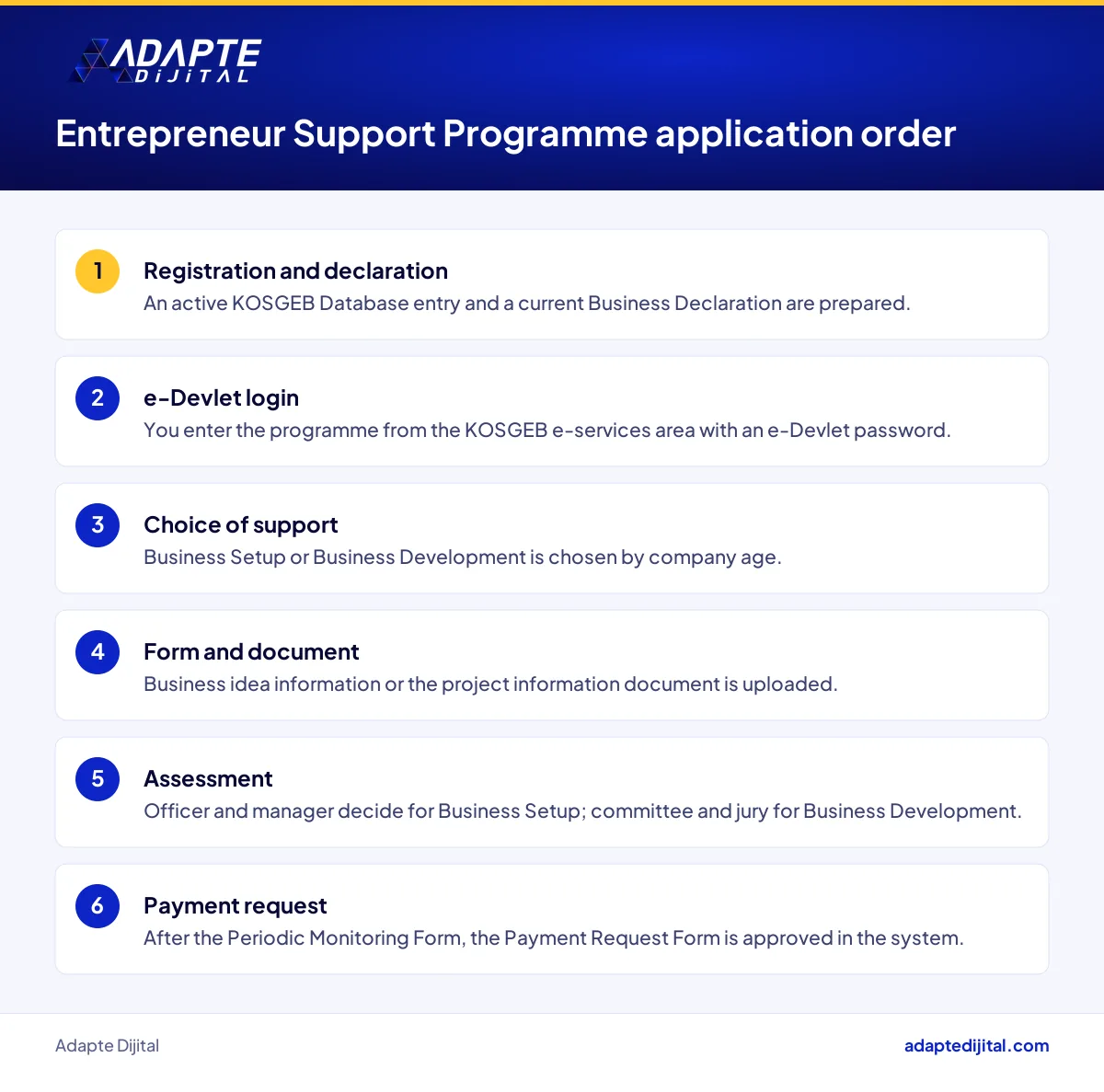
There is a three-step order: registration and declaration first, then the e-Devlet login, then the choice of support and the form. According to the KOSGEB programme page, the e-services address is edevlet.kosgeb.gov.tr and the login uses an e-Devlet password.
Step 1: Database entry and Business Declaration
The common precondition for every support is being registered and active in the KOSGEB Database and holding a current Business Declaration. According to KOSGEB’s guide, the declaration is created in five steps in e-services. Turnover and balance sheet figures come from GİB, the Turkish Revenue Administration, and premium days come from SGK, the Social Security Institution.
Step 2: Log in with e-Devlet from the e-services area
According to the programme page, you enter the Entrepreneur Support Programme from the e-services area at the top right of the KOSGEB website, using your e-Devlet password. The exact menu name is not given, so look for the programme’s name on screen.
Step 3: Choose the right support and the right time window
You apply for Business Setup Support within one year of founding and for Business Development Support within three years. For businesses founded on or after 16 December 2024, the one-year condition for Business Setup is not applied until 31 December 2026. If you do not yet know which support fits you, start with our Entrepreneur Support Programme guide, which compares all three.
What does the KOSGEB Business Setup Support application form ask for, and how is it assessed?
BU BÖLÜMÜN ÖZETİ
- “Information on the business idea” is not a business plan
- The training certificate is not uploaded, it comes from the system
- 15 days to appeal a rejection, 2 months to withdraw
The form is filled in through e-Devlet and asks for four blocks: business details, founder details, a status declaration and information on the business idea. Applications are always open; a responsible officer assesses them and the manager approves. The outcome comes back as acceptance, rejection or a request for correction.
“Information on the business idea” is not a business plan
Here is the common mistake: following online write-ups and preparing a long business plan. The phrase “business plan” does not appear in the current Business Setup Application Form; its second section asks for a document titled “information on the business idea”.
The training certificate is not uploaded, it comes from the system
The name and completion date of the entrepreneurship training are filled in automatically by the system; no separate document is uploaded. Which training is required, and who is exempt, is covered in our article on entrepreneurship training and exemptions.
15 days to appeal a rejection, 2 months to withdraw
Under the programme’s Directive, you can appeal a Business Setup rejection within 15 days of notification. If no support payment has been made, you can withdraw by written notice within 2 months of the start of the support. Without that notice, you are treated as having used the programme.
How do the video, committee and jury work in a KOSGEB Business Development Support application?
BU BÖLÜMÜN ÖZETİ
- The video rule: 100 MB, 10 minutes, three file formats
- Committee and jury score out of 100, with a threshold of 50
- The calendar form gives durations, not dates
Business Development Support follows a calendar: application period, check, committee and jury. Under the Directive, application periods are set in the calendar form. You fill in the project application form, upload the project information document and attachments, then finish by clicking “Approve application”. A project not approved before the deadline is not assessed.
The video rule: 100 MB, 10 minutes, three file formats
According to the programme page, the video must be no larger than 100 MB, no longer than 10 minutes, and in mp4, avi or mpeg format. If you hire a filmmaker, get your own quote.
Committee and jury score out of 100, with a threshold of 50
The assessment starts with a check form, moves to a committee and ends with a jury. Projects with a committee score of 50 or more go to the jury, and projects with a jury score of 50 or more are ranked. Under the Directive, these results cannot be appealed.
The calendar form gives durations, not dates
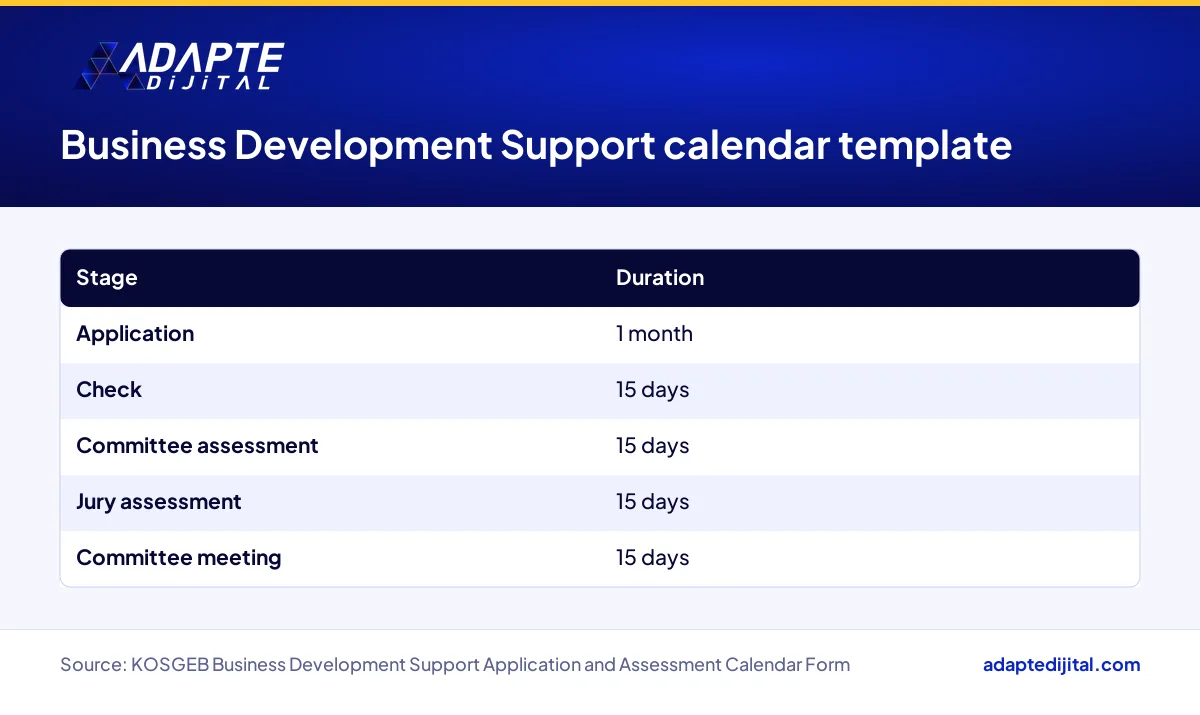
The calendar form sets these durations: application 1 month, check 15 days, committee assessment 15 days, jury assessment 15 days, committee meeting 15 days. Concrete dates for the 2026 application period could not be found, and a note on the form says the Presidency may announce a different calendar. Confirm the date on the official page when a period opens; new period announcements also appear in our grants and incentives news archive.
Which founders does KOSGEB’s e-Devlet application system affect, and how?
BU BÖLÜMÜN ÖZETİ
- Easier: the sole proprietorship with current records
- Harder: the manufacturer preparing a video and project document
- Indirectly affected: accountants
The system rewards founders whose records are in order. In autumn 2026, a young founder opening a sole proprietorship in Istanbul who already uses e-Devlet and electronic notification moves through the Business Setup form without a hitch. A business with scattered records, no UETS address or an outdated declaration gets turned away at the same screen.
Easier: the sole proprietorship with current records
A sole proprietorship enters the national ID number instead of a tax number. If its database entry, declaration and UETS address are current, most of the work is already done.
Harder: the manufacturer preparing a video and project document
A manufacturing workshop applying for Business Development has to turn what happens at the workbench into a video and a project information document. Because the jury score is final, a weak presentation can leave a good project sitting on the shelf.
Indirectly affected: accountants
Accountants often get the first call when the Business Declaration or the payment request documents come up.
What does a KOSGEB application demand on the digital side, from data to electronic notification and video?
The whole application rests on data discipline. The Business Declaration draws on GİB and SGK data, the notification address needs a 15-digit UETS number, and Business Development requires a video within file limits. Payment also runs through the system once support is accepted: after the Periodic Monitoring Form is saved, the Payment Request Form is filled in and approved with documents.
Consistent data is the hidden condition
Turnover at GİB, premium days at SGK and the details in your declaration all have to tell the same story. Keep invoices, contracts and receipts in one digital folder from day one.
The video and the project document are content production
The Business Development video is a 10-minute presentation of your product and your team. Product pages on your website, production photos and your customer list are its raw material.
What should a business owner do this week to prepare a KOSGEB application?
BU BÖLÜMÜN ÖZETİ
- Days one and two: records, declaration and electronic notification
- Midweek: business idea text and status declaration
- End of the week: the checklist
This week, focus on clearing the path to the form rather than filling it in. Check your records, pin down your UETS address and write up your business idea against the form’s headings. If you are eyeing Business Development, outline the video now.
Days one and two: records, declaration and electronic notification
Check that your KOSGEB Database entry is active and your Business Declaration is current. Write down your 15-digit UETS address. If you have a Findeks Business Assessment Report, add it to your file.
Midweek: business idea text and status declaration
Draft the headings of the “information on the business idea” section in part two of the form. Decide what your status declaration covers. Check that your training record shows.
End of the week: the checklist
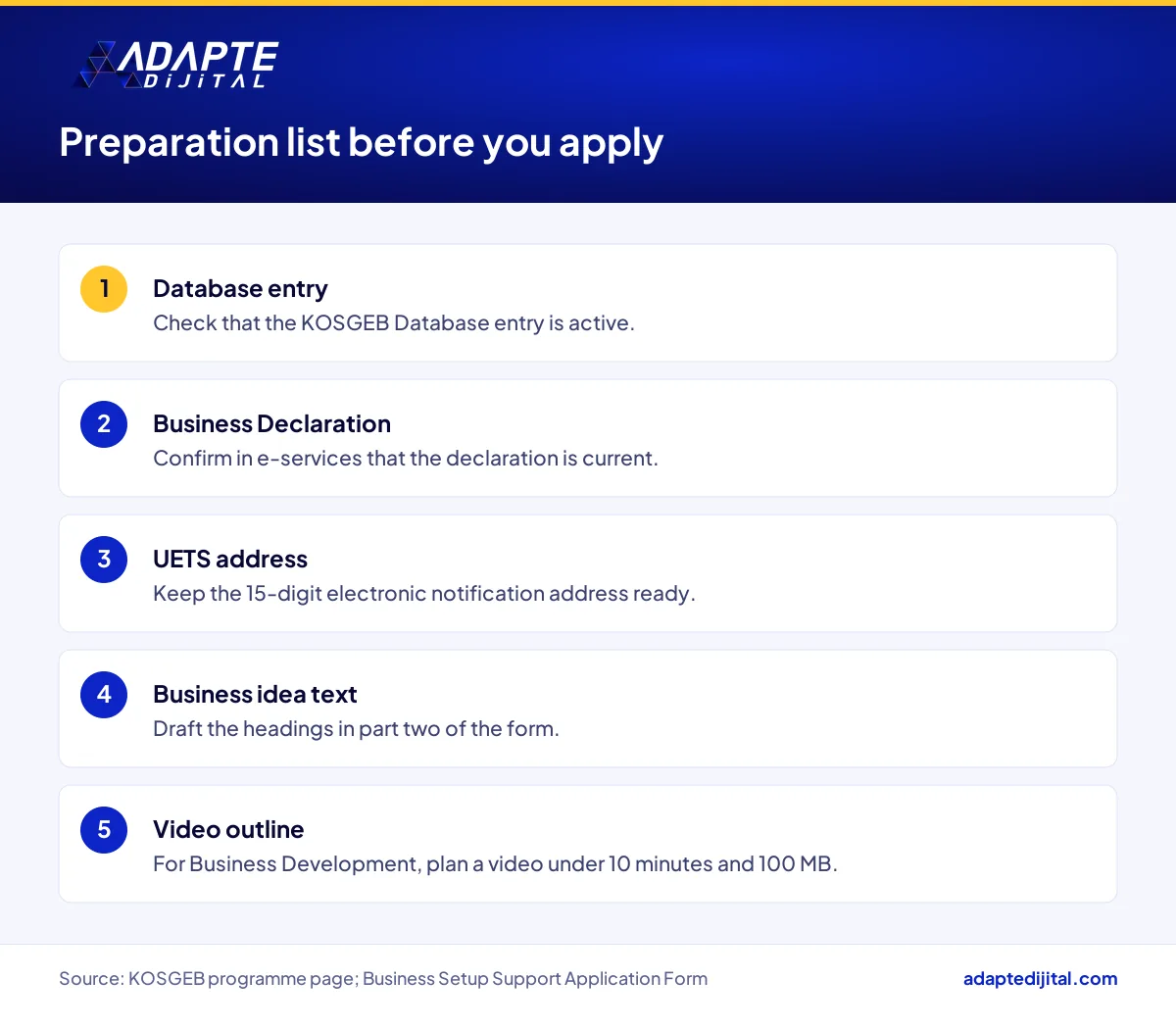
The checklist: (1) database entry active, (2) Business Declaration current, (3) UETS address ready, (4) business idea text written, (5) training record visible, (6) for Business Development, video outline and project information document drafted. Aligning application content with your digital storefront is work we handle in our digital consulting service.
Quick Summary
- You apply from the KOSGEB e-services area using an e-Devlet password (KOSGEB programme page).
- The precondition is an active KOSGEB Database entry and a current Business Declaration.
- Business Setup Support is always open, and a rejection can be appealed within 15 days (KOSGEB Directive).
- The Business Development video must not exceed 100 MB or 10 minutes (KOSGEB programme page).
- In Business Development the committee and jury threshold is 50 points, with no appeal (KOSGEB Directive).
Short Glossary
- UETS
- UETS is the National Electronic Notification System used to receive official notices online in Türkiye.
- Project information document
- The project information document is the official document used to describe the project in a Business Development Support application.
- Payment Request Form
- The Payment Request Form is the system form used to request payment for an accepted support.
Frequently Asked Questions
Next Step
If you want to review your pre-application preparation together, fill in the consult your expert form.
Support amounts and conditions can change; check the current terms on the institution’s official page before applying. This article is not financial or legal advice.
Sources: KOSGEB, Entrepreneur Support Programme (no date on page, accessed 13 October 2026) · KOSGEB Business Setup Support Application Form (dated 5 October 2026) · Business Development Support Application and Assessment Calendar Form
Updated: October 2026
Sık Sorulan Sorular
The form asks for the tax number (the national ID number for a sole proprietorship), the 15-digit UETS electronic notification address, the trade name, the field of activity and the ownership share. The form also covers founder details and a young, veteran, first-degree martyr-relative or disabled status declaration.
The phrase business plan does not appear in the current Business Setup Application Form. Business Setup asks for information on the business idea, and Business Development asks for a project information document.
Under the KOSGEB Directive, you can appeal a Business Setup Support rejection within 15 days of notification.
No. Under the KOSGEB Directive, Business Development Support assessment results cannot be appealed.