
What to check when buying a website: a 9-point pre-purchase inspection list
What to check when buying a website comes down to three things: the traffic is real, the domain is clean and the demand can move to you. Those three headings split into 9 checks. Each check has a threshold, and any check that misses it is a red flag. You finish it before paying, in 7 to 14 days, with read access from the seller.
Look at the account itself, not at screenshots. The list below is the digital version of looking under the counter before you take over a shop. At the end there is a scoring table you can copy.
Which 3 kinds of access should you ask for first?
BU BÖLÜMÜN ÖZETİ
- 1. Search Console view access
- 2. Analytics Viewer role
- 3. Read access to enquiry records
On day one, ask for restricted or full user access in Search Console, the Viewer role in Analytics and read access to 12 months of enquiry records. None of these gives ownership; they only let you see the data yourself. If the seller hesitates, ask why before going further.
1. Search Console view access
Search Console is Google’s free tool showing how often a site appears and gets clicked in search. It keeps up to 16 months of performance data. A restricted user cannot change settings, so the seller takes no risk.
2. Analytics Viewer role
Analytics counts where visitors come from and what they do. The Viewer role reads reports and deletes nothing. If Search Console clicks and Analytics visits move the same way, the data is consistent.
3. Read access to enquiry records
Form notifications, call logs or the order list. If you buy a site for its demand, you need to see that demand’s trail. A copy with personal data masked is enough.
Checks 1 to 3: is the traffic real and balanced?
BU BÖLÜMÜN ÖZETİ
- Check 1: 12-month trend
- Check 2: Page spread
- Check 3: Non-brand query share
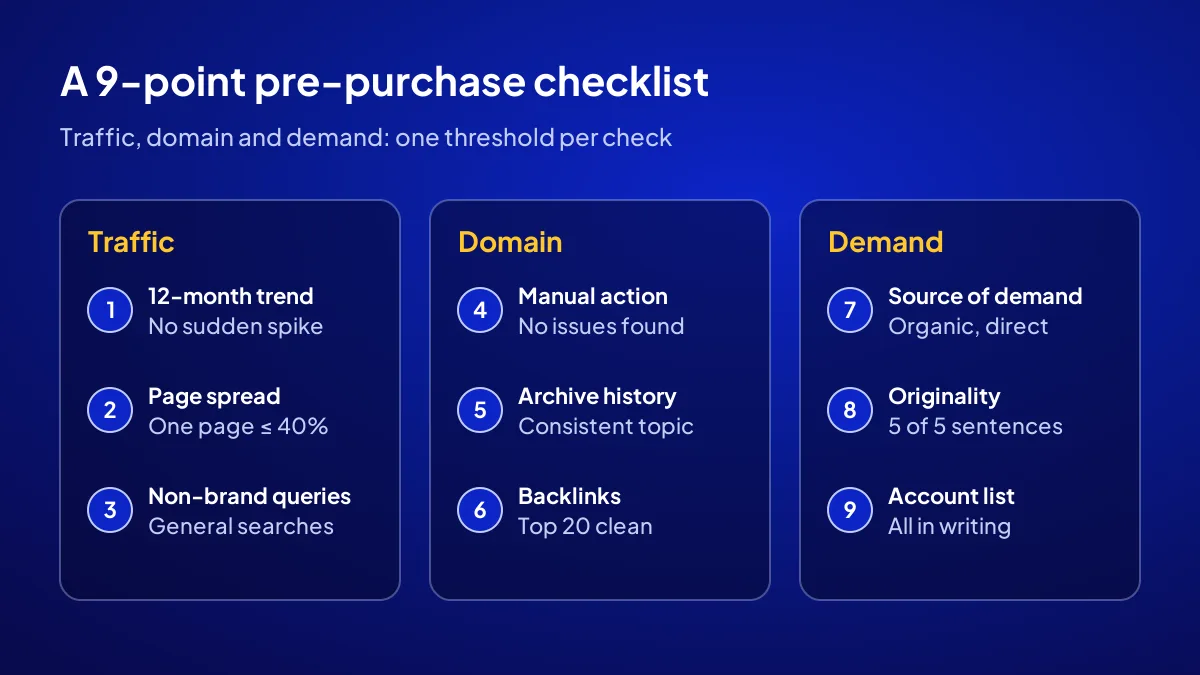
At least 12 months of Search Console data tells you whether traffic is real. A wavy but steady line is a good sign. A sudden jump in the last 2 months needs explaining, because traffic pumped up before a sale brings no customers. Traffic also should not lean on one page or one query.
Check 1: 12-month trend
Set the date filter to 12 months, then 16. Threshold: the last 3 months’ average clicks stay above half the previous 9 months’ average. Ask for any drop to be explained in writing.
Check 2: Page spread
In the Performance report’s Pages tab, no single page should bring over 40 percent of clicks. Otherwise the till stops the day that page slips.
Check 3: Non-brand query share
In the Queries tab, set aside searches containing the site name. Real demand comes from general queries typed by people who do not know the name. That is what you are buying, not the owner’s circle of friends.
Checks 4 to 6: is the domain’s history clean?
BU BÖLÜMÜN ÖZETİ
- Check 4: Manual actions report
- Check 5: Archive history and registration term
- Check 6: Backlink profile
A clean domain history means the trust it has built comes with it. A dirty one means you are buying a penalty or a bad reputation. Look in three places: the Manual actions report, the domain’s old versions in the web archive and the sites linking to it.
Check 4: Manual actions report
Open Security and Manual Actions in Search Console. According to Google’s help page, this report shows whether a manual action applies to the site, and its history. Threshold: no issues detected.
Check 5: Archive history and registration term
Check the domain’s old snapshots in the internet archive. A history of betting, copied or unrelated content is a red flag. Registration should run for at least 12 more months.
Check 6: Backlink profile
A backlink is a link another site gives you. In the Links report, open the top 20 linking sites one by one. Piles of links from meaningless foreign sites are what a once-bitten buyer asks about first.
Checks 7 to 9: can the demand move to you?
BU BÖLÜMÜN ÖZETİ
- Check 7: Source of demand
- Check 8: Originality of content
- Check 9: List of accounts to transfer
It depends on what the demand is tied to. Tied to the domain, the content and the system, it comes with the transfer. Tied to the owner’s personal relationships, the same customers will not walk in whoever opens the shutters. The last three checks tell these apart.
Check 7: Source of demand
Match 12 months of form and call records with Analytics sources. Threshold: most enquiries come from organic search or direct visits. Demand from the seller’s personal phone book does not transfer.
Check 8: Originality of content
Search Google for one quoted sentence from each of 5 random articles. If the text appears elsewhere, it is copied, which costs rankings and can raise copyright issues.
Check 9: List of accounts to transfer
Domain, hosting, email, Search Console, Analytics and any Google Business Profile. Ask in writing whose name each is in. A gap in the list is a gap on transfer day.
How do you score the 9 checks in one table?
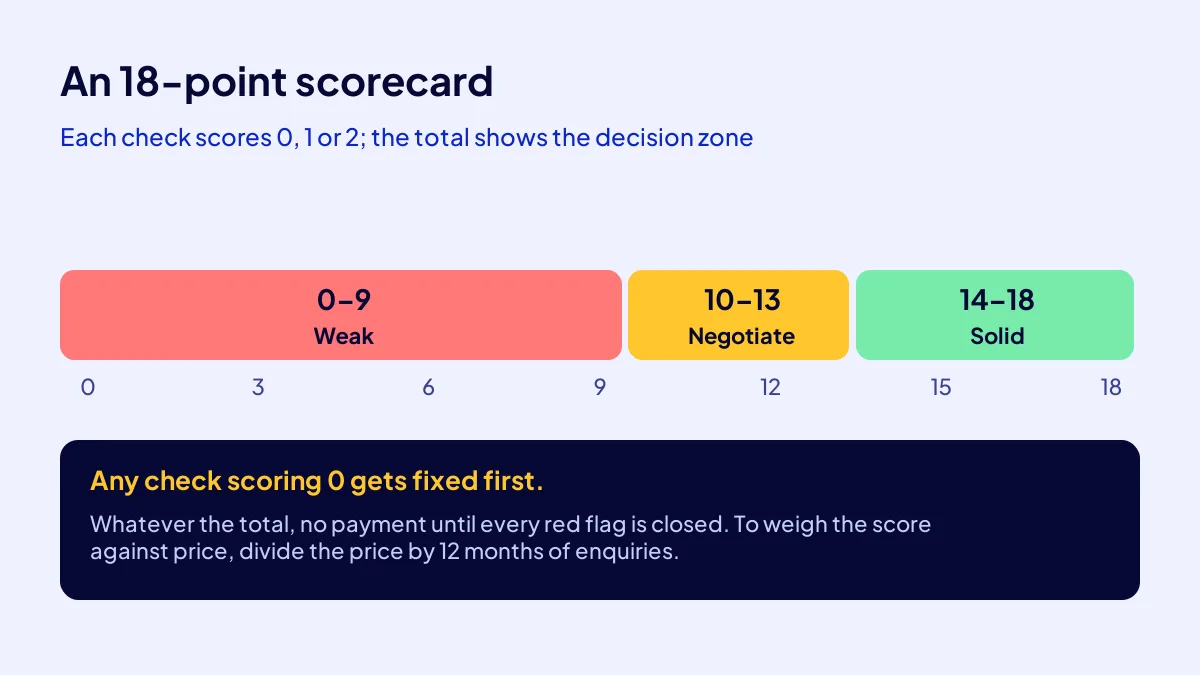
Score each check 0, 1 or 2: 2 passes comfortably, 1 is borderline, 0 is a red flag. Out of 18, 14 or more is a solid candidate; 10 to 13 calls for negotiation and more questions. Any 0 gets fixed first, whatever the total.
| Check | Threshold (2 points) | Red flag (0 points) |
|---|---|---|
| 1. 12-month trend | Last 3 months above half the earlier average | Sudden drop or unexplained spike |
| 2. Page spread | No page above 40% of clicks | One page carries most traffic |
| 3. Non-brand queries | Demand comes from general queries | Clicks only come via the site name |
| 4. Manual action | No issues detected | Active or unresolved action |
| 5. Domain history | Consistent topic, 12+ months registration left | Unrelated or copied history |
| 6. Backlinks | Top 20 links from relevant sites | Piles of links from junk sites |
| 7. Source of demand | Mostly organic or direct | The seller’s personal circle |
| 8. Content originality | 5 of 5 sentences original | Texts also found on other sites |
| 9. Account list | All accounts listed and transferable | Account owner unclear |
Put the score next to the price
Divide the price by the last 12 months’ enquiries to get a takeover cost per enquiry. Say a TRY 90,000 asset collected 360 enquiries: TRY 250 each. This is not an earnings forecast, just a way to weigh two candidates on one scale.
Do the profit sum separately
Enquiries do not become profit on their own. For the sum with your own margin, see is my store profitable.
Most common mistake: Deciding on a screenshot the seller sends. A screenshot hides the date range, filter and source. Ignore any figure you have not seen in your own account.
What drives the price on ASSETOR, and how does the inspection read it?
On ASSETOR, assets are sold in three tiers: Silver at TRY 60,000, Gold at TRY 90,000 and Platinum at TRY 180,000. There are 6 assets in Platinum, 2 in Gold and 6 in Silver. All are running and already collecting demand: e-commerce sites, production businesses or service platforms. The list is the same for every tier; only the depth changes.
Same list, different depth
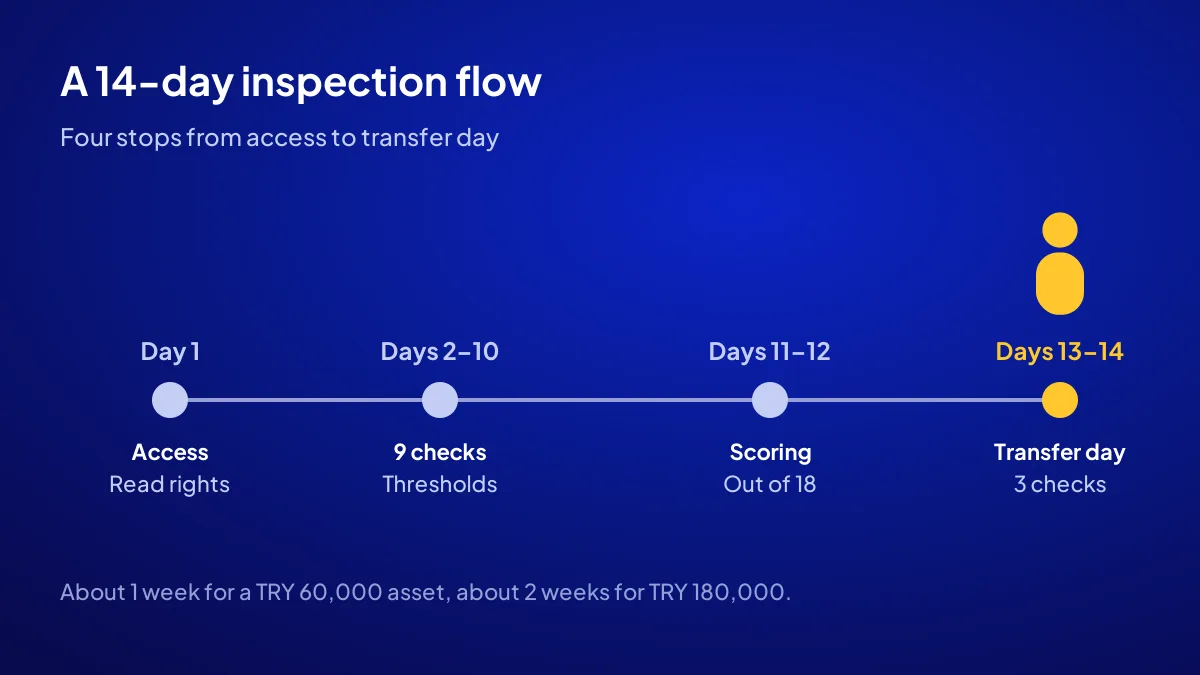
A TRY 60,000 asset takes about a week. For a TRY 180,000 asset, read the same checks over two weeks with longer date ranges. Bigger money, longer look.
Do not expect a guarantee, ask for data
ASSETOR does not guarantee earnings. It gives you the asset’s data to date. To see the assets tier by tier, visit the ASSETOR digital assets for sale page.
Once the inspection is done, what do you check on transfer day?
On transfer day, check that everything you inspected now sits in your accounts, before final payment. The domain is in your name, you own the Search Console property and the previous owner’s verification traces are deleted.
The order of account transfer
The 6-step order, menu by menu, is in how Search Console and Analytics accounts are transferred.
Inspect, choose, take over
ASSETOR’s process is inspect, choose, take over; each step is explained in how ASSETOR works. For building versus taking over, read buying a ready-made online business.
Quick Summary
- Inspect in your own account, not from screenshots.
- No single page should carry more than 40 percent of clicks.
- The Manual actions report should say no issues detected.
- 14 or more out of 18 is a solid candidate; fix any 0-point check first.
- ASSETOR prices are TRY 60, 90 and 180 thousand, with no earnings guarantee.
Short Glossary
Manual action: A manual action is a reviewer’s decision used to demote a site that breaks Google’s rules.
Non-brand query: A non-brand query is the category used for searches by people who do not know the site’s name.
Takeover cost per enquiry: Takeover cost per enquiry is the ratio used to compare candidates: price divided by 12 months’ enquiries.
Next Step
List ready? Browse the digital assets for sale on ASSETOR and ask for read access to the one you like.
Frequently Asked Questions
Source: Search Console Help — Manual actions report
Sık Sorulan Sorular
ASSETOR’s process is inspect, choose, take over. You inspect with read access; on transfer, the domain, site and accounts move to your name and the old owner’s verification traces are removed.
About a week for a TRY 60,000 asset, and about two weeks, with longer date ranges, for a TRY 180,000 asset.
No. The score reads past data only. ASSETOR does not guarantee earnings; decide on your own numbers and situation.
Updated: October 2026