
TÜRKPATENT trademark search step by step: 6 steps, 3 traps and how to read results
A TÜRKPATENT trademark search is free, on the Trademark Search screen of the Turkish Patent and Trademark Office website. You type a candidate name, choose a search type, set a class filter and check each record’s status. Prepared well, the first round takes about 30 minutes.
The search answers one question first: is this name taken or free? It does not promise a registration, and an empty screen can still hide similarity trouble. Below are 6 steps, each with a threshold, and 3 traps.
What should you have ready before you search?
Sit down with three things: three spellings of the candidate name, a list of the goods or services you will sell, and the class numbers that match that list. This takes 15 minutes and is half the job. Unprepared, you celebrate the first empty result and open the shutters too early.
Three spellings: yours, the heard one, the misspelled one
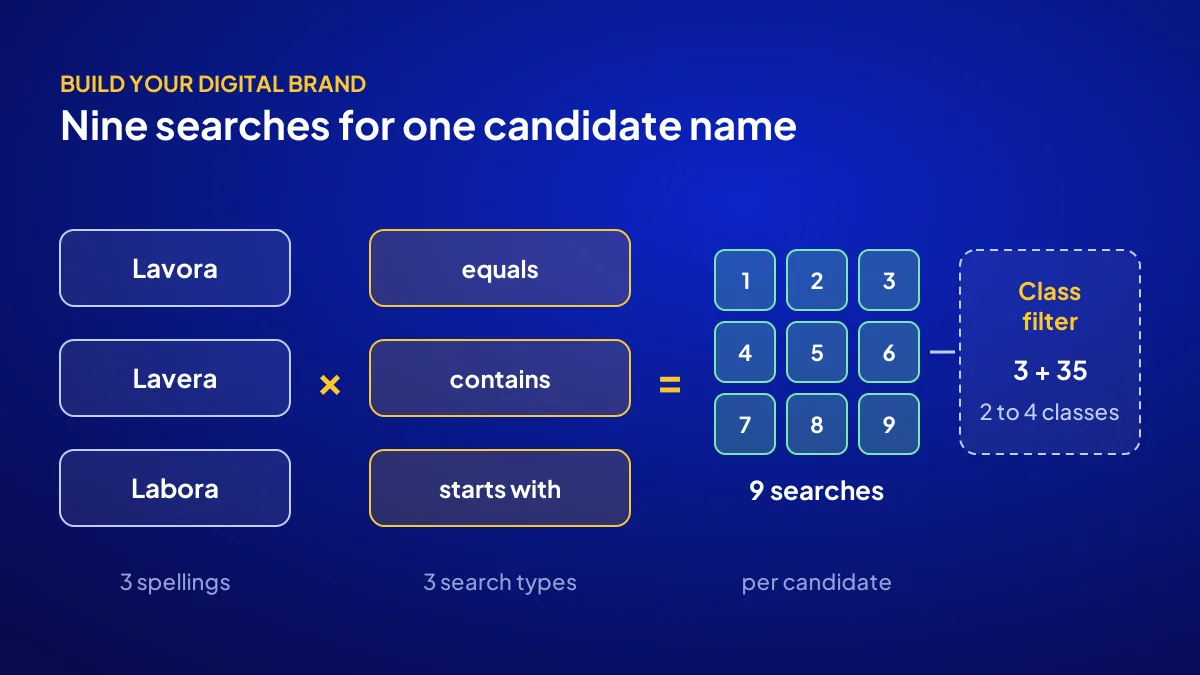
Say you are setting up a handmade soap brand in Beylikdüzü, Istanbul, and your candidate name is “Lavora”. Add sound-alikes such as “Lavera” and “Labora”. Customers hear a name, then type it; similarity starts in the ear.
Time and cost
Free. Preparation 15 minutes, first round 30, results log 15: set aside one hour.
How do you run a TÜRKPATENT search in 6 steps?
The search runs on the Trademark Search screen at turkpatent.gov.tr. The screen offers a name box, a search type (“contains”, “starts with”, “equals”) and a class filter (“all classes” or “specified classes”). If the system asks you to log in, use your e-Devlet credentials. Every step below has a number attached.
- Start with “equals”. Search the exact name across all classes. Time: 2 minutes. Threshold: one exact match in your class knocks the name out.
- Widen with “contains” on the root, e.g. “lavor”. Time: 5 minutes. Over 20 results: move to the class filter.
- Enter your 2 to 4 classes under “specified classes”. Time: 3 minutes.
- Search the other 2 spellings in the same order. 3 spellings × 3 search types = 9 searches. Time: 10 minutes.
- Check mark, classes, status and owner. Time: 30 seconds per result.
- Score each candidate from 0 to 10 with the table below. Time: 10 minutes.
How do you read the statuses in the results list?
Every record has a status, and that status is the language of risk. Whatever the wording, each record falls into one of four groups: registered, in progress, refused or lapsed. The first two are red in your class. The last two are not a green light, but they do not block your path.
| Status group | What it means | For you |
|---|---|---|
| Registered | Protection is active; a mark is protected for 10 years and can be renewed | Red if in your class |
| Application or publication stage | Not registered yet, but counts as an earlier application | Red if in your class |
| Refused or withdrawn | The application has fallen; it does not protect the mark | Amber: find out why it was refused |
| Protection lapsed | A record that was not renewed | Amber: someone may still use the name in the market |
Why the owner column matters
One owner with records in many classes is someone growing a business. Even a different class could cause trouble later.
The application date column
An earlier filing date ranks ahead of you. Until you file, every in-progress record does.
Three traps: why does an empty screen mislead you?
BU BÖLÜMÜN ÖZETİ
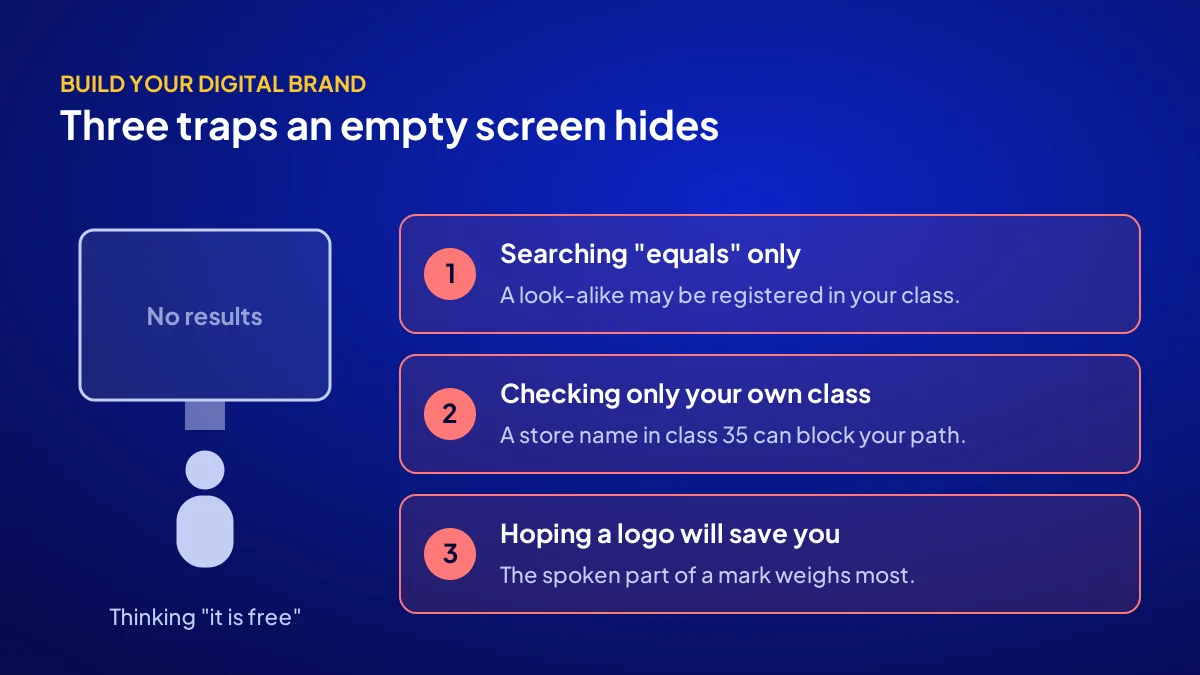
- Trap 1: assuming an empty “equals” result means the name is free
- Trap 2: checking only your own class
- Trap 3: thinking a logo will save you
The most dangerous result is an empty screen, because it relaxes you. When examining an application, TÜRKPATENT refuses on its own motion only identical or indistinguishably similar earlier marks. Looser similarities are examined only if the earlier owner files an opposition. Owners have 2 months after publication in the Trademark Bulletin, so the real test happens there.
Trap 1: assuming an empty “equals” result means the name is free
With no exact match, “Lavera” can still be registered in your class. Sound and look are weighed under likelihood of confusion, so never decide before all 9 searches.
Trap 2: checking only your own class
Soap is class 3, but a store chain holding the name in class 35 crosses your path online. Check neighbouring classes too.
Trap 3: thinking a logo will save you
A similar name in a different logo keeps the risk. The spoken part of a mark weighs most, and a word search does not measure logo shape.
The most common mistake: running the search after the sign and packaging have been printed. If the name is taken, the print shop money goes down the drain.
Score the result: how many points out of 10 does each candidate get?
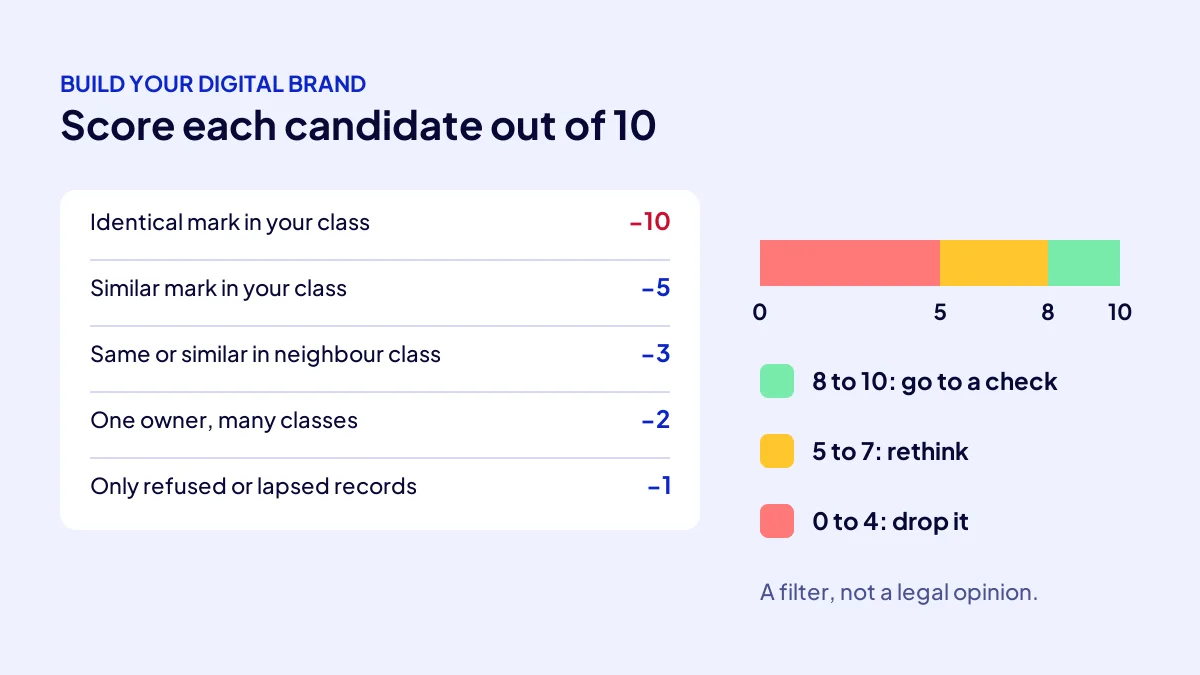
When the search is done, hold a score, not a feeling. Every candidate starts at 10 and loses points for each risky record. 8 or above moves on to an availability check, 5 to 7 gets a rethink, below 5 comes off the list. This is not a legal measure; it shows which names are not worth your time.
| Finding | Deduct |
|---|---|
| Identical mark in your class, registered or in progress | −10 (candidate out) |
| Similar-sounding or similar-looking mark in your class | −5 |
| Same or similar mark in a neighbouring class (e.g. 35) | −3 |
| Same owner holds records in many classes | −2 |
| Only refused or lapsed similar records | −1 |
Worked example
A registered “Lavera” in class 3 takes “Lavora” to 10 − 5 = 5. A similar record in class 35 drops it to 5 − 3 = 2. Out; next candidate.
Where does your own search end and an availability check begin?
Your own search is the elimination round: it clears names that are plainly taken. An availability check weighs similarity, class and bulletin risk in more depth. In the Build Your Digital Brand campaign, a TÜRKPATENT preliminary search and availability check are part of the consulting. It is not a legal opinion or a registration.
Which 6 lines should go in your search log?
A search is worth what you can come back to. Fill in the same 6 lines per candidate, so you show a consultant or partner a summary, not screenshots. We weigh when brand consulting is worth paying for in brand consulting cost.
- Candidate name and its 3 spellings
- Classes searched (e.g. 3, 35)
- Date of the 9 searches
- Risky records found: mark, class, status, owner
- Score (0 to 10) and decision: pass, rethink, drop
- Next step: availability check or a new candidate
Quick Summary
- A TÜRKPATENT trademark search is free; round one takes 30 minutes.
- Run 3 spellings × 3 search types = 9 searches.
- Check neighbouring classes too.
- An empty screen does not mean availability.
- Score candidates out of 10: 8 and above go to a check.
- Search before printing signs or packaging.
Short Glossary
Nice Classification: The Nice Classification is the international list used to sort trademark goods and services into 45 classes.
Likelihood of confusion: Likelihood of confusion is the similarity test used to judge whether consumers would link two marks in their minds.
Trademark Bulletin: The Trademark Bulletin is the TÜRKPATENT publication used to announce applications to the public for opposition.
Next Step
A candidate above 8 points is ready for a deeper check. Apply to the Build Your Digital Brand campaign for the availability check, identity, site and 108 articles in one package. For the 10% coupon, just mention the code when you apply or during the call.
Frequently Asked Questions
Source: Turkish Patent and Trademark Office — Trademark Search
Sık Sorulan Sorular
Trademarks are grouped into 45 classes under the Nice Classification: classes 1 to 34 are goods, 35 to 45 are services. Soap sits in class 3; selling online adds class 35 for retail. Write down your 2 to 4 classes.
Search at least 3; a single name that turns out taken kills all motivation. If one passes 8 points, round one is a success. See where the name sits in the whole build order in building a digital brand.
Filing is an add-on special offer handled with a trademark attorney. We explain how the check differs from registration in what is a trademark availability search. The cost of going without registration is covered in why an unregistered brand is a risk.
TRY 36,000 + VAT, fixed and paid upfront; with 20% VAT that is TRY 43,200, but check the current rate on the invoice. Consulting, identity, a 6-page site and 108 articles are included. There are 12 brand slots and the last day is 1 November 2026. For details, see the Build Your Digital Brand campaign page.
A search is a snapshot of one day. If you delayed filing, rerun the 9 searches before deciding.
No. The TÜRKPATENT preliminary search and availability check in the campaign are a preliminary assessment, not a legal opinion. Registration filing is an add-on special offer handled with a trademark attorney.
No. The search is free; fees arise when you file.
No. A name is protected only once registered, and a similar mark can still oppose in the bulletin period.
Updated: October 2026