
Search Console ownership transfer: moving Analytics and linked accounts in 6 steps
A Search Console ownership transfer happens in two moves: first you become an owner through your own verification, then the previous owner is removed and their verification tokens are deleted from the site. The Analytics property is either moved into your account, or you get the Administrator role and the old users are removed. The whole process is 6 steps and usually takes 1 to 3 working days.
There is one rule about order: the old owner is not removed until the new owner is verified. Otherwise nobody holds the account for a while. Think of changing the lock on a shop you take over: you do not throw away the old key before the new one is in your hand. Below are the menu path, timing and requirements for each step.
How does ownership change hands in Search Console?
Search Console has two kinds of owner: verified and delegated. A verified owner proves ownership with a personal token placed on the site. A delegated owner is added by a verified owner, without a token. In a transfer you need to be a verified owner, because delegated ownership stays tied to the person who granted it.
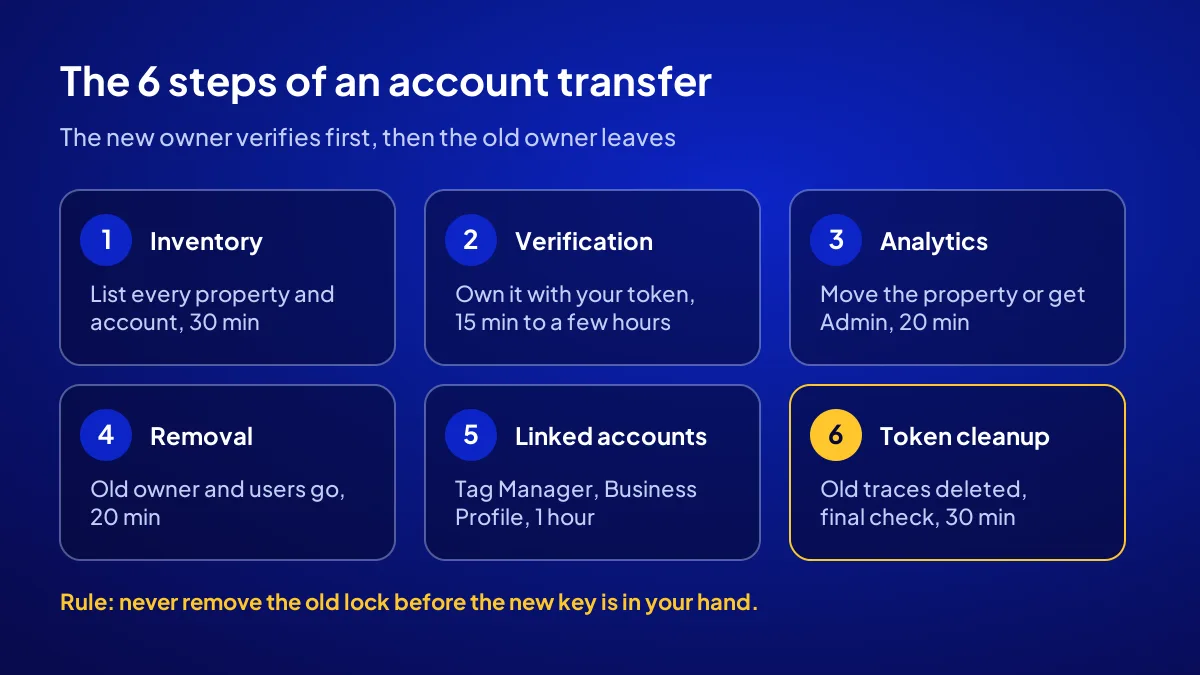
What are the 6 steps, in order and with timings?
Steps one to four transfer Search Console and Analytics, step five gathers the other linked accounts and step six locks the door. Timing depends on how fast the seller responds; the times below assume both sides work the same day.
- Account inventory (30 minutes): Search Console properties, Analytics property, Tag Manager, Business Profile, domain and hosting.
- Your Search Console verification (15 minutes to a few hours): DNS changes may need time to spread.
- Administrator role or property move in Analytics (20 minutes).
- Removing the old owner and users (20 minutes).
- Transferring linked accounts (1 hour): Tag Manager, Business Profile and any ad account links.
- Deleting old tokens and the final check (30 minutes).
How is the new owner added to Search Console?
BU BÖLÜMÜN ÖZETİ
- Domain property: DNS record
- URL-prefix property: file or tag
- Do not settle for delegated ownership
You, the new owner, sign in with your own Google account and add the site as a property. Google gives you a verification token. It is placed on the site or in the domain’s DNS settings, then you press Verify. Once it passes, you are a verified owner and can see up to 16 months of past data.
Domain property: DNS record
A domain property covers the whole site, including subdomains and both http and https. It can only be verified by DNS record. If the domain is still in the seller’s account, they must add the record.
URL-prefix property: file or tag
A URL-prefix property covers one address format. It can be verified with an HTML file, a page tag or the Analytics link. Uploading the file needs hosting access.
Do not settle for delegated ownership
The seller can add you as an owner under Settings > Users and permissions. It is quick, but only a temporary bridge. The transfer is not done until you are verified with your own token.
How is the old owner removed, and where are tokens deleted?
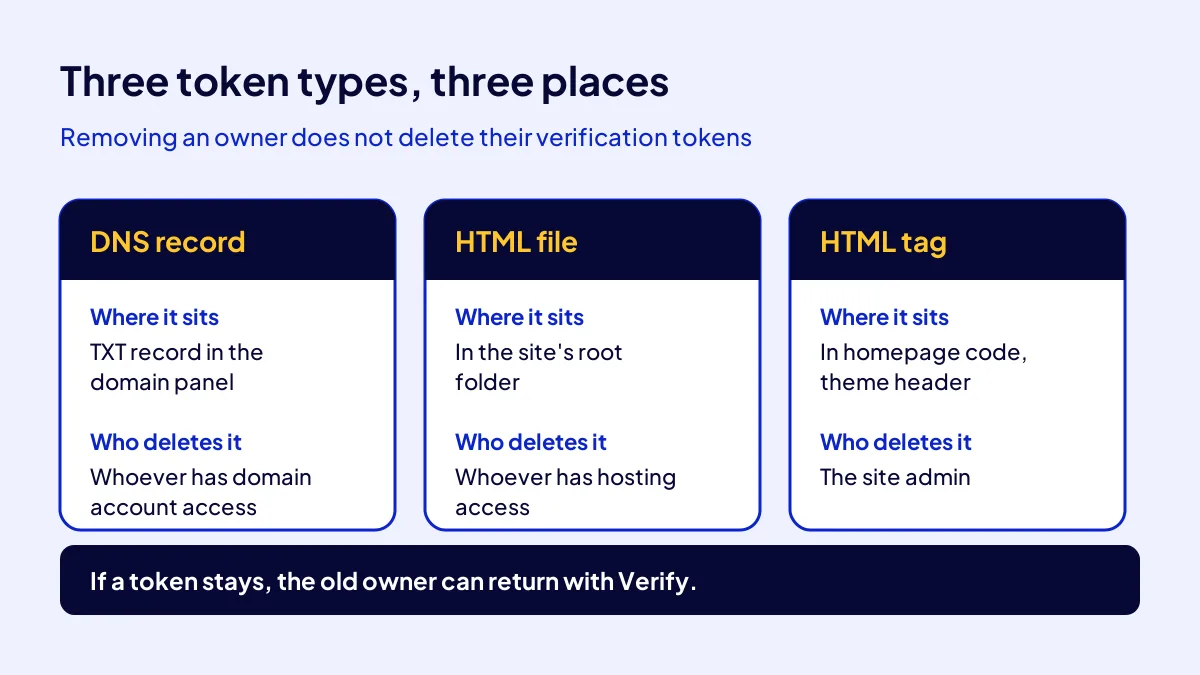
You remove the old owner on the Settings > Users and permissions page: open the three-dot menu next to them and choose Remove access. For a verified owner, a window lists their tokens. Without deleting them, the removal is only half done. Where you delete each token depends on its type.
| Token type | Where it sits | Who deletes it |
|---|---|---|
| DNS record | TXT record in the domain panel | Whoever has domain account access |
| HTML file | The site’s root folder | Whoever has hosting access |
| HTML tag | Homepage code, usually the theme header | The site admin |
Delegated owners and users
Also remove the full and restricted users the old owner added. Old access given to an agency or freelancer is often forgotten.
Which route moves the Analytics property?
Analytics offers two routes: move the property into your account, or leave it in place, give you the Administrator role and remove the old users. According to Google’s help page, a move needs the Administrator and Editor roles on both source and destination accounts. The measurement ID stays the same, so no retagging. Reporting data and product links move with the property.
| Criterion | Move the property | Grant a role |
|---|---|---|
| Menu path | Admin > Property details > Move property | Admin > Property access management |
| Needs | An Analytics account of your own | Only your Google account email |
| Old account | Property leaves it entirely | Property stays under it |
| Best for | A permanent, clean transfer | A temporary handover period |
What blocks a move
A link to Google Ad Manager must be removed first. A destination account at its 50-property limit cannot receive it. Change history from before the move stays in the source account.
Which 6 checks close the transfer?
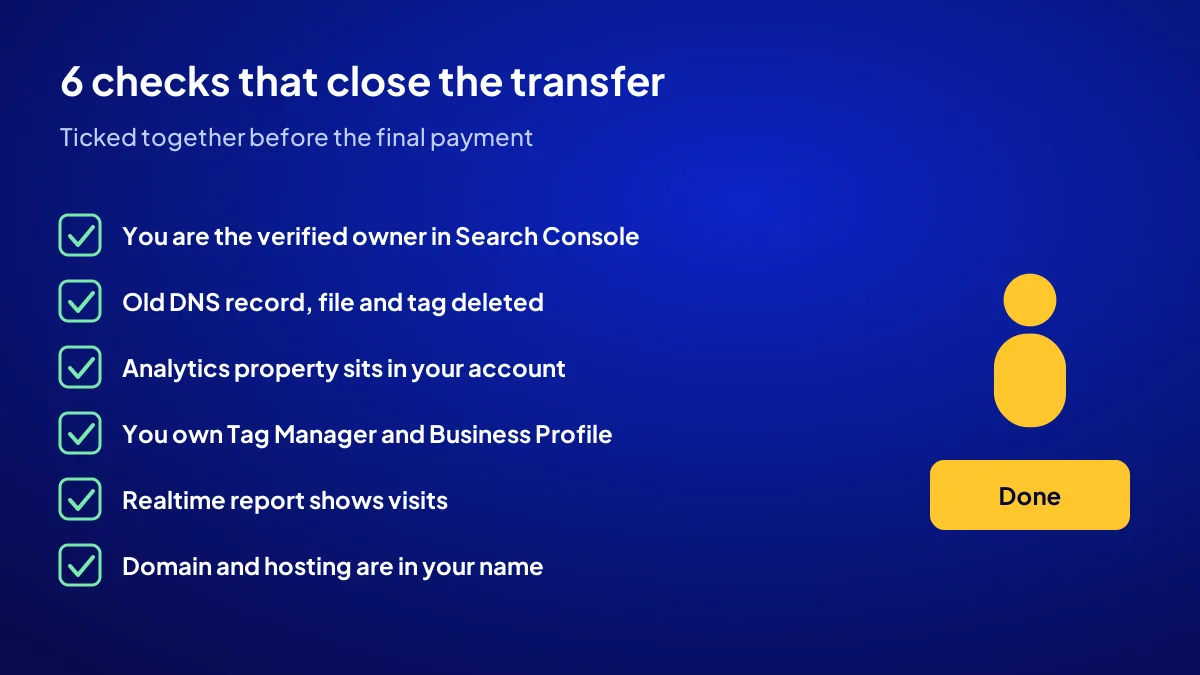
The transfer is done when all six items are ticked. Both sides review this list before the final part of payment. If an item is missing, the transfer stays open. Data should keep flowing the day you open for business.
- You are the verified owner in Search Console; the old owner is gone.
- The old owner’s DNS record, HTML file and tag are deleted.
- The Analytics property is in your account, or you are its only admin.
- You own Tag Manager and the Business Profile.
- The realtime report shows visits; tracking is not broken.
- Domain and hosting are registered in your name.
Choose the asset you will take over
ASSETOR has three tiers: Silver TRY 60,000, Gold TRY 90,000, Platinum TRY 180,000. All are running digital businesses that already collect demand, with no earnings guarantee. To see them, visit the ASSETOR digital assets for sale page.
Quick Summary
- You verify with your own token first; then the old owner leaves.
- Removing an owner does not delete their tokens; delete them separately.
- A domain property is verified by DNS record only.
- For a permanent transfer, move the Analytics property to your account.
- A move keeps the measurement ID; no retagging.
- The transfer is not closed until all six checks pass.
Short Glossary
Verified owner: A verified owner is the Search Console role used for someone who proves the site is theirs with their own token.
Verification token: A verification token is a personal code placed in a DNS record, HTML file or page tag, used to prove ownership.
Domain property: A domain property is the Search Console type used to track a whole domain, including subdomains and all protocols, in one place.
Next Step
You know how the transfer works; now choose what to take over. Browse the digital assets for sale on ASSETOR and pick the tier that fits you.
Frequently Asked Questions
Source: Search Console Help — Manage owners, users and permissions
Sık Sorulan Sorular
A token shows Google the site is yours: a DNS record line, an HTML file in the root folder or a tag in the page code. Each owner’s token is unique.
Google’s help page is clear: removing an owner does not delete their verification tokens. If a token stays, the old owner can press Verify and regain access. The spare key stays in their pocket.
The buyer creates and verifies a token; the seller places it on the site, then gives up access. Agree this in writing.
A site can have several Search Console properties: a domain property plus separate URL-prefix properties for “https” and “www”. A missing line means a missing transfer.
Tying final payment to the step-6 check is clean for both sides. We explain ASSETOR’s overall transfer flow in inspect, choose, take over.
Only you and people you added should remain. Check the DNS record in the domain panel and open the file’s address in a browser.
Common mistake: Removing the old owner from the list but leaving the token on the site. The list looks clean, yet while the token stays, the old owner is a few clicks from coming back.
For a permanent transfer, move the property. Granting a role is quick, but the parent account is still the seller’s. A turnkey handover means the property sits in your account.
Open the Analytics realtime report and visit the site from your phone. If the visit shows, the code is in place. To read the site’s overall health, see how do I know my website works.
A transfer is the last link of a good inspection. For the 9 pre-payment checks, see how to inspect a site before buying; for building versus taking over, see buying a ready-made online business.
On ASSETOR the process runs inspect, choose, take over. On transfer, the domain, site and linked accounts move to your name; you verify in Search Console, and the old owner and their tokens are removed.
If both sides work the same day, the 6 steps usually finish in 1 to 3 working days. The longest wait is usually the DNS record spreading.
Yes. The data belongs to the site, not the owner. Once verified, you see up to 16 months of the property’s performance data.
Updated: October 2026