
First month digital marketing results: is visibility working? Read 6 numbers

You read first month digital marketing results through 6 numbers: how many people saw you, what they searched to find you, how many called or asked for directions, how many visited your site, what share of viewers clicked and how many turned into customers. The first four come from Google Business Profile and visitor tracking; the last two from Search Console, conversion tracking and your own notebook.
One month is too short for a verdict but long enough to see direction. So the first-month question is not “did I win” but “is it heading the right way”. Below: where each number sits, how long it takes to find and when it signals trouble.
Which 6 numbers tell you how month one went?
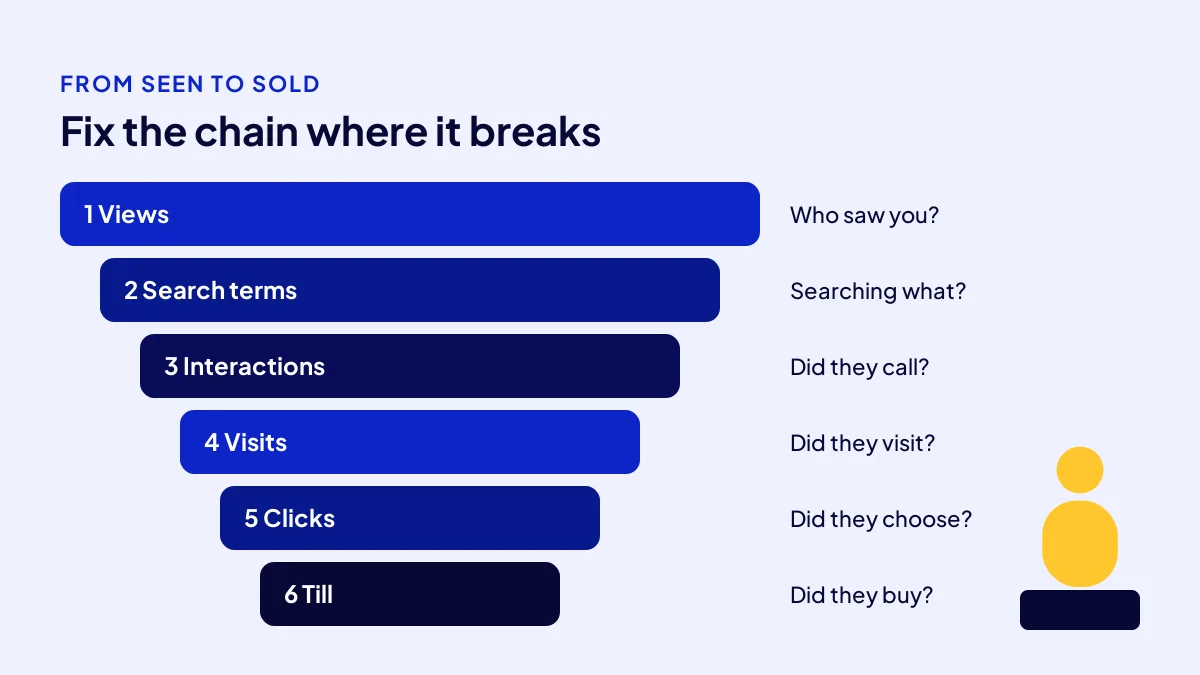
The six numbers form a chain: seen, interest, action, visit, chosen and till. Wherever the chain breaks is where the fix goes. Judging on one number is counting the crowd outside and never the till.
- Profile views: how many people saw you on Google Search and Maps?
- Search terms: which words did they use to find you?
- Interactions: how many called, messaged or asked for directions?
- Site visits: how many reached your site or sales page?
- Click-through rate: what share of viewers clicked?
- Conversions and till: how many forms, calls or messages became customers?
What 3 things do you prepare before reading the numbers?
BU BÖLÜMÜN ÖZETİ
- Prep 1: write down the baseline (10 minutes, day one)
- Prep 2: wait a full 30 days (calendar only)
- Prep 3: keep a notebook at the till (2 minutes a day)
A number means nothing alone; its comparison gives it meaning. So three things come first: a baseline, a full 30 days and a simple notebook. Setup takes 20 minutes on day one and costs nothing.
Prep 1: write down the baseline (10 minutes, day one)
Note views, searches and interactions from the month before the work starts. If the profile is new, your baseline is zero; that is a starting point too.
Prep 2: wait a full 30 days (calendar only)
Do not judge on the 12th of the month. Google says Business Profile search data updates at the start of each month and can take up to 5 days to show.
Prep 3: keep a notebook at the till (2 minutes a day)
Ask every new customer “how did you hear about us” and tick the answer. A paper notebook will do. It is the only reliable source for number six.
Common mistake: Looking at week one and saying “it is not working”. Profile verification, the ad account’s learning period and site indexing all take time. Decide on the full month.
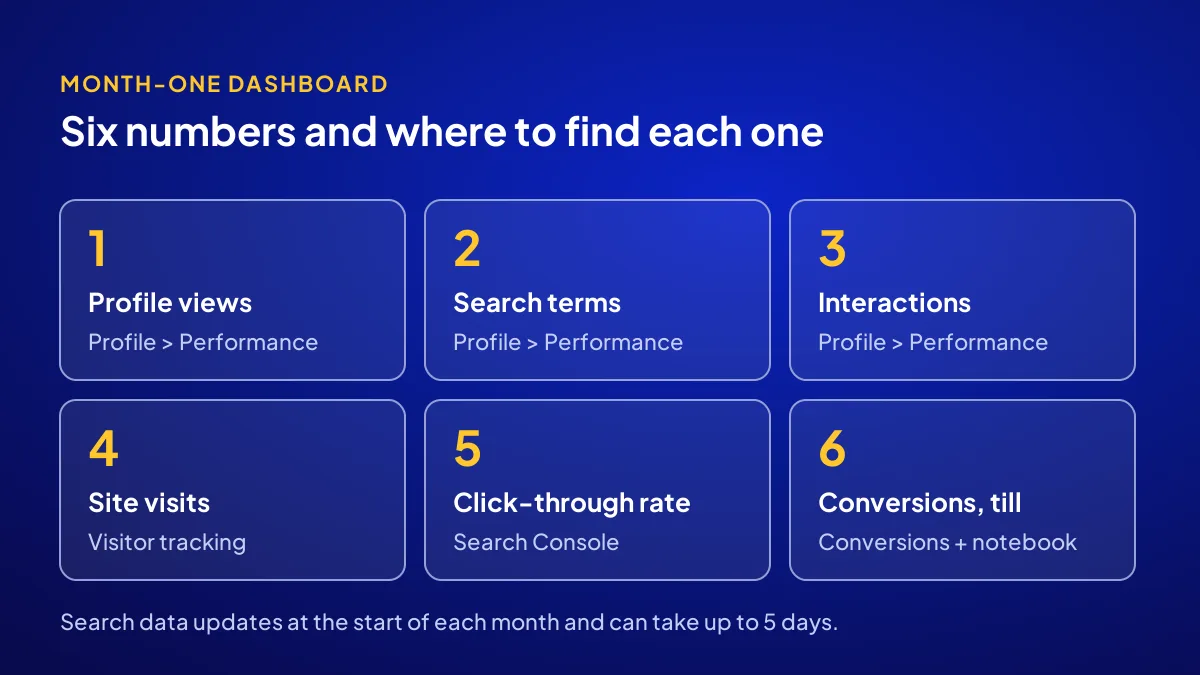
Numbers 1 and 2: who saw you, and what did they search?
The first two numbers measure visibility, and both sit in the Performance section of Google Business Profile. Finding them takes 5 minutes, costs nothing and needs a verified profile. Views show how many people saw you; search terms show the words they used. Together they answer “am I visible to the right people”.
Number 1: profile views (Performance, 2 minutes)
Google counts unique people here; one person counts once a day. Growth over the baseline is enough; do not expect a big jump in month one.
Number 2: search terms (Performance, 3 minutes)
If only your business name tops the list, people who already know you are finding you. If trade searches such as “hairdresser Beylikdüzü” appear, new customers are starting to see you. That is the real good news of month one.
Numbers 3 and 4: how many viewers took a step?
Being seen is not walking in. Numbers three and four measure whether viewers act: call, message, ask for directions or visit your site. If both are low, the problem is not visibility but the shop window: photos, reviews, description or how the site opens on a phone.
Number 3: interactions (Performance, 3 minutes)
Calls, messages, direction requests and website clicks show separately. For a local shop, calls and directions matter most. Compare these two with your baseline.
Number 4: site visits (visitor tracking, 5 minutes)
The Website Recipe comes with visitor tracking set up. Check total visitors and how many came from phones. Visits without taps on the call button mean the first screen needs work.
Numbers 5 and 6: do clicks reach the till?
The last two numbers tie visibility to money. Click-through rate shows what share of viewers chose you; conversions show how many of those became customers. If the till is quiet, the answer hides between these two. Give them 10 minutes together.
Number 5: click-through rate (Search Console Performance report, 5 minutes)
Divide clicks by impressions. Our own example: adaptedijital.com had 1,699 clicks against 142,296 impressions between 14 June and 13 September 2026, about 1.2%. Mobile was 1.86%, desktop 0.57%. Split by device; if phones do not click, titles and descriptions need work.
Number 6: conversions and till (conversion tracking + notebook, 5 minutes)
The Google Ads and Meta Ads recipes come with conversion tracking, so forms, calls and messages show there. Divide ad spend by conversions to get cost per conversion. Then match it to the notebook: how many actually bought? If ads run but sales do not come, see the checks in running ads but no sales.
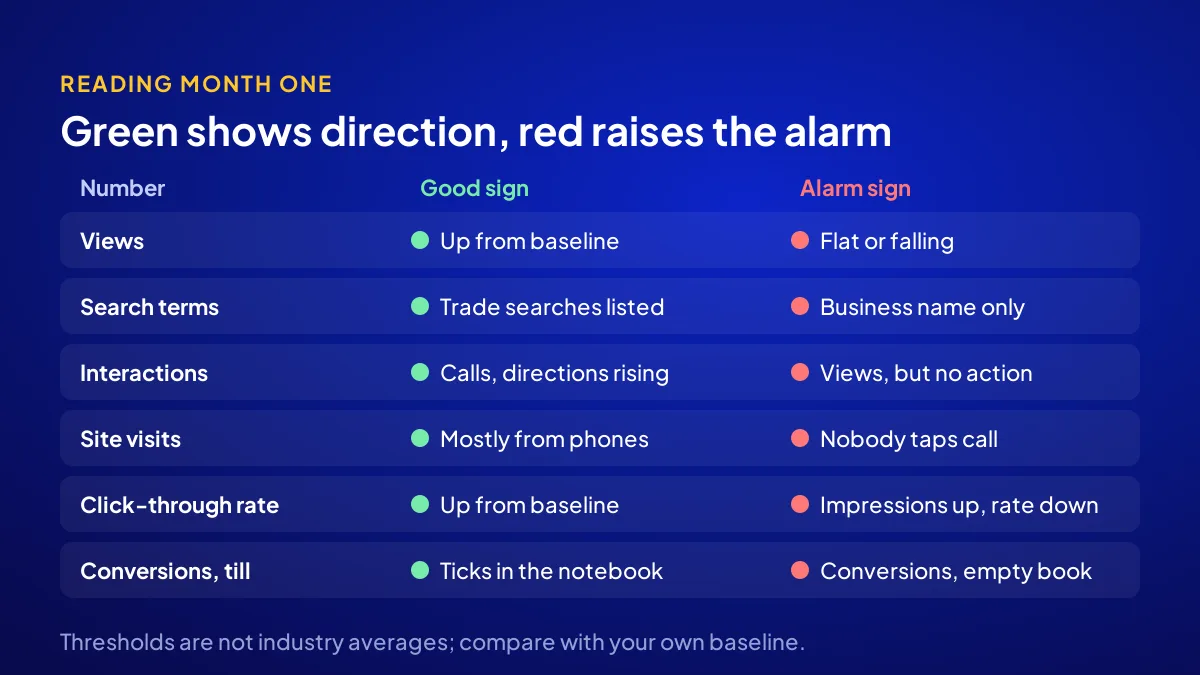
What does each number say, and which one signals trouble?
The table gathers direction signals for month one. These thresholds are not industry averages but the practical reading rules we use. The real comparison is with your baseline; an alarm row is where the review starts.
| Number | Where to find it | Good sign in month one | Alarm sign |
|---|---|---|---|
| 1. Profile views | Business Profile, Performance | Up from baseline | Flat or falling |
| 2. Search terms | Business Profile, Performance | Trade searches on the list | Business name only |
| 3. Interactions | Business Profile, Performance | Calls and directions rising | Views up, interactions zero |
| 4. Site visits | Visitor tracking | Most visits from phones | Visits, but no call taps |
| 5. Click-through rate | Search Console | Up from baseline | Impressions up, rate down |
| 6. Conversions and till | Conversion tracking and notebook | “From Google” ticks in the notebook | Conversions, empty notebook |
What goes on the table at the month-one review?
BU BÖLÜMÜN ÖZETİ
- What we keep
- What we change
- The plan for months two and three
In the Get Visible Online campaign, results are reviewed together at the end of month one. The six numbers, the baseline and the notebook go on the table. The aim is not blame but setting the next two months by the numbers, in under an hour.
What we keep
The work behind a rising number stays. If trade searches made the list, the pages and profile fields carrying those words stay as they are.
What we change
The work behind an alarm row changes. Low interactions point to the shop window, low clicks to titles, low conversions to the offer or page. In ad recipes, budget split is discussed here too.
The plan for months two and three
The plan focuses on one link of the chain. The price breakdown is in online visibility package price, and how a recipe is built is in how the recipe system works.
A 30-minute month-end checklist
Run this list in the first week of each month, once search data has updated. Same 30 minutes, same order, so months compare. We compare what each package solves in the first 3 months in the digital marketing packages guide.
- Check that search data has updated.
- Write the six numbers on one page.
- Compare each with the baseline and last month.
- Mark the alarm rows.
- Count the “from Google” ticks in the notebook.
- Pick one fix for next month.
Quick Summary
- One month is too short for a verdict, long enough for direction.
- Six numbers: views, search terms, interactions, visits, click-through rate, conversions.
- Compare with your own baseline, not an industry average.
- Search data updates at the start of the month; wait for the full month.
- The only reliable till number is the notebook at the counter.
- In the campaign, results are reviewed together after month one.
Short Glossary
Click-through rate: Click-through rate is the ratio used to measure what share of the people who saw you clicked.
Conversion: A conversion is the measure used to record that a visitor took a wanted action such as a form, call or message.
Baseline: A baseline is the comparison figure recorded at the start and used to measure the effect of the work.
Next Step
If you want a routine that reads all six numbers and sits down with you after month one, fill in the needs form on the Get Visible Online campaign page. Adapte suggests the right recipe and delivery starts with payment.
Frequently Asked Questions
Source: Google Business Profile Help — Understand your Business Profile performance & insights
Sık Sorulan Sorular
Results are reviewed together with Adapte. The six numbers are compared with the baseline, and what to keep and change is agreed. The plan for the remaining two months is set by those numbers.
Month one is too short for a verdict. If views and interactions rise, the chain is forming; the review finds the broken link. No result is promised; direction is read from the numbers.
The Google Ads and Meta Ads recipes come with conversion tracking. The ad budget is not included in the package and is paid to Google or Meta separately. Divide spend by conversions to see cost per conversion.
Updated: October 2026