
What do Search Console and GA4 show in the first 90 days after a website launch?
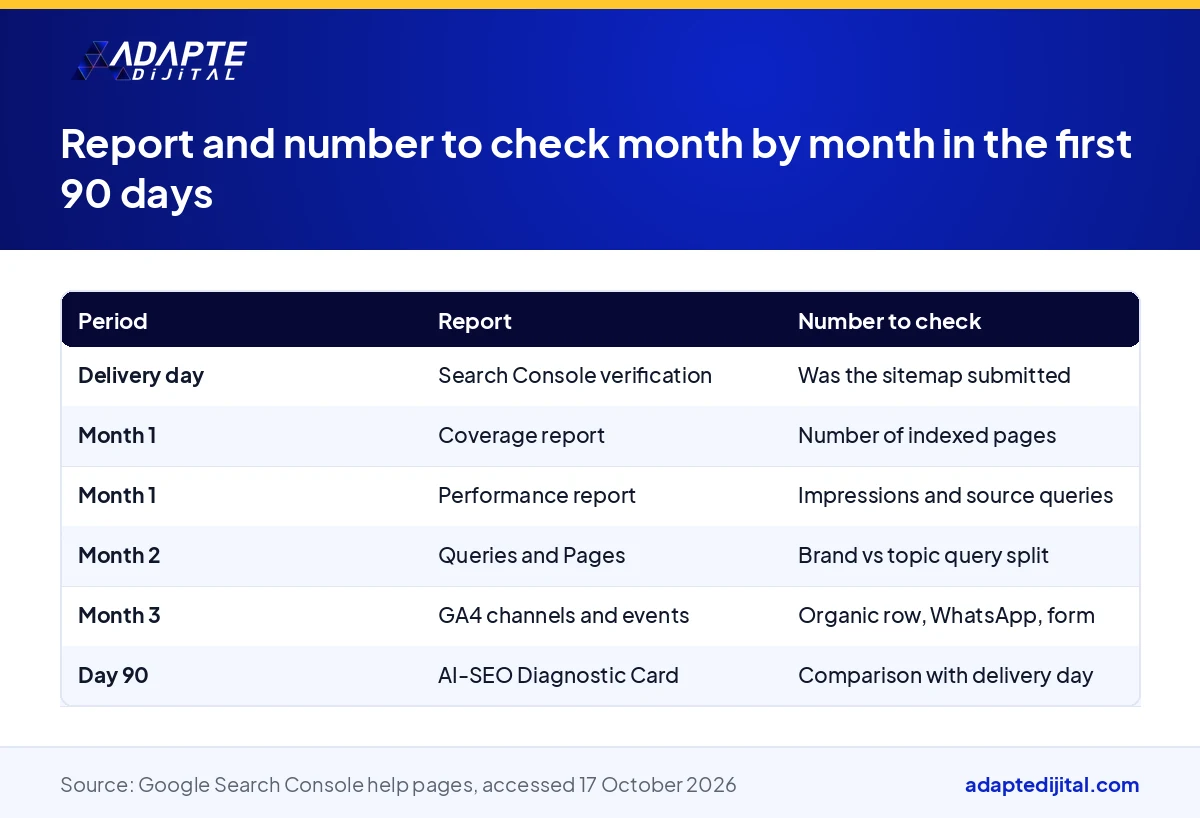
In the first 90 days after your website is delivered, Search Console and GA4 show you four numbers: indexed pages, impressions, clicks and queries. These four numbers move in order: pages are indexed first, then impressions appear, and clicks and queries come last (Google Search Console help page, accessed 17 October 2026). This article explains which number to look at and when; it does not say how much traffic will come, because nobody can.
What this means for you: the first 90 days are for confirming that the site is being read, not for sales. In this period a new company’s website gets recognised by search engines and AI models. A founder who follows it with the right reports makes the “ask for more” decision on day 90 based on numbers.
What does Search Console show in the first 90 days after a website is delivered?
Search Console is Google’s official report on how it sees your site. On delivery day the site is verified and the sitemap is submitted. In the first weeks the most meaningful report is the Coverage report; then the Performance report starts to fill. The team that built the site sets it up, but you should be the one reading it.
Impressions: the first visible signal
An impression is each time your site appears in a search result; it does not need to be clicked. On a new site this is the first number to move. If there are impressions, Google has matched your site with a question. At this stage, look at which queries they come from, not how many there are.
Clicks and average position: the second stage
Clicks follow impressions and usually move later. Average position tells you where your site ranks for that query. In the first months it may be a high number; the site is being read but not yet standing out. A position shrinking month by month tells you that you are heading the right way.
Which GA4 number matters in the first 90 days, and which one misleads?
GA4 shows what a visitor does once on the site. Search Console shows the search before the visitor arrives. The two tools look at different places, so their numbers do not match one to one. On a new site, the first place to look in GA4 is not total users but the channel and event reports.
Not the user count, the channel report
In the first months, total users include you, your team and test visits. The channel report separates where visitors come from: organic search, direct, social, referral. The organic row filling over time is the counterpart of the impression and click movement in Search Console.
Events: WhatsApp clicks and form submissions
On a delivered site, the WhatsApp Business link and the forms are marked as events. Their count in GA4 shows how many people tried to reach you from the site. In the first 90 days it may be small; what matters is that the events are being recorded.
How do the query and page reports show that the 108 articles are working?
Two tabs in Search Console’s Performance report answer this: Queries and Pages. Queries show what people typed; Pages show which of your pages appeared. Because the 108 articles were written around 6 keyword groups, each group is tracked in these two tabs.
Brand queries and topic queries are separated
A brand query contains your company’s name; a topic query describes your service. On a new site, brand queries appear first because the people who know you search for you. Topic queries arriving shows that the articles are being read.
6 keyword groups and category pages
Each category page is the home of one keyword group. If the category page and its articles start appearing together in the Pages tab, the group is working. If a group does not appear at all, the articles’ questions and people’s questions may not overlap.
What does the AI-SEO Diagnostic Card’s delivery-day value tell you?
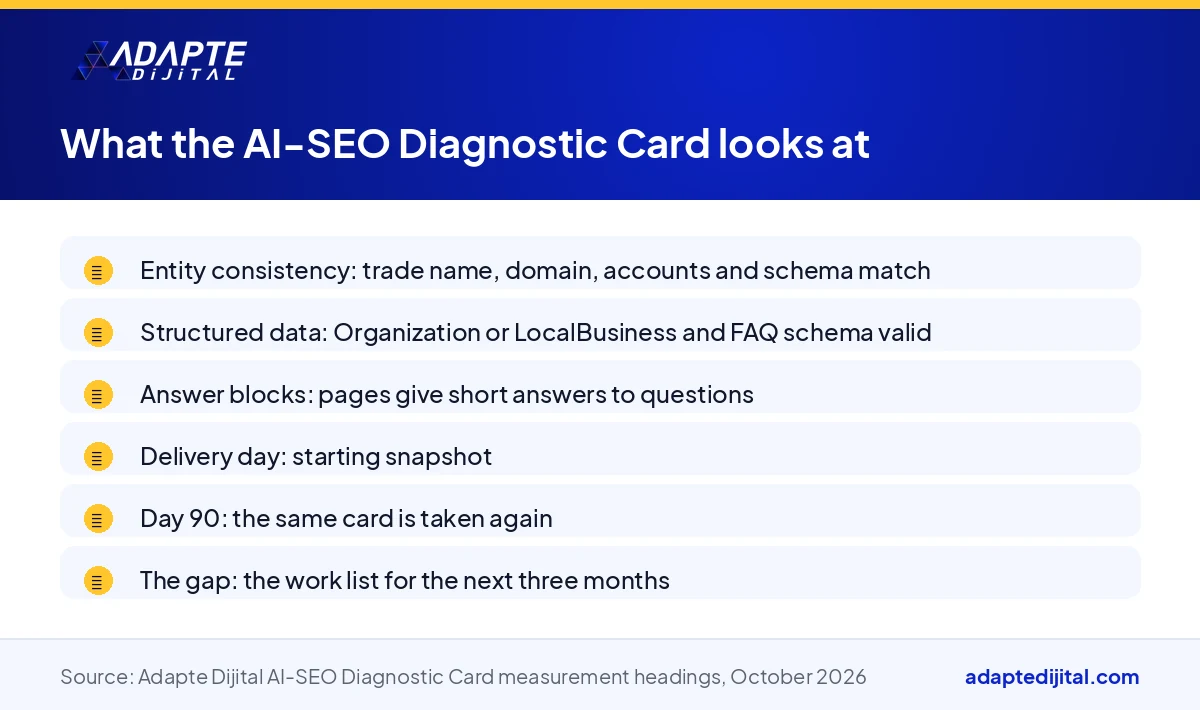
The AI-SEO Diagnostic Card summarises on one page how AI models and search engines read the site. The card taken on delivery day is the starting point. On day 90 the same card is taken again and the two are placed side by side.
What not to do, and what to do, when the numbers are low in the first 90 days?
BU BÖLÜMÜN ÖZETİ
- Do not: rebuild the site or change the domain
- Do: Google Business Profile, accounts and content calendar
- Misreading: adding GA4 and Search Console together
On a new site the numbers are small in the first months; this is expected. The mistake is to take a small number for a fault and change the site. The work in this period is outside the site: accounts, profile, content calendar. The Ministry’s digital company definition had not been published as of October 2026; waiting for it does not stop measurement either.
Do not: rebuild the site or change the domain
If the domain changes, everything Google and AI models have accumulated resets to zero. Changing the design does the same if it breaks page addresses. In the first 90 days, if there is no technical error, the site is left alone. If there is one, it shows in the Coverage report and is fixed precisely.
Do: Google Business Profile, accounts and content calendar
In this period the profile details are completed, the 3 social media accounts tell the same sentence as the site, and the content calendar after the 108 articles is prepared. Accounts opened in the company’s name let you run this from one place; details are in our article on how to open accounts in the company’s name.
Misreading: adding GA4 and Search Console together
Search Console counts clicks on Google, GA4 counts visits on the site. Browser settings and blockers get in between; if the two numbers differ, neither is wrong. Each report answers its own question: Search Console “how was I found”, GA4 “what did the visitor do”.
Which number drives the “ask for more” decision on day 90?
BU BÖLÜMÜN ÖZETİ
- Impressions but no clicks: titles and answer blocks
- Topic queries but no page: content expands
- Maps and WhatsApp signal: advertising and profile
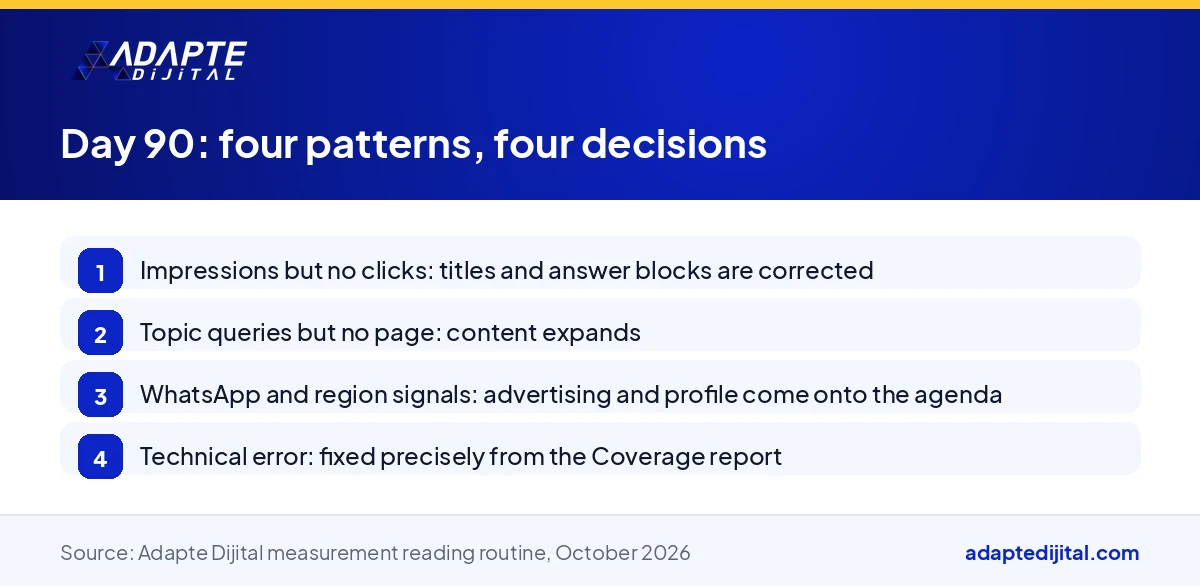
The decision follows four report patterns. In Adapte Dijital’s My Digital Company (Dijital Şirketim Olsun) campaign, we read the delivered site on day 90 through these four patterns; the list of extra services narrows or widens accordingly. An extra service proposal that does not speak in numbers is not heard.
Impressions but no clicks: titles and answer blocks
If the site appears but is not clicked, the problem is not the content’s existence but its presentation. Page titles and first paragraphs are rewritten to answer the searched question more clearly. This is not an extra package but a correction on existing pages.
Topic queries but no page: content expands
If questions with no counterpart on your site pile up in the Queries tab, content is missing. The counterpart is 180 more AI-SEO articles or new category pages. The query report says which group will grow; no guessing.
Maps and WhatsApp signal: advertising and profile
If WhatsApp clicks and the region report are active in GA4, there is demand but you cannot keep up. Then Google and Meta advertising and a competitor visibility report come onto the agenda. Advertising starts after measurement, not before. We run advertising and measurement planning in our digital consulting service.
Quick Summary
- In the first 90 days four numbers move in order: indexed pages, impressions, clicks, queries.
- On delivery, 6 main pages, 12 sub-pages, 6 categories and 108 articles are tracked in the Coverage report.
- In GA4, read the channel, event and region reports, not total users.
- The AI-SEO Diagnostic Card is taken on delivery day and on day 90; the first is the zero point.
- The Ministry’s digital company definition had not been published as of October 2026; measurement does not wait for it.
Short Glossary
- Impression
- Impression is the Search Console metric used to count each time a page appears to a user in search results.
- Coverage report
- Coverage report is the report used to show which pages of a site entered Google’s index and why others did not.
- Event
- Event is the GA4 measurement unit used to record a visitor action such as a click or a form submission.
Frequently Asked Questions
Next Step
For a website that comes with measurement installed on delivery day, book a discovery call on our digital company page; Search Console, GA4 and the AI-SEO Diagnostic Card are included.
The definition and conditions of the digital company scheme are not final yet; support amounts and conditions may change. Check the latest information with the Ministry of Industry and Technology, KOSGEB and the Official Gazette before deciding. This is not legal or financial advice.
Sources: Google Search Console Help, Performance report (accessed 17 October 2026) · Google Search Central, Getting started with Search Console (accessed 17 October 2026) · KOSGEB, Entrepreneur Support Programme renewed (12 October 2026)
Updated: October 2026
Sık Sorulan Sorular
The first number to check is indexed pages. When 6 main pages, 12 sub-pages, 6 categories and 108 articles are delivered, Google reads them one by one. Look for the number rising week by week, with no technical error piling up in the “not indexed” row.
GA4’s region report shows the visitor’s city. If your service area is Istanbul and visitors come from other cities, the content is not stating the region clearly. Read this report together with the service area set in the Google Business Profile.
Someone searching for the registered trade name should see your site first. If not, check the domain and trade name match or the Organization schema. How to build that match is in our article on domain name and trade name alignment. For the MERSİS steps of incorporation, see MERSİS, e-signature and KEP.
The card looks at three things: entity consistency (do trade name, domain, accounts and schema describe the same company), structured data (are the Organization or LocalBusiness and FAQ schemas valid) and answer blocks (do pages answer questions briefly and clearly). The condition under which AI recommends a new company is in our article on why AI does not recommend new companies.
Because a comparison needs a starting point. On delivery day the card documents that the site is technically ready. What changes in later cards relates to content and external signals. Without it, the day-90 card means nothing on its own.
Three questions: has the company name started appearing in AI answers, for which questions, and which page is cited as the source. The answers are read together with the Search Console query report. The gap the card shows is the work list for the next three months.
The programme page of KOSGEB Business Development Support (İş Geliştirme Desteği) lists software and service purchases among the supported items; KOSGEB decides which expenses are accepted. The 90-day report makes the digital section of the business plan measurable. Read that section together with our article on KOSGEB platform fee support; developments are on our digital company page.
Usually not. In the first month you check the number of indexed pages in the Coverage report and impressions in the Performance report. Clicks move later. If pages are not indexed because of a technical error, that is fixed.
Because they count in different places. Search Console records a click on Google’s results page, GA4 records a visit on your site. Browser settings and blockers get in between. The two numbers answer different questions and are not added together.
On day 90, when the four reports are read together. Impressions but no clicks: pages are corrected; topic queries but no page: content expands; WhatsApp and region signals: advertising and profile come onto the agenda.